r/prusa3d • • 2h ago

C1L INDX Conversion Shipping Timelines

21 Upvotes

Far from my first rodeo with Prusa logistics here. But I feel it necessary to post anyway just to keep the volume/loudness on this stuff high.

I have a C1L INDX 8T conversion kit ordered. Order page lists it as Batch 2, shipping starting November 16th.

The next batch, on the shipping page, is listed as starting today.

I have no ideas how the batches are fulfilled, but it would seem that if all batch 2 orders have not shipped, then batch 3 orders will not be shipping yet.

As usual, the shipping info page has been recently updated, but dates have not moved. I'm still listed as batch 2, batch 2 is still listed as shipping from the 16th.

I get that there's a part supply issue. I'm also quite used to Prusa missing their shipping targets. I'm not really expecting that to improve. But I will reiterate after being a pretty loyal Prusa customer that the way logistics are handled, communicated and updated remains wholly unacceptable. When there are delays, it takes FAR too long for there to be substantive communication about it.

So, Batch 2. The date has come and gone. Batch 3's date is here. I understand that there remain delays, but the Prusa logistics/shipping team(s) NEED to regularly update the dates so that customers who have already given you their money continue to receive up-to-date information about expectations! I'm patient, I promise. But clearly batch 2 (and later) isn't going out on time, so update the dates. And if you miss the dates, again, update them again.

Finally, you need to do a better job of understanding your supply chain and determining realistic target dates for shipping. I have ordered the MK4, MK4S, C1L and now the C1L INDX 8T kit. I have yet to see a Prusa product launch go out on time.

You guys do not have a handle on this, it is evident in every product launch, and it makes it very hard to be excited for new products. INDX was announced over a year ago. C1 customers who ordered it months ago are still waiting. Dates on the shipping page are largely in the past.

I don't know any other company that regularly has product launches that go this way. And there's a reason for that.

It is evident your team needs better leadership and experience at the helm of supply chain and logistics.

r/prusa3d • • 44m ago

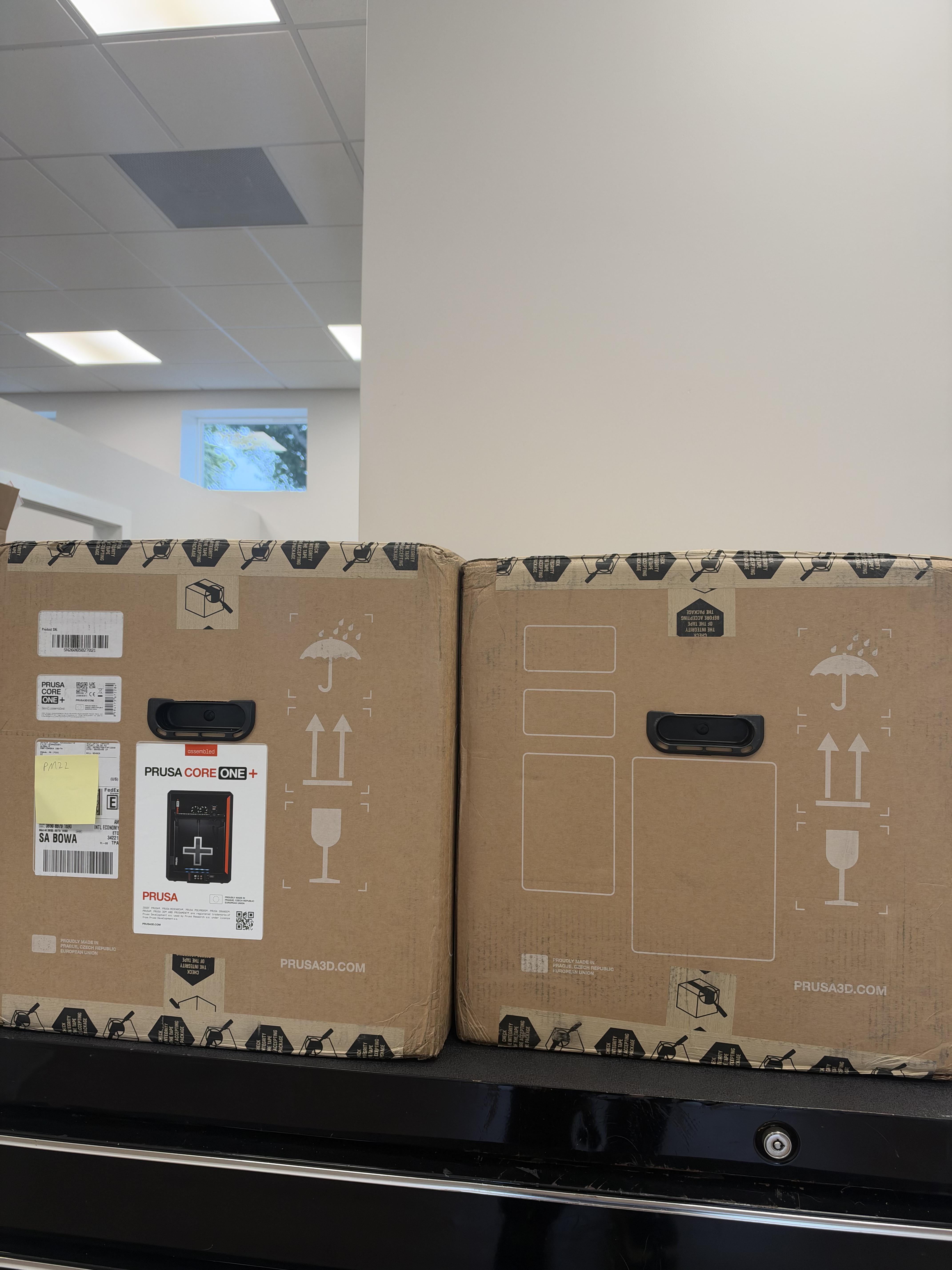
Unboxing Time! Incredible shipping speed for the Core One

Post image
9 Upvotes

Ordered these on the 18th 👀 came in today on the 23rd, all the way from CZ.


r/prusa3d • • 44m ago

Incredible shipping speed for the Core One

Post image
8 Upvotes

Ordered these on the 18th 👀 came in today on the 23rd, all the way from CZ.


r/prusa3d • • 11h ago

I like my C1L+

Thumbnail
gallery
35 Upvotes

I’m just printing and taking care of tinkering profiles or doing flow adjustments.

Just printing fabric sealed china petg out of my USS and I like it.. đŸ‘đŸ»


r/prusa3d • • 1h ago

INDX strange resonance

3 Upvotes

I did Gen 2 + INDX 8T upgrade to my Core one and now have this strange resonance when the toolhead is moving diagonally towards the right side of the printer. This results in severe ghosting.

I have re-calibrated input shaping, phase stepping and belt tension multiple times to no avail.

I boosted 60-70 Hz frequencies and reduced the rest in the video. Resonance starts at around 00:03

Ghosting due to resonance

r/prusa3d • • 18h ago Bravo

Prusa Core One L+ Z-Offset - An Epos about fixing the first layer when printing ASA

Thumbnail
gallery
40 Upvotes

I think this is not only my first post in this sub, but also my first ever Reddit post. It'll be a long one, so bear with me.

Tl;dr: I had a terrible first layer when printing ASA. I fixed the problem, by introducing a Z-offset of 40 ”m. I believe it is caused by the temperature delta between probing the bed at 150 degrees and printing at 260.

Last week, I got my very first 3D-printer, a Prusa Core One L+. I love that thing! It's truly addictive and I was working with it non-stop. I started printing my first benchies and the robo alpaca in Prusament PLA Galaxy Black (pics attached) and then quickly switched to PETG for some functional prints, like the nozzle change tool.

Next on my list was ASA and I already had some project ideas: I wanted to print some parts to mod the Buddy3D cam and a 1:48 model of a fighter jet. The first tries were okay, but not great. The surfaces were uneven and especially the first layer was a desaster.

I am using Light Grey ASA from 3DJake and applied the Prusament ASA default profile. 3DJake gives an ideal temperature of 230 degrees +-20, while the Prusa profile uses 260 degrees. Being new to ASA, I thought that the temperature maybe was too high -> I decided to print a temp tower. To me, it looked like the tower confirmed 260 degrees as good.

The first layers still were terrible. However, I observed that the perimeter layed down perfectly. Only the infill of the first layer looked disgusting. Idea: The perimeter is printed slower than the infill, maybe my speed is to high. -> I reduced the print speed of the first layer infill, to match the perimeter speed.

It still sucked. The first layer looked very soft and gloopy. New idea: maybe the bed is too hot? -> I played with the bed temperature. Everything between 90 and 110 degrees.

You guessed it: it still didn't fix the issue. So I showed it to some friends, who have some years of experience with 3D printing. Their idea: over extrusion. Consequently, I downloaded Orca slicer, for the flow ratio calibration. While printing the tabs, I had a close eye on the first layer: Reducing the flow ratio seemed to help, but at a ratio of 0.85(!) I was still seeing the issue. All the while, the printed tabs showed under(!) extrusion on the top layer. I also printed one of the thin walled boxes, which confirmed that I actually should be printing with *more* material, as the walls were thinner than they should.

Obviously, a larger flow ratio made the problems even worse. So I kept on digging. I recalibrated my Z-axis, I checked wether the nozzle is mounted properly, I recalibrated every feature on the printer, including the belts and extruder. I also dried the filament and stored it in the Prusa dry box during printing. All to no avail. After some more digging, I came across this old Git: https://github.com/prusa3d/Prusa-Firmware-Buddy/issues/4254

Users had a problem with wavy first layers, that looked a bit like mine, just less scrapy. They reported, increasing the z-offset by 40 ”m fixed the issue.

On the Core One L+, this really should not be a thing. After all, the printer is probing the bed, to make sure that it is really level. But then I looked at the exact probing procedure: My printer is heating the nozzle to 150 degrees for probing. However, I am printing ASA at 260 degrees. Did this delta of 110 degrees mess with my tolerances?

The nozzle is screwed into the hot end and sticks out a bit. However, the hot end by itself, is mounted to the nozzle, which is clamped near the heat break in the extruder. The bit that is sticking out of the extruder is ~23 mm long, of which a small part is steel, while ~20 mm are brass. Brass has a thermal expansion coefficient α of ~ 18.5 x 10⁻⁶. Thermal expansion of a material is given by

ΔL = α * L * ΔT

So, for the piece of brass of 20 mm lenght we find an expansion in lenght of... 40.7 ”m! Coincidence?

To test the hypothesis, I printed a single layer using this model from printables and manually increased the z-offset in steps of 10 ”m. If this all is working out, I indeed should see that my problem goes away at a Z-offset of ~40 ”m.

Heureka! A Z-offset of 40 ”m and the printer layed down a near perfect layer (see pictures)!

I lost days of sleep over this and burned through quite some filament, so I felt like sharing this with you fine people. Maybe someone finds it helpful. Maybe someone at Prusa also wants to have a look at a thermal expansion compensation in the firmware ( u/nomadsgalaxy u/Tommy_Prusa3D ?).


r/prusa3d • • 18h ago

How I fixed the stuck locking pin on my INDX (probably).

Post image
39 Upvotes

TLDR; there was a tiny burr at the tip of the locking pin. I removed it with a file and completed a 5hr print with zero park failures, something it's never done on anything but single-color prints.

My INDX has been suffering from this locking pin issue (see picture). It gets stuck down and then the tool won't release during parking. I did all the usual stuff, dock calibration, belts, gantry squareness, etc. Nothing helped. I couldn't complete any multicolor prints without getting multiple stuck tools I had to deal with.

I removed the pin for inspection by removing that single torx screw on the black housing. What I found was a small burr on the inside surface of the pin. It was right at the very tip, presumably from when the pin was cut to length during manufacturing. It was on the surface facing the brass gear, which is the worst possible place for it to be. I took a small file and carefully removed the burr. I could feel when it was gone because the file stopped grabbing at the tip of the pin.

First test print after this was a 5hr, 440 tool change, 4 color print without a single failed park. This has never happened. I know, one data point doesn't a trend make. I get it. But understand that it's never completed a multicolor print without at least four failed parks per print. I figured I'd share in case someone else wants to check their own printer.


r/prusa3d • • 3h ago

[Prusa one core + Gen 2] Nozzle Cleaning not Working but going through

Post image
2 Upvotes

Hello,

I bought myself a prusa Core One + Gen 2, I assembled it, I made all the Calibration process, I already made several print, It works like a charm.

But when I launch a print every warming up steps works fine except the nozzle Cleaning, the step is going through (the nozzle is doing back and forth above the pad), except there is a Gap of like 4cm between the cleaning part and the nozzle

I have the latest Firmware since I finished it last thursday

any Idea?


r/prusa3d • • 8h ago

Has nobody designed a better fan shroud for the Mk4s?

4 Upvotes

So I had a print fail that ended up cracking the fan shroud on my Prusa Mk4s. I'm just printing a PETG replacement (because it's what I have on hand!) and I was really surprised to find no 3rd party improvements on Printables etc. For every Prusa since the dawn of time there has been hundreds of alternative fan shrouds etc that supposedly improve performance but for the Mk4s I can't seem to find anytthing!

Am I just being daft or is the stock fan shroud just perfect from the factory?


r/prusa3d • • 14h ago

From the author of Maintenance: Autostorager, a separate four-folder Storage inbox for Prusa Connect Local

Thumbnail
gallery
9 Upvotes

Hi r/prusa3d,

I'm the author of Maintenance, one of the most downloaded community extensions for Prusa Connect Local (PCL) atm. I'd like to present you my newest extension:

Autostorager is an open-source file inbox for PCL. It watches up to four folders on your server and/or your local PC/Macs and imports every .gcode and .bgcode it finds into Storage, where it appears with its preview and slicer details exactly like a manual upload.

No cloud, no account, no extra service. It runs as a PCL module and uses the same storage API as the upload button.

What it does

  • Watches up to four folders on the server or your PCs/Macs.
  • Takes .gcode and .bgcode files as soon as their size has stopped changing.
  • Imports them through the Storage API, so preview, slicer data and print time are there.
  • Never overwrites a name: if part.gcode exists, it becomes part-1.gcode.
  • Moves the source into successful/ only after the storage has the bytes, so a file is never deleted before the import is safe.
  • Moves a failed file into failed/ and writes a small report naming the step, the reason, the time and the path.
  • Shows the last imports on a dashboard card, with a green dot for success and a red dot for failure.

Where do the files go?

Nothing is deleted. When a file lands in a watched folder, Autostorager copies it into Storage first. Only after that copy is committed does it move the source into successful/ inside the watched folder. If the import fails, the file goes into failed/ with a small report naming the step and the reason.

One of the screenshots in the screenshot-"carussel" here on Reddit shows the root of my G: folder after a batch: it is empty except successful/. Every file that was dropped there was imported and then moved into successful/; the source files are still on the disk. Storage has the imported copies.

Why four folders?

Four is not a random limit. A small farm usually has more than one source:

  • one workstation per designer,
  • a NAS or a shared incoming/ folder,
  • a per-material or per-customer queue,
  • a second room or a second network.

Two sources are live in my setup: /app/config/pc-in on the PCL server, and /app/config/autostorager-g, which is the G: folder on my Linux desktop mounted over Samba/CIFS. The page shows both. A file dropped on G: is imported into Storage, and the source is moved into /mnt/g/Autostorager/successful/. The recent-imports list in the screenshot is all from that second source.

For example: four PCs on the LAN, each with its own shared drop folder. Mount the four shares into the PCL container and give Autostorager one path per source. Each folder keeps its own successful/ and failed/, so you can see which source a failure came from, and all files land in the same Storage. The other two slots are free.

The watcher does not recurse. Each top-level folder is a clean queue; a subfolder is ignored. That is deliberate: no surprise imports from a directory tree, and no scanning of a whole share.

Two ways to use it

  • One folder on the server, shared with the clients: create the folder on the server, share it with Samba, and let every Windows, Linux or Mac client write into the same queue. Autostorager watches one folder. This is the easiest setup for a farm.
  • The folders stay on the clients: share each client folder and mount it on the server with CIFS/NFS. Autostorager watches the mounts. This is more work, but it is how the server watches a folder that physically lives on your desktop. That is the G: example above.

Safety details

  • Only regular files are taken. Symbolic links, directories, devices, pipes and sockets are skipped.
  • A symbolic link with a .gcode name is never followed.
  • The watched folder is the boundary: successful/ and failed/ must be real directories inside it, and a link that points outside is refused.
  • The failure report is created new and is never written through an existing file or link.
  • A file is taken only after its size held still across two checks, so a slicer still writing it is left alone.

What it does not do

  • It does not start prints. It fills Storage; you print from PCL.
  • It does not slice. Use PrusaSlicer or OrcaSlicer as before.
  • It does not watch subfolders or SMB paths directly. Mount the share into the server; the folder path is the one the server sees.
  • It is not a print queue or scheduler.

Also included

  • English, German and Czech UI and manual. If your language is missing, please feel invited to translate the extension. The new <tag>.json has to land on GitHub; a pull request is how it ships.
  • A built-in manual with users and rights, file rules, Linux/container setup and per-OS notes.
  • Roles: a viewer can see the page, an operator can change the settings, an admin can grant those roles.
  • Settings for language, interval, storage, maximum file size and move-on-success.
  • MIT licensed, free.

Install

Prusa Connect Local >=0.1.0-beta.1, then:

Marketplace → Extensions → Autostorager → Install.

Add the folder paths as the server sees them. For a folder on another LAN machine, mount its share into the PCL container first.

Marketplace: https://plugin-marketplace.prusa3d.com/connect/extensions/com.github.aux.singlergold2.connect-local-autostorager

Source and issues: https://github.com/SinglerGold2/connect-local-autostorager

Feedback and questions welcome, so ask me anything.

https://imgur.com/IYXPqUm


r/prusa3d • • 6h ago

Question/Need help Prusa XL: is this belt movement normal?

2 Upvotes

Hi

While printing with my Prusa XL, I noticed an odd rattling/crackling noise. It reminded me of a bearing noise, but I'm not sure where it's coming from or whether anything is actually wrong.

In this short video, the belt seems to move up and down slightly. Is this normal belt tracking, or does anything look unusual?

Can you hear the noise in the video? Has anyone experienced something similar? I'd appreciate suggestions on what to check before assuming a part needs replacing.

Thanks


r/prusa3d • • 1d ago

FedEx Tariff refunds available

46 Upvotes

Been checking once a month on the status of my FedEx Tariff refund, no joy till now. It's showing my refund was available starting 11-9-26. I submitted the paperwork this morning and received a confirmation email. ETA is within 30 days.

  • Ordered a CoreOne on 2-9-25
  • FedEx Tariff Bill on 5-21-25 for $138.32
  • Refund is $94.50 (10% of C1 price)
  • Refund Interest $7.60
  • "Note that refund amounts shown may differ from the final amount disbursed after FedEx completes validation, reconciliation, and any applicable adjustments"

Has anyone else filed or received their refund?


r/prusa3d • • 5h ago

Prusa Core One L+ filament stuck and breaking

Thumbnail
gallery
1 Upvotes

Hello Everyone :)

Lets start with: Sorry for my bad english <.<

I have the Prusa now for about a Month, but sadly for the past 2-3 weeks i got more and more Problems.

Short:

I got myself the Prusa Core one L+ with the current Firmware (i belive 8.0)

Problem:

Filament getting stuck in one way or another.

What i used:

Prusament PLA Galaxy Black

Prusament PETG, two different Blue

Sunlu PETG Red

PRUSA Slicer 2.9.7 and 2.9.6 (i belive the current and the one version older) with mostly Standard profiles.

Only changed like fuzzy Skin on the Prusament settings and some Temperature and Support hight changes on the Sunlu. I never touched speed in any form.

What i tried:

Cleaning nozzle, changing nozzle, changing Material, carefully push the filament into the machine, re-calibrsting filament sensors... multiple times... and other stuff by accident.

Remove broken Filament multiple times.... Software Updates.

Some other things i belive are not worth mentioning.

Filament is not tangled, i checked

It feels like it get worse, so i wanted to ask what i should check next. Since i am not native english, i wasnt probably not searching for the right thing.

Long:

I belive the main Source of problems seems to be some Filament feeding issues. In the first 1-2 Weeks there were no Problems, basically everything was perfect.

Then many Prints startet but it seemed like they were not Printing properly and not enough Filament would come out.

Later i got Errors about Stuck Filament.

That startet between 5-10% into the print, reloading brought me about 1-3% further until the next error appeared. Aswell as a "the Filament sensors are not properly calibrated" error. I got this fully pre assembled, which is weird. Recalibrating didnt fix anything. Still a calibration error..... when the filament doesent break

The first Problems happend with the Sunlu PETG, after some successfull Prints. I tried to Print a Pokeball and somehow the walls had some holes (Pic 1). This also happend to the Prusament.

Then i tried reorienting, changing the supports etc. Nothing seemed to fix the Problem.

I then changed the Model and Material. Now the Filament was constantly stuck. Every Print started without problems, except one that blobbed.

I cleaned the nozzle as good as i could and everything was fine again. Some prints and filament changes later, some prints didnt fully Print. Some having "holes".

I did Completely reloade the spool a few times, trying PETG

Cleaning the High Flow Nozzle

Changing it with the stronger not HF

And things would only get worse.

Now it prints 4-10% until the Fillamnt breaks off. I have disassembled the nozzle 3 times and removed the broken bit.

It does not notice stuck fillamet anymore. I hear the clicking sound... maybe filament trying to feed and fail? But that clicking sound is not there from the beginning. It comes later.

I think it could be Somewhere with the Idler or gearbox. But since i have a prebuild, i dont have the PG assembly. I dont know if or what i can touch without "breaking" more.

Do you have any suggestions or tips?


r/prusa3d • • 5h ago

Question/Need help Fusion "Print Utility" export not working with PrusaSlicer 3?

Post image
1 Upvotes

I've been using the alpha PrusaSlicer 3 for a while, and it's working well. But one thing that's quite annoying is that if i use the "Print Utility" export in Fusion, it doesn't seem to work.

I can manually select the alpha of PrusaSlicer 3 via the "Custom" field, but when I try to export the file over for slicing, nothing happens. Nothing shows up in the slicer.

For now I've just been exporting an STL and manually importing it in, but that's a lot more friction than I would like.

Is anyone else experiencing this?

I'm on macOS 27.0, on slicer 3.0.0-alpha12 and Fusion 2706.1.17 and using a Prusa CoreONE+ with firmware 7.0.0+16903.


r/prusa3d • • 5h ago

Printing issues with "floating points" (e.g. bottom points of star)

Thumbnail
gallery
1 Upvotes

Hoping to get some advice on what I need to adjust with my Core One+ to get the bottom sides of these prints correct. The first image is a tree topper star using grid supports. I tried grid supports because the organic supports (second star) also had the same issue. Doesn't seem related to the supports. The Batman mask also had an issue with some of the top teeth. This was printed with organic supports.

What issue am I looking at here?


r/prusa3d • • 17h ago

Question/Need help Gift ideas for Mk3 owner
$100

8 Upvotes

Looking for gift ideas for my dad, he has 2 Mk3s and 1 MMU. He is still newer to the hobby and I would love to get him some things to use for Christmas but I don’t really know where to start. I have a pretty good understanding of the hobby from an outsiders perspective, but I would really appreciate ya’lls expertise. I’m thinking of $100 budget.


r/prusa3d • • 6h ago

Question/Need help Any other sources to obtain a Prusa XL XY Stepper motor?

1 Upvotes

Hi,

One of my XY motors has shown increased resistance at a certain radial position and it's preventing homing and creating false collision detections. And I suspect the reason why I have a lot of layer shift problems from the start. It is now out of warranty and I need to get a replacement.

Unfortunately, I live in Southeast Asia and the shipping cost from Prusa pretty much doubles the price of the motor. The motor is a custom spec so a one-to-one replacement of size and torque may not be suitable.

Are there any other third party sites that sell this motor and have better shipping options? I've checked out PartsBuilts3D via a VPN, they're out of stock of these motors.


r/prusa3d • • 1d ago

Print of the Month I made 3D printed Business cards (with NFC & QR) for Formnext

39 Upvotes

This was my 4th year at Formnext, I usually go for work. This year I went looking for one. So I 3D printed Business cards with NFC tags that hold my Vcard info and QR codes to my linkedin.

The card information shown in the video is of course 100% real no fake /s

I used this NFC Business Card from Printables. I modified it in prusaslicer and added my info and a NFC NTAG215 mid-print.

My printables tag: @Albeart3D


r/prusa3d • • 1d ago

Question/Need help Optimizing Print Quality on the Prusa Core One+

Thumbnail
gallery
32 Upvotes

Hi everyone, I'm really happy with the print quality of my CoreOne+, but I'd like to make a few tweaks here and there. As a reference, I always hold my prints up to bright, direct light so I can see even the tiniest irregularities.

I know that all prints look bad in direct light, but with the CoreOne, you just have to go that far, otherwise, you simply won't see any irregularities.

I’ve attached some photos for reference. One was taken under normal conditions, and the other in harsh lighting.

Do you have any tips on how to further improve the quality?

Here is a video, so you can see, when the irregularities become visible https://workupload.com/file/8hFzYbGz5tM


r/prusa3d • • 23h ago

Question/Need help How to connect Buddy cam and Prusa Sliucer running Pursa Connect local?

12 Upvotes

Hey guys, I just installed Prusa Connect Local to a Pi4 which was pretty straight forward. What I canÂŽt yet get to work is:

  • How do I connect the buddy cam with it
  • How do I connect prusa slicer to it so I can automatically send prints via it

Thanks in advance for any help :)


r/prusa3d • • 16h ago

Solved✔ How to prevent Interface layer generating in middle of supports?

Post image
3 Upvotes

Hey all, looking for some advice as I'm guessing I'm doing something incorrectly and haven't been able to figure it out on my own.

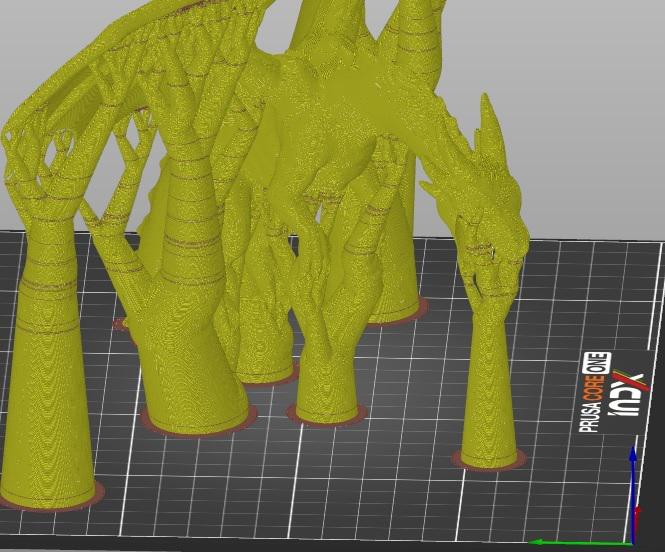
C1 with an 8 tool INDX. Trying to print out a dragon using organic supports (though this happens with any support type) and wanted to use PETG as the support interface layer to make it detach cleanly. (the main print is all PLA)

I've set the support material/raft interface extruder to use the PETG tool head.
It works.... except it seems like any time that PETG would be used.. it prints that entire support layer in PETG.

In the picture you can see that by brown stripes in the middle of the yellow PLA supports.

The problem, of course is that it means that the supports end up detaching before the print is completed which caused a print failure.

Is there some way that I am missing to force the slicer to *only* use the second material when there is an actual interface layer? I'm not concerned about the additional time or tool changes this would need

I've tried every option I can think of but no luck ; using both Prusa slicer 3.0 alpha 13 and 2.9.7.

I see that I can set the Support Material/Raft Skirt Extruder) to the PETG toolhead and then ALL of the supports will be generated using that....
and that might be what I end up trying without a solution...

But that's just not what I'm trying to do and I feel like I'm just missing some combo of settings to get it right?

EDIT:

I was a derp.
I'd tried setting the support extruder to use PETG.. but it didnt dawn on me to explicitly set it to use the PLA one. (Previously I'd left it as automatic)

So now I have the support extruder as PLA and the interface one as PETG and in the slicer it looks like it does the trick.
Currently printing it now and will see how it works


r/prusa3d • • 23h ago

Is there a PrusaSlicer profile for the CORE One L+ INDX 8-Tool yet?

10 Upvotes

I’m expecting my CORE One L+ INDX 8-Tool in the second week of December and would like to prepare a few projects before it arrives.

In PrusaSlicer 2.9.7 on macOS, the setup wizard shows “Prusa CORE One INDX - 8T” and “Prusa CORE One L / L+” as separate options. I can’t find an entry that combines the larger L+ with the 8-tool INDX setup.

Has anyone found the exact profile in PrusaSlicer 3.0 or through a profile update for 2.9.7? If it shows up for you, could you share the profile name and slicer version, or a screenshot of the selector?

I’d also be interested in hearing whether anyone has successfully sliced and printed on the L+ INDX 8-Tool using EasyPrint or another profile made for this exact machine. Thanks!


r/prusa3d • • 19h ago

Question/Need help Upgrade MK3

5 Upvotes

My father has had a Prusa i3 MK3 for a few years now. I wanted to get him a Christmas gift to upgrade his printer, but browsing the Prusa website has just left me very confused.

What kind of upgrade could I get him? Could you also explain the potential improvements to me?


r/prusa3d • • 11h ago

High Temp Nozzle for XL

1 Upvotes

Does anyone know if there is going to be a High temp nozzle for XL/XL+?