r/wacom • • Nov 20 '25

Drawing Tablet Buying Guide with Recommendations

Thumbnail
docs.thesevenpens.com
14 Upvotes

r/wacom • • Jul 11 '25

News / PSA r/Wacom - Rules, Art Posts, FAQs

5 Upvotes

BASICS

If you haven't checked it out yet, we have two tabs on the Subreddit Menu bar for our Wiki and FAQs pages.

  • Read the Posting Guidelines before you post.
  • The Wiki has basic subreddit rules, reviews, links; as well as official Wacom information.
  • The FAQs is a good collection of frequently asked questions and answers. Visit the FAQ page before posting because you might find what you're looking for!

DRIVERS

To find drivers for your Wacom tablet, go to https://www.wacom.com/download and search by name (example: Movink") or model number (example: DTK-2100).

For a historical list of drivers going back 10 years go here: https://thesevenpens.github.io/DrawTabDataExplorer/drivers where you can find direct links drivers on Wacom's site.

PEN COMPATIBILITY

  • This List of Tablets & Cintiqs has a comprehensive rundown of most Wacom models and corresponding pens.
  • This List of Wacom Pens, will give you a good visual for a Pen you might have or are trying to buy after visiting the first Tablet list.
  • You can find Nib Replacements for pens from the last couple generations.
  • Wacom does not produce most older pens. So, you could have a hard time finding them and they may be expensive.

ART POSTS

We would like more people to post their artwork, but too often we get people just spamming and karma farming. Blatant self promotion is extremely limited, so when posting your artwork, tag it with the right flair and follow these few simple rules:

  • You can post a link to your art socials, but not in the title, only in a comment after posting.
  • Start a conversation: Ask a question, tell us what you struggled with, what your goals are, ask for critique, etc.
  • No blatant multi-sub posting or spamming your work here too frequently (karma farming).
  • Also tell us what software and hardware you're using. Neglecting this wont cause a removal, but most likely someone will ask.

r/wacom • • 3h ago

Purchase Advice Will the buyout affect new purchases? Interested in the Movinkpad 14

5 Upvotes

Hello-

So after a few months of research and reading testimonials/reviews to see what standalone drawing tablet was best for me, I decided to dip into some savings to cough up for the Movinkpad 14... But literally three days after deciding, the buyout was announced and now the longevity (part of the appeal for wacom) is in question- like drivers maintenance and a potentially dark forshadowing to beloved discontinued products.

I'm not savvy in either business nor art devices and have seen others pop up with the same question in the previous post about the buyout- should this be a factor and reevaluate in the purchase intentions? Or would the rumours that the devices might actually be more affordable come true and its best to hold on? Is it even worth it to stick with wacom?

(Also side question... I heard that wacom usually offers deals and sales at the end of December... would that happen for the Movinkpad 14?)


r/wacom • • 5h ago

Testimony Wacom should have made reliable trade in program

7 Upvotes

I find myself buying new ipad pro 12.9 every three years due to myriad of reasons, ipad pro isnt as reliable as it used to be and poor battery.
But I dont see myself buying new cintiq pro when my current one from last decade is running fine.I have used newer models and have always fascinated with one but I have always find them way too expensive and big.I use my cintiq pro with macbook so I dont encounter much driver problems.
I am okay with multiple ipad pros as they have other usecases but drawing tablets?I wish wacom made some fair trading programs so I can buy newer model for fraction of price.


r/wacom • • 10h ago

Solved Pro Pen 3 case!

Post image
11 Upvotes

Here's a inexpensive Pro Pen 3 travel case solution; especially if you use the Pro Pen 3 with one of those grips which gives it the same shape as the Pro Pen 2.

I bought the above [inexpensive] Pro Pen 2 case from AliExpress and whilst the Pen Pro 3 doesn't fit by default, with a very easy modification, it can be made to accommodate the Pen Pro 3.

The slide out inner section is designed to be twisted/removable from it's outer sleave. Removing this then makes removing the Inner rubber section that holds the pen easier. On mine, the rubber section was not glued in but was a snug fit and was quite easy to coax it out.

Once you have the rubber section out, simply use a sharp blade to cut off about 1.5cm from base of this rubber section. This end bit is narrower on the inside than the rest of it's length and it also doesn't allow for the Pen Pro 3's extra length. Once the end has been cut off, the rubber re-inserted and the inner section installed back into the outer shell, the base that was removed is not visible as the inner section is designed to only extend so far out of the outer sleave. Therefore, when put back together, it doesn't look like it's been modified in any way.

You can leave like this and call it job done, however if you wanted, you could try and drill the inner part of the rubber end that had been cut off to make it's diameter larger and slightly deeper and then glue it back in situ, maybe not quite as flush as it was originally. Putting this rubber end cap type section back in would give the pen something to butt up against when putting the pen in the case and I would recommend doing this extra step especially if you don't have a sleave on your pen. If you do use a sleave on the pen, it's not really necessary.

I hope this helps :)


r/wacom • • 3h ago

Problem Is there a sure way to tell if it is tablet or pen at fault for the haphazard sensitivity loss?

2 Upvotes

Hello. I have Cintiq 16, had it for a while. Recently, one issue is plaguing me: random sensitivity loss. Like, doing consecutive strokes and some won't register or register only partially. If I push it down really hard, it works fine, but if I'm trying to do light strokes, it constantly loses the touch. And I have the sensitivity set to maximum in settings. It is very frustrating and negatively impacts my work time. The main problem is that I can't really tell what is causing this - is it tablet or the pen? Pen isn't exactly chip, so it would such heavily if I bought a new one only to find out it wasn't the pen issue. But nothing I could find online so far could help me find out what is causing this. Maybe someone here can help. Thank you.


r/wacom • • 2h ago

Problem Wacom cintiq 24(2025): Is it normal for the frame to be abit loose?

1 Upvotes

I purchased this cintiq 2 weeks ago , and noticed that the frame is abit loose on the right and top side of the device, will this lead to future problems / is it worth sending a claim? The support center in my country said it’s normal and should be fine unless the screen started popping .

Does anyone else’ cintiq 24 (2025) have this?


r/wacom • • 15h ago

Purchase Advice When is the best time for Wacom sales?

4 Upvotes

I'm looking to buy the Wacom Cintiq 16 as my first drawing tablet/display. It's $700, and currently on a Black Friday sale for $625. Is Black Friday the best time of year for Wacom sales (and should I buy it now), or would I be better off waiting until a Christmas/New Years sale for an even better deal?


r/wacom • • 18h ago

Purchase Advice Is buying a used cintiq a good idea?

4 Upvotes

Ive bought other screen tablets before (xppen artist 12 and a ugee which sucked), but my first drawing tablet was a wacom intuos pen that still works, so i know wacom is good, the main problem is that theyre way out of my budget, ive read ppl say used ones are a good alternative as well but idk how risky itd be, any recommendations/advice ? :)


r/wacom • • 1d ago

Misc What is going to happen?

Post image
612 Upvotes

I remember owning a decade old wacom that was sold to me before and it held remarkably well. No warranty needed because we never abused it. I even sold it to a professor who would be using it for lecture, so it travelled to new owner that appreciated it. Now I am back looking for a brand new chapter with Wacom. No matter how expensive it is I always choose this brand, because I rather spend something more once than regret spending cheap multiple times. If the quality tanks after the buyout, then Wacom regrettably has lost their identity.


r/wacom • • 1d ago

Misc I believe that you can use Wacom One as a cutting board

Post image
22 Upvotes

It's been 7 years, and this buddy is still unkillable. This particular model is a Nokia of drawing tables. I have no idea what can break it outside of literally smashing nails with it.


r/wacom • • 1d ago

Purchase Advice Used Wacom 16 pro vs new Wacom 16 2025

5 Upvotes

I’m looking to get a new tablet and I’m torn between these two options. Is it worth it to consider the Wacom 16 pro 2021 if both are around the same price? The pro has the express keys and touch screen but its older, doesn’t have the pro pen 3, and will have less future software support. On the other hand, the 2025 cintiq 16 has less resolution and no express keys and no touch screen.

I’m leaning towards the 2025 cintiq 16, but I’d like to hear thoughts from pros in the field with experience bc I plan on keeping it for a long time. Does the touch screen and built in express keys make it worth considering a used 2021 pro?

Edit: I’ll be mostly using a tablet for illustration/digital painting


r/wacom • • 23h ago

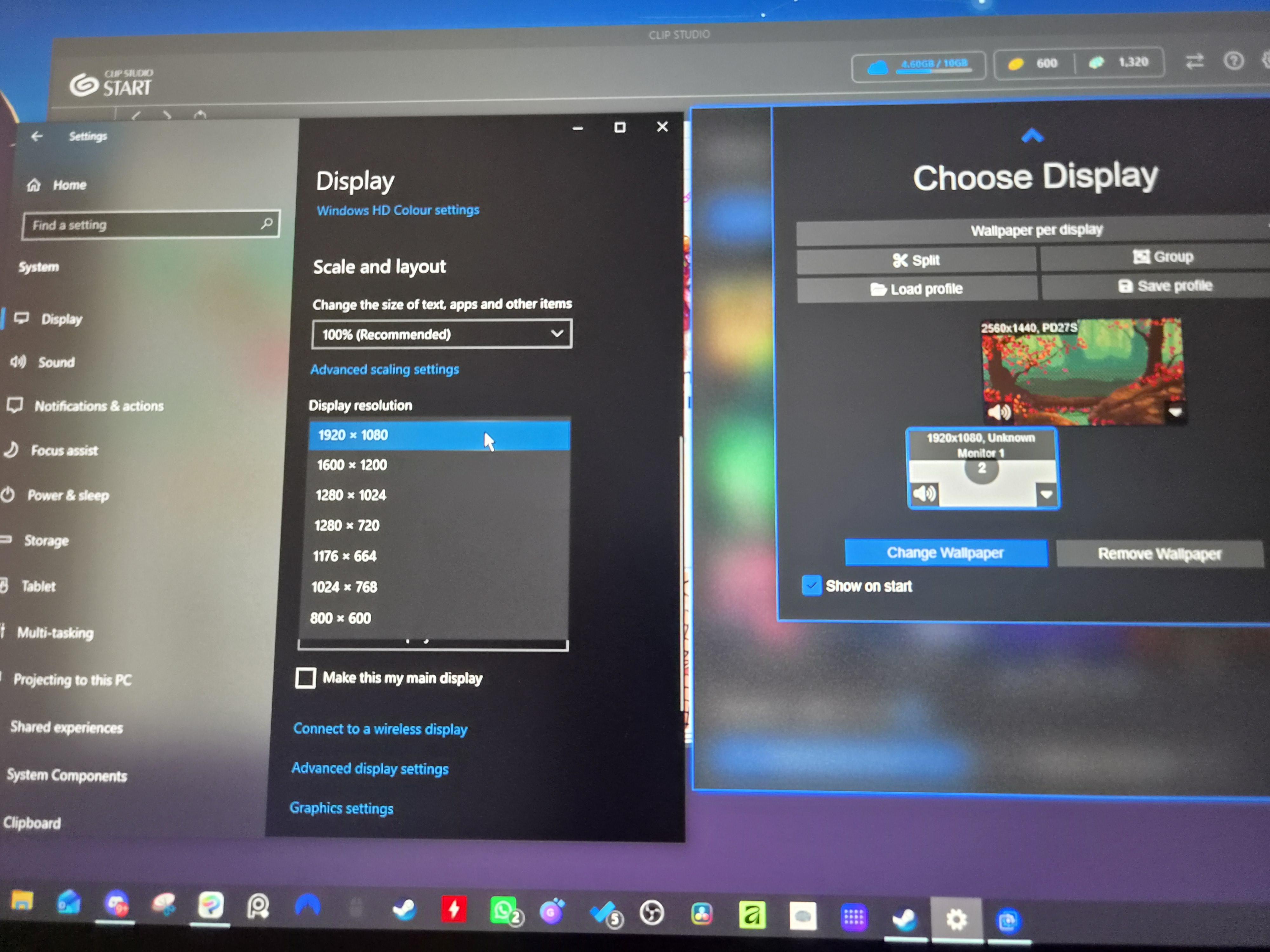
Solved Wacom (drivers?)not starting up properly

Post image
2 Upvotes

Edit: figured it out. I needed to upgrade my graphic drivers lol

Ive been having an issue that's been going on for a few weeks now, I was hoping someone might be able to help me 🥲

I have a wacom cintiq 24 (2025)

Whenever I first load up my pc I have an issue with the wacom only displaying 1920x1080, the software shows it's connected and working, the only way to fix it is to restart my pc every time. I've noticed wallpaper engine doesn't load either unless I restart. Has anyone been experiencing this? It's really irritating having to restart my pc every time I wake it up every morning

Sometimes it straight up shows no connection aswel

I have tried diagnosing within the software but it tells me it's working just fine


r/wacom • • 1d ago

Solved Version 29 of the free Tablet App for Mac is out and is even better!

Thumbnail
gallery
43 Upvotes

Thank you so very much for all of your helpful feedback!

Tablet App for Mac V29 is out: press your Pen button 2 twice for a colour palette right where your pen is, or hold Pen button 1 for a floating keyboard you can type on with the pen.

The newest Tablet App for Mac gives the eraser its own pressure feel, finds any app setting with a search box, lets you type exact values next to every slider, keeps the Radial menu open until you close it, and adds Italian, Swedish and Brazilian Portuguese, plus many fixes and better Bluetooth support for your trusted Wacom tablets.

It's free and open source (GPL-3.0), with no tracking.

All new feedback welcome 👈🏻🤓👌🏻

Download: https://digitalgroceries.github.io/tablet-app-for-mac/


r/wacom • • 1d ago

Purchase Advice Wacom MovinkPad Pro 14 vs XP-Pen Magic Pad Pro 13 – Which one would you choose?

5 Upvotes

Hey everyone!

I'm looking for a versatile drawing tablet that I can use both as a standalone device (mainly for sketching, but potentially for some more demanding projects as well) and connected to my PC for software like Photoshop.

For reference, my PC is a Lenovo Legion 5 Pro (RTX 4070 + 16GB RAM).

Portability is also important to me, as I want to be able to carry the tablet easily in a backpack when travelling.

At the moment, I'm torn between the Wacom MovinkPad Pro 14 and the XP-Pen Magic Pad Pro 13.

The Wacom seems to have significantly better specs, and the drawing experience on its OLED display looks amazing. However, I'm still unsure whether OLED is necessarily better than LCD for this kind of use.

Despite that, I'm leaning slightly towards the XP-Pen because of its native pen display functionality, which allows you to connect it to a PC and use it directly as a drawing display.

I've read that it's possible to achieve something similar with the Wacom using Artemis + Apollo, but I haven't been able to find much detailed information about this setup.

I also came across a developer ("u/tigien" (https://www.reddit.com/user/tigien/)) who is working on a custom solution called StreamPro, which looks extremely promising, especially for 2D/3D artists and video editors:

" I created a fork of Artemis/Apollo aimed at 2D/3D artists and editors – r/MoonlightStreaming" (https://www.reddit.com/r/MoonlightStreaming/comments/1sablql/comment/19st5awzek5ph/?context=3)

However, I have no idea when the final version will be released.

So, which tablet would you choose?

I'm planning to take advantage of the Black Friday deals, so I'd like to make a decision soon.

If the price drops are good enough, I'd really like to go for the Wacom, but only if I can achieve very low latency when using it as a pen display, ideally comparable to the native XP-Pen experience.

I'd really appreciate hearing your thoughts!

And if you own either of these tablets, I'd especially love to hear about your real-world experience. How do they feel to draw on? How is the overall performance? And how well do they work as standalone devices?

Thanks!


r/wacom • • 1d ago

Problem What is wrong?😅

Post image
1 Upvotes

Anyone know what´s wrong? Keep getting pop out lines across the drawing


r/wacom • • 1d ago

Purchase Advice Moveink 14 for Vector Art?

2 Upvotes

I'm doing a lot of sketch to vector art work using PC connected tablet usually in Fresco and Illustrator, and I am looking for a tablet to be able to work on it unplugged from PC.

I really like Moveink 14 and what it has to offer in terms of large display, price, pen, paper like feel and flexibility of connecting to PC if needed. But from what I understand Android doesn't have any of the vector apps at all, like it's a conspiracy?? No Fresco, no Illustrator, no Affinity and none of it is even planned.

Does anyone use it for similar purposes and what are you using then? And if not, am I basically stuck with iPad Pro?


r/wacom • • 1d ago

Purchase Advice Wacom Nibs

9 Upvotes

Hi! I recently bought my first Wacom tablet, a Wacom Cintiq 16 (2025 version), and I've been wondering about the recent news of Wacom being acquired.

What does this mean for the future of their products? Will the current lineup eventually be discontinued, including replacement nibs, or will they continue producing tablets and accessories compatible with older devices, just under a different name? Should I consider stocking up on a few extra nibs, just in case?

I also wanted to ask: do third-party EMR pens work with Wacom tablets? Has anyone tried using one with the Cintiq 16 (2025) or a similar model?

Sorry if this comes across as a little panicky! I've wanted to learn how to draw for a very long time, and this tablet was a pretty big investment for me, especially considering the country I live in and how long it takes to save up for something like this.

I just want to make sure I understand my options and what the best alternatives might be going forward.

Thank you so much! ❤️


r/wacom • • 1d ago

Question Can I connect a Wacom Cintiq 16 2025 with just one cable to the display?

1 Upvotes

Question: Can I connect a Wacom Cintiq 16 2025 (DTK168) with just one cable to the display?

I’ve just bought a Wacom Cintiq 16 (DTK168). I’m using it with an older PC that has no USB-C ports, so I currently have 3 cables plugged into the back of the display.

My previous Wacom One 13-inch (non-touch) had just one USB-C cable running to the display. Wacom had supplied a kind of hub or box, so the connections for power, video and USB were further down the cable, so I could keep them near the PC or on the floor and leave my desk tidy.

I tried reusing the Wacom One 3-in-1 cable, but it didn’t work. Wacom confirmed that it’s incompatible with the Cintiq 16 2025.

I mainly use the Cintiq for taking notes and marking up documents, and I often rotate it between portrait and landscape. Having 3 cables attached makes that awkward.....

Is there a compatible cable, hub or adaptor that would let me keep the power, video and USB connections near the PC, with just one USB-C cable running to the Cintiq?

I noted Wacom sell ACK45719Z, but it is n't listed as a compatible device.


r/wacom • • 2d ago

Purchase Advice Is Cintiq Pro 24 still good or should I get the Cintiq 24 (2025)?

5 Upvotes

Need help deciding between these two tablets. Been using a Huion GT-191 for almost a decade now both as a hobby and now professionally, and it did me well. But I decided to finally upgrade to a nicer tablet, with a pen that doesn't require charging and a screen that isn't just smooth glossy glass.

I've narrowed it down to these two options, since I can get a refurbished Cintiq Pro 24 for roughly the same price as the newer Cintiq 24 (or maybe even cheaper used). My only issues with the Pro are:

  • It's an older model, which isn't a huge deal for me because I know it's a huge upgrade to my current tablet, but I'm not sure if it's been long enough that it isn't worth getting over Wacom's newer offerings.
  • For ergonomics I want to put it on a monitor arm, but it seems like it requires a specific adapter that no one sells anymore, or use the ergo stand which is also hard to find (and expensive). Seems like my best route for this would be to find some used tablets on eBay that come with a stand/arm, which ups the price a little.
  • I'm not sure if the massive bezels will feel weird or take up too much room. I plan on getting a rather big desk so I can definitely make it fit, but I don't have any experience with using a tablet that big and how it feels to use. I decided that the 24" screen is a good size to move up to, but obviously the tablet is much bigger than that.

Out if Wacom's newer tablets, I narrowed it down to the Cintiq 24, since the price is roughly around my budget and is around what I was looking for. (Obviously the new Cintiq Pros are wayyy pricier, which is why I didn't consider them.) However, this tablet is doesn't have 4k resolution like the Pro, though I'm not sure if that's really an issue for me jumping from a 1080p tablet. I also heard that the Pro 24 has better color accuracy, which isn't necessarily crucial to my work. However, since I want my new tablet to last me a good while, so I feel like the 4k screen and color accuracy might be a lot more useful in the long run.

I was also looking at the Huion Kamvas Pro 24 Gen 3 as a possible option, if anyone has some insight on that one. Since I used a Huion as a daily driver for years now, I have a good amount of trust in Huion's products, and I heard the pen is MUCH better now than the one I have now. However I know that the Wacom pens are still top of the line, and at this price point I thought I might as well buy a Cintiq this time.

If it helps, I plan on doing a lot of 2D animation, illustration, and concept work, as well as some comic illustration down the line. I'm pretty serious about working professionally at this point, and use my tablet everyday for hours at a time.

TLDR: I'm looking at getting a Cintiq Pro 24 used or refurbished for professional work. But I'm worried that because it's an older model and the form factor might be a hassle to deal with, maybe it's worth losing out on the 4k resolution and (slightly) better color accuracy for the Cintiq 24. Any help with this would be super appreciated!


r/wacom • • 2d ago

2027 drawing tablet buying guide Part 9: Connecting pen tablets [SevenPens]

Thumbnail
youtu.be
3 Upvotes

r/wacom • • 2d ago

Purchase Advice Replacement pens for Intuos 4

Thumbnail
gallery
2 Upvotes

Today i was at a thrift store and found this Wacom intuos 4 drawing tablet. Never had a drawing tablet before but it was only 10 dollars and had everything inside except the pen so i bought it. What's the best way to get a replacement pen that wont cost me a ton? I don't mind paying more for the pen than the tablet cost me since it was so cheap but would rather not spend more than like 25-40 usd if possible. I included pictures of the tablet and the label for it it is a model PTK440


r/wacom • • 2d ago

Problem The pen pressure is not being detected properly.

1 Upvotes

As you can see in the video above, there are times when my tablet does not properly detect pen pressure. The moments when I feel the pressure isn't being detected correctly are as follows. This occurs when I am coloring and pressing the pen hard, or when I am drawing with enough force to clearly show 100% opacity, but the opacity does not reach 100%. I am currently using the CTL-610WL and the pen is a Wacom 4K Pen. Because of this issue, I even considered whether I would need to buy a new pen and tablet. Or could the cause of this problem be a driver issue? My current tablet driver version is 6.4.15-1.


r/wacom • • 2d ago

Purchase Advice Wacom Intuos Pro 2025 died on me

5 Upvotes

Hello, my wacom intuos pro 2025 got an issue with the battery and became unusable so I managed to get a refund from amazon and now I'm debating wether to get the same tablet again since I LOVED it or try other brands like xencelabs or the xp pen deco pro 2.

Any advice would be really helpful !