r/WordpressPlugins • • 9h ago

Free [FREE] PHP 8.6 is out: I scanned the 25 most-installed plugins for it. Nothing breaks, but 61 new deprecation notices

Post image
3 Upvotes

PHP 8.6 was released on November 19 and WordPress 7.2 (December 8) adds full support for it. Hosts will start offering it soon, so I added it as a target to my free plugin, Upgravo, and ran it against the 25 most-installed plugins on WordPress.org (about 26,400 PHP files).

What I found for PHP 8.6:

  • Nothing that breaks a site. Zero fatal-level findings that weren't already there on PHP 8.4.
  • 61 new deprecation notices. The three most common:

    • spl_object_hash() is deprecated (use spl_object_id(), which returns an int, not a string)
    • returning a value from __construct() is deprecated (it was always ignored anyway)
    • the is_integer() / is_double() / doubleval() aliases are deprecated
  • Some hits were in code that never runs on modern PHP (Symfony's polyfill for PHP 7.2 uses spl_object_hash()), so the scanner now hides those instead of scaring you.

Deprecations don't stop your site, but they fill your error log and they become real errors in PHP 9.

Upgravo runs entirely on your server: no external service, no exec(), works on shared hosting. You pick the PHP version you want to move to and it tells you, plugin by plugin, what breaks, what's just a notice, and (for the common cases) how to fix it with a before/after example. The screenshot is a real scan of a test site going from PHP 8.5 to 8.6.

https://wordpress.org/plugins/upgravo/

Disclosure: I built it. Feedback on false positives is very welcome. A comment on my last post here led to a fix in how it detects if ( function_exists() ) guards.


r/WordpressPlugins • • 9h ago

[FREE] Making WordPress accessible to AI agents: three free, open-source plugins to read, interact and observe

3 Upvotes

Full disclosure: I'm the independent developer behind these three free, open-source WordPress plugins.

I've been exploring what it actually means to make a WordPress website accessible to AI agents, beyond the increasingly common "AI-ready" label.

I see three distinct technical problems:

- How can agents access website content in a machine-friendly format?

- How can agents interact with a website through explicit tools?

- How can website owners observe whether those interfaces are actually being used?

I've been building three plugins to address these problems directly within WordPress.

**1. Read — Mescio for Agents**

Provides an alternative Markdown representation of existing WordPress content through HTTP content negotiation and discoverable alternate URLs. It also generates llms.txt and llms-full.txt.

It doesn't replace HTML or require rebuilding the website.

https://wordpress.org/plugins/mescio-for-agents/

**2. Act — WebMCP Bridge**

Exposes tools for content search, retrieval and cart interactions, allowing compatible agents to interact with WordPress through explicit interfaces rather than relying exclusively on HTML parsing or browser automation.

https://wordpress.org/plugins/webmcp-bridge/

**3. Observe — Mescio Insights**

Records actual requests handled by these integrations, including the declared client identity, requested resource or tool, timestamp and response status.

Everything stays within the WordPress database. No external SaaS, no IP address collection, no external analytics service.

https://wordpress.org/plugins/mescio-insights/

**What the project is not**

- An SEO or AI ranking tool.

- A ChatGPT citation tracker.

- A GEO scoring platform.

- A guarantee that AI agents will discover or use your website.

A crawler fetching a Markdown document does not mean that the website appeared in an AI-generated answer.

There are limitations, too. User-agent identification is not definitive, llms.txt is not a universally adopted standard, and requests that never reach the supported WordPress integrations cannot be observed.

The underlying idea is to make existing websites more accessible to software agents while keeping the infrastructure and data under the website owner's control.

I'd genuinely appreciate technical feedback from the WordPress community:

- Do you see value in exposing explicit machine-readable representations alongside HTML?

- Would you use agent-specific tools on your WordPress sites?

- What would you want to observe or measure about agent interactions?

I'm particularly interested in the practical challenges around caching, compatibility, discovery and security.


r/WordpressPlugins • • 8h ago

[PROMOTION] For WordPress plugin devs: find the bug hiding behind 30 differently worded support tickets

2 Upvotes

If you sell a WordPress plugin, your support inbox is the best product research you have, and it’s rarely read as a whole.

You answer tickets one by one to clear the queue. Meanwhile, the same conflict arrives worded 30 different ways, the same setup question eats up every Tuesday because your docs don't quite answer it, and a customer whose licence renews next month is quietly getting frustrated across four replies.

I co-founded Overdesk to fix this for our own workflow while supporting our plugins' users. It isn’t a WP plugin; it connects to Help Scout, Zendesk, Intercom, or FreeScout, reads your ticket history as a whole, and surfaces the recurring bugs, doc gaps, and churn risks you miss when you're just clearing the inbox.

Because WP support is useless without licence context, we also built reply drafting around a few strict guardrails:

  • Live licence context (read-only): Drafts pull the customer's actual plan, activation count, or order status from Freemius or WooCommerce so you aren't copy-pasting keys back and forth. It never modifies an order or licence.
  • Human-in-the-loop by default: Drafts land as internal notes. Nothing ever goes to a customer until someone on your team reviews it and hits send.
  • Privacy & BYOK: Licence keys and passwords are scrubbed and swapped for stand-ins before the LLM ever sees the ticket, and it runs on your own Anthropic API key so you control costs.
  • One-click bug handoff: If a ticket uncovers a real bug, you can push it straight to GitHub, Linear, or Jira as an issue (it stops at the issue and never touches your repo).

If you want to test it against your own queue, there's a 14-day full-feature trial (no credit card) at https://overdesk.io.

Mostly curious how other plugin teams here handle this right now. Do you have a system for spotting patterns across tickets, or is everyone just fighting fires one ticket at a time?


r/WordpressPlugins • • 7h ago

[FREE] I built a browser-based bulk WebP/AVIF image compressor for WordPress (zero server uploads, no heavy plugins)

1 Upvotes

Hi everyone,

Instead of installing heavy image optimization plugins that slow down your WordPress dashboard or eat up server resources, I built a lightweight web tool called SlimWebp (https://slimwebp.com/wordpress-image-compressor).

It compresses and resizes up to 30 images simultaneously right inside your browser using the HTML5 Canvas API—meaning your images never leave your device. It automatically presets a 1920px max width and WebP format tailored for WordPress posts and pages, then lets you download everything in one ZIP file.

100% free, no sign-up required. Would love to hear your thoughts!


r/WordpressPlugins • • 12h ago

Title: [For Sale][FREEMIUM][PROMO] Two WordPress plugins with 3,000+ active installs combined: AdFlow (ad manager) and Ultimate Watermark

2 Upvotes

Hi all,

I've been building WordPress products for 10+ years and I'm cutting down to fewer products, so I'm selling two plugins. They can go together or separately.

**AdFlow: ad manager for AdSense, ad networks and sponsor ads**

- 2,000+ active installs on WordPress.org

- Free: Auto Ads, automatic placements, ads.txt manager, Consent Mode v2, cookieless stats, sponsor ads

- Pro: earnings dashboard, click protection, direct ad sales

- One-click import from Advanced Ads, Ad Inserter, AdRotate and WP QUADS. Advanced Ads is currently closed on WordPress.org, so its users are looking for alternatives.

- https://wordpress.org/plugins/simple-google-adsense/

**Ultimate Watermark: automatic image watermarking**

- 1,000+ active installs on WordPress.org

- Free: text and logo watermarks, auto-watermark on upload, bulk mode, backup and restore of originals, WooCommerce product images

- Pro: unlimited watermarks, dynamic placeholders, rules engine

- https://wordpress.org/plugins/ultimate-watermark/

**What's included:** free and Pro code, and the WordPress.org listings.

To be upfront: both have a solid user base but small paid revenue. They'd suit someone with marketing time or an existing product line to cross-sell into.

Happy to answer questions here. For details, DM me or email me.umeshuser@gmail.com.


r/WordpressPlugins • • 13h ago

[PROMOTION] Queryra, AI search for WooCommerce and WordPress: 1,000 extra searches a month for 6 months, free (code BF26)

Thumbnail
queryra.com
2 Upvotes

I build Queryra, an AI search plugin for WooCommerce and WordPress (free plan on wp.org).

Black Friday, until Nov 30: 1,000 extra AI searches a month for 6 months, on any plan, the free one too. No card.

Make a free account, open the Club tab, enter BF26. You can hook up your site later, the bonus stays on the account.

Happy to answer questions here.


r/WordpressPlugins • • 10h ago

Free [FREE][PROMOTION] I couldn't find a gallery plugin I liked, so I built my own (albums and private albums, folders, lightbox with EXIF etc.)

Thumbnail
gallery
1 Upvotes

I'm a hobby photographer, and for a long time I was looking for a WordPress gallery plugin that would do what I need. I tried quite a few. Some were great at one thing but missing others, and some felt heavy and clunky to work with.

So I eventually gave up searching and wrote my own. It's called Bazantik Photo Gallery, it's free and open source (GPL), and it's now in the WordPress.org directory.

What it does:

  • Albums and folders to organize photos
  • Private albums: password-protected, or "unlisted" with a secret link. They're hidden from search, archives, feeds and sitemaps
  • Justified grid that keeps the original aspect ratios (no cropping)
  • Full-screen lightbox with zoom, pinch-to-zoom on phones, slideshow, keyboard navigation and original download
  • EXIF info panel and an optional map for geotagged photos (can be turned off globally or per album)
  • Background processing of large uploads, so you can drop in dozens of big photos on shared hosting without timeouts
  • Optional map providers with your own API key

It's a young plugin (1.0.0), so I'd really appreciate bug reports and feedback from any browser, device or theme. Android and Firefox have had the least testing so far.

I'm the author, so this is a self-promo and I'd be happy to hear honest feedback: what's missing, what's annoying, what you'd do differently.

WordPress.org: https://wordpress.org/plugins/bazantik-photo-gallery/

GitHub: https://github.com/bazantik/bazantik-photo-gallery


r/WordpressPlugins • • 10h ago

[PROMOTION] I built a self-hosted e-signature plugin for WordPress — 40% off through Sunday

0 Upvotes

Full disclosure: I built WPsigner, a WordPress plugin for electronic signatures.

The idea is to sign contracts from your WordPress dashboard without paying per envelope or per seat, and without sending the documents to a third-party SaaS by default. Files stay encrypted on your own site. Every plan has unlimited documents and signers; plans only differ by how many WordPress sites you license.

It covers the usual flow (upload a PDF, add signers, drag-and-drop fields, send), plus audit trails, SHA-256 hashing, optional OTP (email, SMS, or WhatsApp), and integrations with Gravity Forms, WPForms, Fluent Forms, and Elementor. The evidence and controls are designed to support ESIGN, UETA, and eIDAS SES workflows.

Black Friday is 40% off every plan through Sunday, November 30, with the code BLACKFRIDAY — the biggest discount we run all year. 30-day money-back guarantee.

https://wpsigner.com/pricing/

Happy to answer questions or hear what you'd change.


r/WordpressPlugins • • 11h ago

Promotion [PROMOTION] Black Friday giveaway: 5 PeepSo Ultimate licenses, 1 site, 1 year

Post image
1 Upvotes

Thinking about adding a community to your WordPress site?

I’m part of the PeepSo team. For Black Friday, we’re giving five people a PeepSo Ultimate Bundle license for one website, valid for one year, including updates and standard technical support.

PeepSo adds member profiles, activity feeds, groups and chat to WordPress. You could use it for a course community, a membership site, a professional network or a group built around a shared interest.

To enter, leave one comment telling us:

  1. Who your community would be for and what it would help them do.
  2. What you’d build with PeepSo and what you’d do in the first 30 days.
  3. Where your first members would come from.

Give us specific, practical details. Short answers are welcome. Website links are optional in the comments.

Entry details:

  • Have an existing WordPress site or a project you intend to start within 30 days.
  • Your Reddit account must be at least 30 days old when the giveaway opens. There’s no minimum karma requirement.
  • One entry per person or business. Entrants must be 18 or older and meet the location requirements in the full rules.
  • No purchase, credit card, newsletter signup or review required. The gifted year has no automatic renewal.

The PeepSo team will choose five winning entries based on:

  • Community purpose (40%): a clear audience and a useful reason for members to join and return.
  • Launch plan (30%): achievable steps for the first 30 days and a clear role for PeepSo.
  • First members (30%): a credible way to reach the people the community is for.

Thoughtful, practical plans are what we’re looking for. A small, focused project can win. Upvotes, karma totals and entry length won’t earn judging points.

We’ll verify the selected projects privately through PeepSo support, so please don’t post contact details or license information here.

Entries close Monday, 30 November 2026, at 23:59 CET (22:59 UTC). We’ll announce the winners in an edit to this post on Tuesday, 1 December. Winners will have until 8 December to claim; unclaimed prizes go to the next highest-ranked eligible entries.


r/WordpressPlugins • • 13h ago

Title: [For Sale][FREEMIUM] Two WordPress plugins with 3,000+ active installs combined: AdFlow (ad manager) and Ultimate Watermark

0 Upvotes

Hi all,

I've been building WordPress products for 10+ years and I'm cutting down to fewer products, so I'm selling two plugins. They can go together or separately.

**AdFlow: ad manager for AdSense, ad networks and sponsor ads**

- 2,000+ active installs on WordPress.org

- Free: Auto Ads, automatic placements, ads.txt manager, Consent Mode v2, cookieless stats, sponsor ads

- Pro: earnings dashboard, click protection, direct ad sales

- One-click import from Advanced Ads, Ad Inserter, AdRotate and WP QUADS. Advanced Ads is currently closed on WordPress.org, so its users are looking for alternatives.

- https://wordpress.org/plugins/simple-google-adsense/

**Ultimate Watermark: automatic image watermarking**

- 1,000+ active installs on WordPress.org

- Free: text and logo watermarks, auto-watermark on upload, bulk mode, backup and restore of originals, WooCommerce product images

- Pro: unlimited watermarks, dynamic placeholders, rules engine

- https://wordpress.org/plugins/ultimate-watermark/

**What's included:** free and Pro code, and the WordPress.org listings.

To be upfront: both have a solid user base but small paid revenue. They'd suit someone with marketing time or an existing product line to cross-sell into.

Happy to answer questions here. For details, DM me or email me.umeshuser@gmail.com.


r/WordpressPlugins • • 18h ago

[Help] 1-min anonymous questionnaire on WordPress development and custom code

Thumbnail
reddit.com
1 Upvotes

r/WordpressPlugins • • 19h ago

Discussion Is Eventin becoming the go-to alternative to The Events Calendar for WordPress? [DISCUSSION]

1 Upvotes

We've been seeing an interesting shift among WordPress users looking for The Events Calendar alternatives.

While The Events Calendar has been a popular WordPress event management plugin for years, some users are exploring alternatives because of pricing, functionality, compatibility, and customer support.

Eventin is one of the best WordPress event management plugins gaining attention in this space. But don't just take our word for it. Here are two interesting reviews from WordPress.org.

1. Choosing Eventin over The Events Calendar for better functionality

One user chose Eventin because of its Elementor Pro integration and what they considered better features than The Events Calendar. They've used it for nearly two years on a client's website to showcase virtual events and sell tickets for in-person events.

Review: Amazing functionality and features

2. Moving from The Events Calendar to Eventin for pricing and support

Another user evaluated Eventin as a replacement for The Events Calendar. Their experience with customer support, functionality, and pricing convinced them to move forward with migrating their website.

Review: Great Support

These experiences also help explain why we developed a dedicated The Events Calendar to Eventin migration feature.

Instead of manually recreating existing events, users can import their events directly into Eventin.

It covers:

  • Event calendar and event scheduling
  • Event registration and ticket sales
  • Attendee management
  • Recurring events
  • WooCommerce integration
  • Virtual and in-person events
  • AI-powered event networking and matchmaking

Full disclosure: I'm part of the Eventin team, so naturally, I'm interested in understanding why people switch between WordPress event management plugins.

I'm curious to hear from this community.

Are you still using The Events Calendar, or have you already switched to an alternative?

What's driving your decision? Pricing, functionality, performance, or customer support?


r/WordpressPlugins • • 20h ago

Free [FREE] WooCommerce affiliate plugin

1 Upvotes

Hi everyone,

We’ve just published Affiliate Program for WooCommerce on WordPress, and I’d appreciate feedback from people who run WooCommerce stores.

https://wordpress.org/plugins/rtw-affiliate-program-for-woocommerce/

The free plugin lets affiliates register, share referral links and check their commissions through a dashboard. Store owners can set percentage or fixed commissions by product and category, add one-time performance bonuses, and handle payout requests manually. It supports classic and block checkout.

It’s a free plugin with no trial period, licence key or usage limits.

If you have some time to try it, I’d particularly like to know:

  • Was anything confusing during setup or affiliate registration?
  • Did a referred order earn the commission you expected?
  • Is there a workflow or feature you need that the free plugin doesn’t cover?

Bug reports and honest criticism are welcome. You can leave findings here or in the plugin’s WordPress.org support forum. Thanks for taking a look.


r/WordpressPlugins • • 21h ago

Free Rank Math FINALLY compatible with Divi 5… Almost… [FREE]

Thumbnail gallery
1 Upvotes

r/WordpressPlugins • • 1d ago

[FREE] - MBR Performance vers 2.2.0 (update)

2 Upvotes

Just to let everyone know, I've released an update to my performance and optimization plugin, MBR Performance.

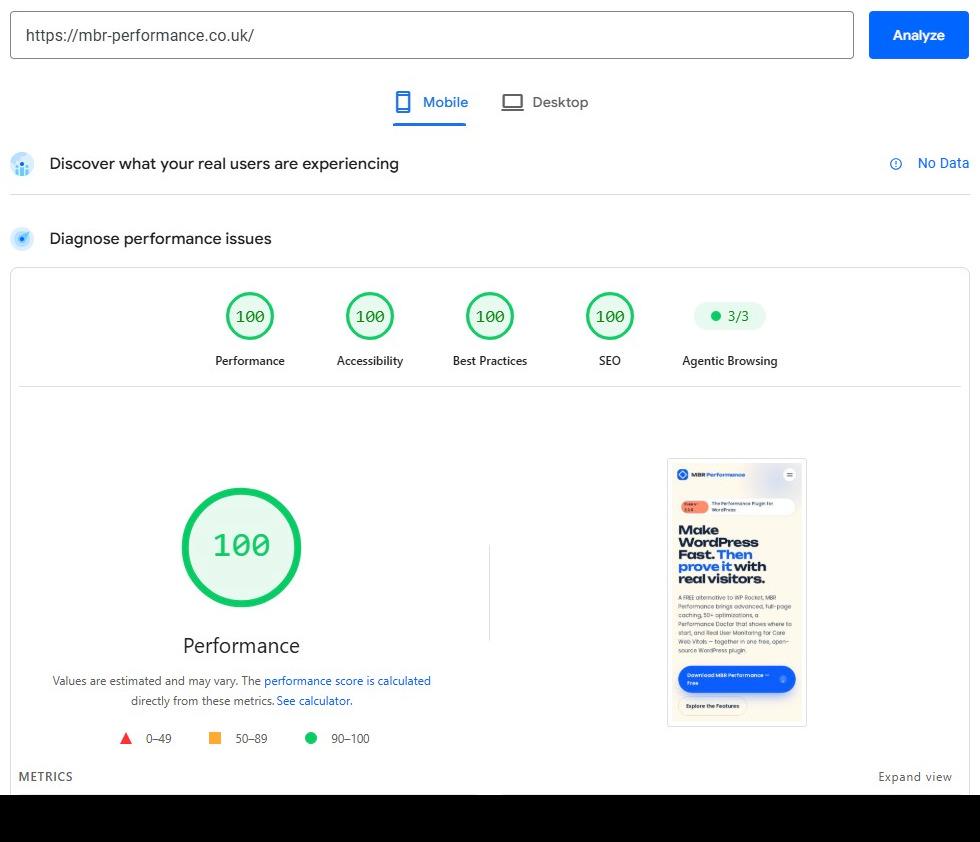
MBR Performance is a free and open-source plugin for WordPress that delivers advanced, three-tier full-page caching, plus 50+ optimizations for website, server and clients' browsers. It also ships with a Performance Doctor to help new users identify where the biggest gains can be made, and Real User Monitoring (RUM) delivering live scores from actual traffic (CLS, INP, LCP).

MBR Performance will help your website to reach that perfect score

What's New?

Version 2.2.0 delivers...

  • Object Cache (Memcached). Page caching saves finished pages. An object cache saves the database results WordPress builds pages from in Memcached’s memory, so they are not fetched again on every request. It speeds up everything a page cache cannot serve — logged-in visitors, wp-admin, WooCommerce carts and checkout, search, AJAX and REST requests — and satisfies the persistent object cache recommendation in Site Health.
  • CSS: Skip rendering off-screen sections. On a long page, the browser lays out and paints every section, including the ones nobody has scrolled to yet. Skip Rendering Off-Screen Sections, in the Rendering group near the foot of the CSS tab, adds content-visibility: auto to your page’s top-level sections, so the browser skips that work for anything off-screen and does it just in time as the visitor scrolls. It is a real gain for rendering time and for INP on long posts and page-builder pages, where most of the page starts off-screen.
  • Font Fallback Metrics. While a web font downloads, the browser draws your text in a system font and swaps the web font in when it arrives. The two are never quite the same size, so at that moment lines wrap differently, paragraphs grow or shrink, and everything below them moves. That movement is layout shift, and it counts against your CLS score. Match Fallback Font Metrics (with Self-host Google Fonts on) adds a fallback face for each self-hosted family. It points to a system font, resized with size-adjust and re-spaced with the ascent, descent and line-gap overrides so it takes up the same room as the web font — so when the web font arrives, nothing moves. In testing, a paragraph in Playfair Display kept exactly the same line breaks in its fallback, where plain Times New Roman came out a third shorter.

As always, MBR Performance remains free and open-source with no 'pro' version waiting to ambush you around the corner. Every line of code is published on GitHub.

Website and Download - https://mbr-performance.co.uk/
GitHub Repository - https://github.com/HarbourBob/MBR-Performance

MBR Performance is part of the Little Web Shack suite of free and open-source plugins.


r/WordpressPlugins • • 1d ago

[PROMOTION] Why struggle to find worthwhile content when so many sensational videos are at all the video sharing platforms? Just use this plugin to make it simple

Thumbnail
gallery
1 Upvotes

All you need are up to 30 video links to paste into the Maax Bulk Video Post plugin and within seconds (or minutes depending on server), you quickly get many pages with the embedded video to share across social media and attract hundreds of visitors per hour.

It also includes an ad banner manager to allow shortcode insertion to the category config area, an included feature. See details at https://maax.site/maax-bulk-post/


r/WordpressPlugins • • 1d ago

[HELP] Menu manager

0 Upvotes

I have a site with quite a big menu structure and I want something to manage it.

The WP menu is too cumbersome to deal with.

I need to be able to duplicate menus at the very least.

Any advice?


r/WordpressPlugins • • 1d ago

Free Groups Memberships and Access Control 4.10.0 released [FREE]

Thumbnail reddit.com
1 Upvotes

r/WordpressPlugins • • 1d ago

Freemium Last-minute Black Friday prep on WordPress? Here’s a 2-minute way to add promo widgets natively [FREEMIUM]

0 Upvotes

With Black Friday literally right around the corner, I know a lot of folks are still trying to get sale banners, countdowns, or promo callouts live without breaking their site or wrestling with clunky embeds.

If you need a quick setup, you can drop in promotional and sales widgets using the free Redesignee plugin.

Why it’s handy for a last-minute push:

  • Super fast setup: Takes about 2–3 minutes to install.
  • Native editing: You can customize everything directly inside WordPress using the free plugin. No bouncing back and forth between external dashboards.

You can browse the promotional widgets here:https://redesignee.com/collections/promotional-sales-widgets

And grab the free WordPress plugin here:https://wordpress.org/plugins/redesignee/

Good luck to everyone running sales this weekend!


r/WordpressPlugins • • 1d ago

Help [HELP] Beginner WordPress question: for a small business/portfolio site, what are your must-have plugins — and which ones do you avoid?

0 Upvotes

Hi everyone, I'm learning WordPress alongside my other web skills (HTML/CSS/JavaScript, React) and I work in digital marketing, so I often see WordPress from the content/social side as well. I want to set up WordPress properly from the start instead of installing 30 plugins and slowing the site down. So, from your experience:

  1. What are your must-have plugins for a small business or portfolio site? (security, backup, SEO, speed, contact form)
  2. Which popular plugins do you avoid, and why?
  3. Free theme you actually trust for a clean portfolio?

I prefer a light setup that loads fast on mobile, since most visitors here in India open sites on phones first. Thanks in advance — I'll note down every suggestion and try the setup myself.


r/WordpressPlugins • • 1d ago

Promotion [PROMOTION] what a small woo shop's search log looked like after 11 weeks (1,447 searches)

Thumbnail
queryra.com
1 Upvotes

I build a search plugin (Queryra) so take this with a grain of salt. One of our users runs a small czech shop, about 700 products, and let us publish his search log plus a pretty critical email about what our search still gets wrong.

Stuff from his log that's useful whatever search you run:

- 65% of searches were one word, 21% two. product types and names, not sentences

- about 1 in 10 dropped the accents (klicenka instead of klíčenka). if that returns nothing you lose those people and never hear about it

- typos everywhere

- first search for a 2027 diary came on 7 sept, the shop's 5th day live. "next year" starts early

- the most common search (diář, diary) put an elastic band for the large diary first, diaries right behind. one word searches are where accessories climb above the actual thing

- bots type bare years and junk into search boxes. strip them before reading the log as demand

His complaints were fair btw: the bottom of the list gets loose, tags don't count for much. Full writeup with his email is linked above.


r/WordpressPlugins • • 1d ago

Discussion [DISCUSSION] Do you still trust WordPress broken-link checkers, or have false positives / scary bulk actions made you stop?

0 Upvotes

I’m considering building a small WordPress plugin and I want a sanity check before I write it.

I keep seeing the same complaints about the popular checkers: links that return 403 or sit behind bot protection get marked “broken,” and in at least one case a “Select All” + Unlink action hit far more rows than were on the screen (hundreds of unlinks in one go). AIOSEO’s checker has similar “this link isn’t actually broken” threads on wordpress.org.

If you manage content-heavy sites, or several client sites:

  • What do you use today, and do you trust the results?
  • Have false positives or a dangerous bulk action actually burned you?
  • If a checker clearly labeled “blocked / 403” separately from “404,” limited bulk actions to visible rows with a confirm step, and had a simple scheduled email report, would that be worth paying for? I’m thinking in the neighborhood of $49/year for one site, plus an agency licence if that’s what people need.

I’m not selling anything. There’s no plugin yet. Happy to share a short waitlist page in a comment if that’s allowed and anyone wants to be notified.


r/WordpressPlugins • • 1d ago

[FREEMIUM] I built a sort of "Lovable for WordPress": build and customize your site by asking AI

2 Upvotes

If you’ve used tools like Lovable or v0, you know how convenient it is to just describe the website you want and have AI build it for you.

I wanted that same experience, but for existing WordPress sites: building new pages, adding custom features, and restyling the site without having to install another bloated plugin, touch code, or hire a developer.

So I spent the last few months building YoMorph, a plugin that adds an AI assistant to your WordPress dashboard: you just ask for whatever you want in your own words, and it builds it for you. No coding knowledge required. Some examples of what you can ask:

  • Add a Black Friday sale banner with a countdown to midnight
  • Give your header and shop a festive Christmas look
  • Build an entire new page, like a Contact page with an email form and FAQ

How it works:

  • It reads your setup first: It inspects your active theme, styling, and fonts so whatever it builds matches your site naturally.
  • Private live preview: Nothing touches live visitors until you click Apply. It generates the change in a private preview window so you can test it first.
  • Clean undo and toggle: Every change lives in a Version History tab. You can toggle any change on or off, or revert it completely with one click.

You can download it directly at yomorph.com. It comes with free credits upon activation (no sign-up or card required), which is enough to test out a couple of real changes. If you ever need more, credits are pay-as-you-go with no subscription, and there is a +25% bonus running this week for Black Friday.

I would love to hear your feedback on the plugin and answer any questions you may have!


r/WordpressPlugins • • 1d ago

Free [FREE] Draco Insomnis — stops fake sign-ups without captchas

2 Upvotes

Hi all,

Draco Insomnis is now on WordPress.org — a free, open-source security plugin (GPLv2) that stops fake sign-ups without captchas, feeds bots a fake success, and keeps evidence for abuse reports.

https://wordpress.org/plugins/draco-insomnis/

What it does:

  • Registration protection: scores every public sign-up before the account exists. No captcha — a hidden trap field and a signed page stamp do the work. Bots get told "registration complete" and no account is created.
  • Two-step login: a 6-digit code by e-mail after the right password, trusted devices, and a recovery e-mail.
  • Firewall: precise signatures, not word lists. Blocks scanners and probes (.env, .git, wp-config backups, known web shells), starts in log-only mode, and hides the list of user names from anonymous visitors.
  • Forms and sign-ups: holds contact messages, blog comments and new accounts until the sender confirms from their e-mail.
  • Site mail (SMTP): sends the site's mail through a real mailbox, with ready-made settings for Hostinger, IONOS, Microsoft 365, Google and more.
  • Anti-copy: closes the content API to anonymous visitors, with a pace limit, and search engines verified by DNS.

Also in the box: country filter, CIDR and "forever" blocks, a button to test the firewall, password rules against known breaches, security headers and HSTS, privileged-account lock, abuse reports, and an optional malicious-link check.

Everything starts off — you switch on what you need. It sends your data to no third party; the few optional outside services (country list, breached-password check, malicious-link check) are off by default.

Thank you to everyone who sent suggestions and bug reports — this plugin is better because of you. Please keep them coming, here or on the plugin page.

And one ask: the plugin is translated into many languages, and corrections from native speakers are very welcome, especially for the Asian, African and Middle Eastern languages. If your language is missing or a string reads wrong, you can help translate it here: https://translate.wordpress.org/projects/wp-plugins/draco-insomnis/

Made by Notorius Vision in Menorca, the team behind OPNV Systems. The same engine also runs beyond WordPress — PrestaShop, Drupal, Joomla, Moodle, Magento, Laravel, any PHP server, Docker, static sites, and apps in Node.js, Python, Go, Ruby, .NET, Java, Kotlin and Rust: https://github.com/fermatacordis-create/draco-insomnis

Happy to answer questions in the comments.