r/eink • u/ResolutionOriginal80 • 2h ago
my e-ink business card

42
Upvotes
r/eink • u/cedarrenjun • 4h ago
We’re developing a new 4.7" e-paper device powered by ESP32-S31.
Specs:
• ESP32 S31, 16MB PSRAM + 16MB NOR Flash
• 4.7-inch display, 297 PPI, front light
• 2-point touch, 4 physical buttons (similar to Yuexingtong)
• Linear actuator for haptic feedback
• 6-axis IMU for auto rotation, built-in temperature & humidity sensor, IR transceiver
• Dual microphones + speaker
• 16GB TF card included, TF card slot for upgrade
• Wi-Fi / Bluetooth file transfer, AirDrop compatible
• Supports ai-native & Workbuddy
• Unused IOs broken out, expandable for custom peripherals
• Open 3D files, compatible with CNC, 3D printing, bare PCB
• White front panel
• Build: front AG glass, aluminum midframe, rear AG glass
• 2000mAh battery
We will have engineering prototypes ready next month.
We are looking for 10 beta testers.
DM me if you’re interested!
r/eink • u/VegetableSir7788 • 9h ago

my old kobo touch was just sitting in a drawer so i gave it a new brain. it only has 256 MB of ram and stock firmware is painfully slow on it, so i wrote KoboDash, a native C app that draws straight to the screen. way faster than stock!
it reads epub, mobi and txt offline, long press a word and you get the english/german dictionary (you can add more dictionaries too). it can also be a desk dashboard with weather and calendar from your own server.
hold home for 2 seconds and you're back in stock kobo, no bootloader or kernel stuff touched. only for the touch A (N905).
these are my actual photos. its free and open source: https://github.com/darkbringer1/kobo-ereader
r/eink • u/UsandoFXOS • 48m ago

Perhaps some of you (the most veterans), remember me from 2021 when i created the website adapted for eink screens (like my kindle 2019 my wife gift to me) e-ink.club were i created a collection of about 10 typical brain-games (sudoku, mineswepper, othello, tents & trees, etc.).
Always it has been a non-profit project. So a side-project for me (web developer). And incredibly, after 3 years (from 2021 to 2024) the number of visitants/players continued growing, in fact doubling. So in 2024 i added 3 more games (i announced it here) and since there number of matches/players increased 4x. So this 2026 added Tents & Trees, which i love.
Those games are made just from scratch, using javascript compatible with old devices/web browsers, and requiring the minimal CPU and RAM. Oh, even using a color palette friendly with gray scale screens and with low resolution. Obviously, you also can play to it in a PC or in a cell.
I finally added this week a new one "play": Twistory, a machine to play interactive stories based on very well-known novels, films and legends, using AI. The AI narrates the story you choose by episodes. You decide what happens in each one:
And it is a game: the AI tries to reach the work's original ending while still respecting your decisions. Will it get there… or will you steer it away?
You can use it
Disclaimers
Please... any comment you give me will be always very useful.
Cheers!
r/eink • u/SpeakNowAndEnter • 14h ago
Hello!
I am a civil engineer which involves lots of project meetings and note-taking to keep track of deliverables and questions and things of that nature, and I’ve often found myself with piles of paper notes I’ve taken that I’m stuck sorting through or having to re-type after the fact or whatnot. At one meeting recently I saw another engineer pull out a folio with an electronic notebook, which I’d never even thought of as a concept, and am now really looking into getting one.
I’m pretty sure his was a ReMarkable model, so that’s what I looked into first. Everything about it seems great, except the subscription model for storage and handwriting search feels like a pain. I hate subscriptions and I know that $4 per month will continue to go up over the years. But it having the best writing feel on the market (from what I’ve read) makes it tempting nonetheless.
The BOOX Air6 C is also one I was looking at. I’m a Master’s student as well as a full-time engineer, so being able to download Canvas from the play store to access my lecture PDFs and maybe even mark up engineering plans on it would be a positive, but also the distraction-free aspect of ReMarkable is tempting so that I could just focus on work. For those of you who have the BOOX, have you found it easy to just dedicate it to note taking / PDFs? Or is that kind of wasting its potential?
Also, where could I go to test out some of these units in-hand? I’ve never used an e-ink notebook before, so in terms of writing feel I’d like to actually know what it feels like before dropping ~$500 on one.
Any advice is appreciated!
r/eink • u/at_underscore_ • 14h ago
I’m considering getting a Boox tablet next year to read academic papers through Zotero. I know the integration exists but I’d love to hear actual testimonials!
Hey r/eink,
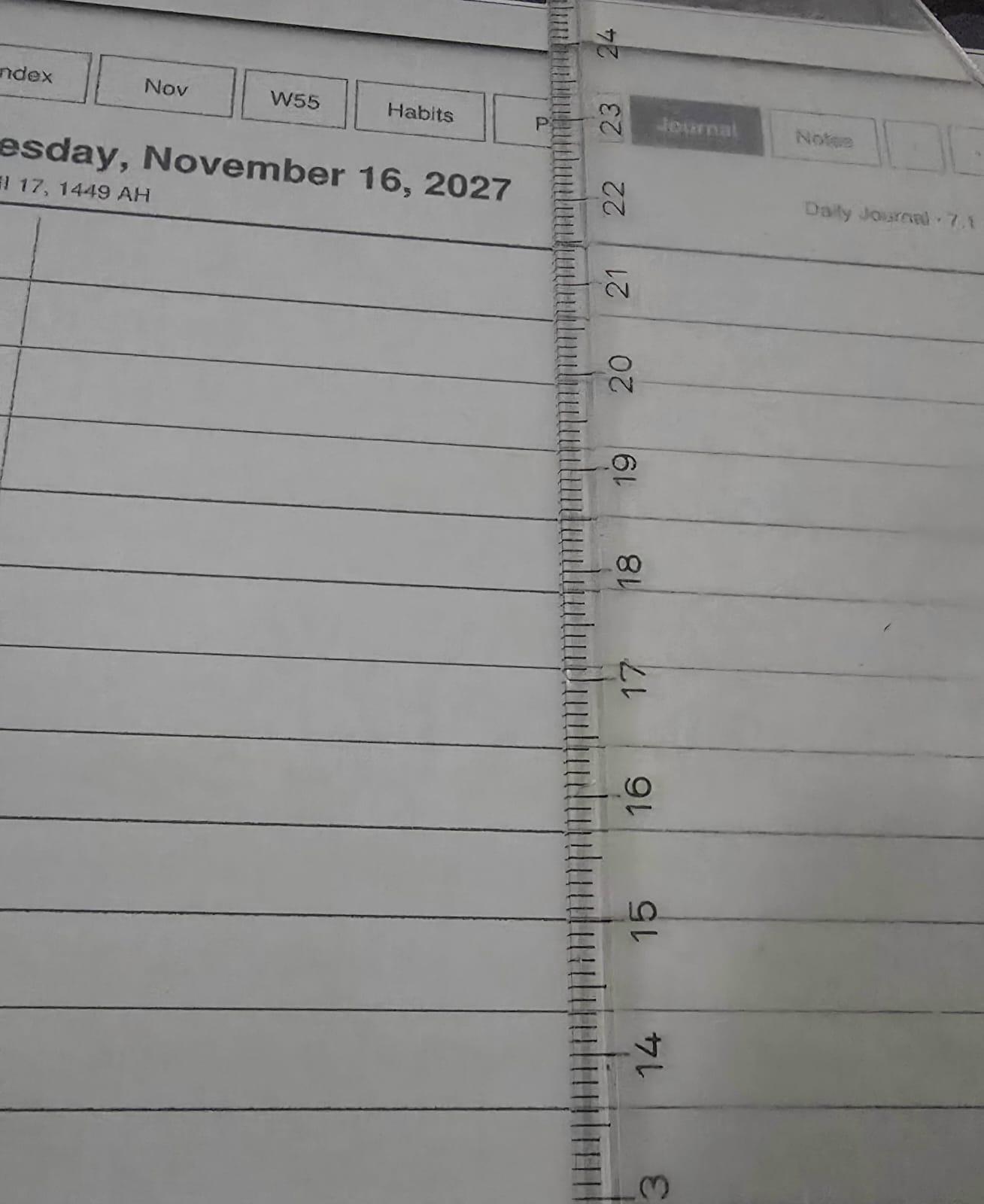
One frustration I always had with digital PDF planners is scaling distortion: most are built on A4/A5, so when opened in "Fit to Screen" on a 6.13", 7.8", 8.2", or 10.3" E-Ink screen, your 8mm ruled lines shrink and feel cramped.
I built a free, 100% client-side web studio that compiles hyperlinked vector PDFs directly at the exact active millimeter dimensions of your display (1 mm = 2.8346 pt), so an 8mm line or 5mm dot grid measures true 1:1 under your stylus.
Try it here: https://e-ink-planner-studio.vercel.app (No account, no backend, everything runs locally in your browser)
18 Calibrated Presets (+ Custom Device Builder):
- Pocket / Narrow (< 95 mm layout): BOOX Palma 2 Pro, Palma 3, reMarkable Paper Pro Move (dedicated stacked weekly cards, 2-column index, single-column habits).
- E-Ink Tablets: Viwoods (Mini & 10.65"), Supernote (Nomad & Manta), reMarkable (2 & Paper Pro), Kindle Scribe, BOOX (Go 10.3 / Note Air4 C / Tab Mini C).
- Standard Tablets: iPad (Mini, 11", 13") & Samsung Galaxy Tab (11", 12.4", 14.6").
- Supports Portrait & Landscape with responsive multi-column spreads for 10"+ screens.
Highlights:
- True 1:1 Physical Ruling: 5mm–8.7mm presets + 4–12mm custom slider, Ruled/Dot/Square/Cornell/Meeting templates, and E-Ink contrast options.
- Floating Toolbar Safe Zone: Configurable Left/Right/Top inset so pen bars never cover navigation tabs.
- Modular & Flexible: Full Planner, Daily Journal, Minimal Calendar, Meeting Hub, or Custom toggles; Sectioned or Chronological page order; custom Cover Page (with image upload).
- Dates, Holidays & Languages: 1–24 month spans (including 14-month early start), custom workweek/rest days, 140+ country holidays, .ics calendar import, optional Hijri date, and 8 languages (EN, AR RTL, FR, DE, ES, IT, TR, JA).
Full transparency: I ruler-tested the output physically on my Viwoods AiPaper Mini, while the other presets are mathematically calibrated from their exact display specs. I'd love feedback from Supernote, BOOX, reMarkable, and Scribe users on how the margins and links feel on real hardware!
r/eink • u/Slight_Safe8745 • 1d ago
I did some more testing on my test bench and figured out a few improvements
The drive experiments used custom firmware on my test bench. Here are the real-time recordings, photo sliders and all the measurements data:
https://docs.paperlesspaper.de/panels/overview
Any use for that?
Credits: Check out this post by u/jonas42215 about the same idea 2-second partial updates on Spectra 6
Disclaimer: I make paperlesspaper.de, I used AI for the documentation.
Important: These are all experimental panel tests! Changing how the controller drives the display can permanently damage or destroy your panel.
r/eink • u/stefansvartling • 15h ago

In this video I review the matte version of the reTerminal Sticky from Seeed Studio and also do a comparison with other micro readers, pocket readers, mini readers, XTEINK X3, EEGOREAD A4 Lite and the mist grey XTEINK X4 Pro.
r/eink • u/leonibass • 1d ago
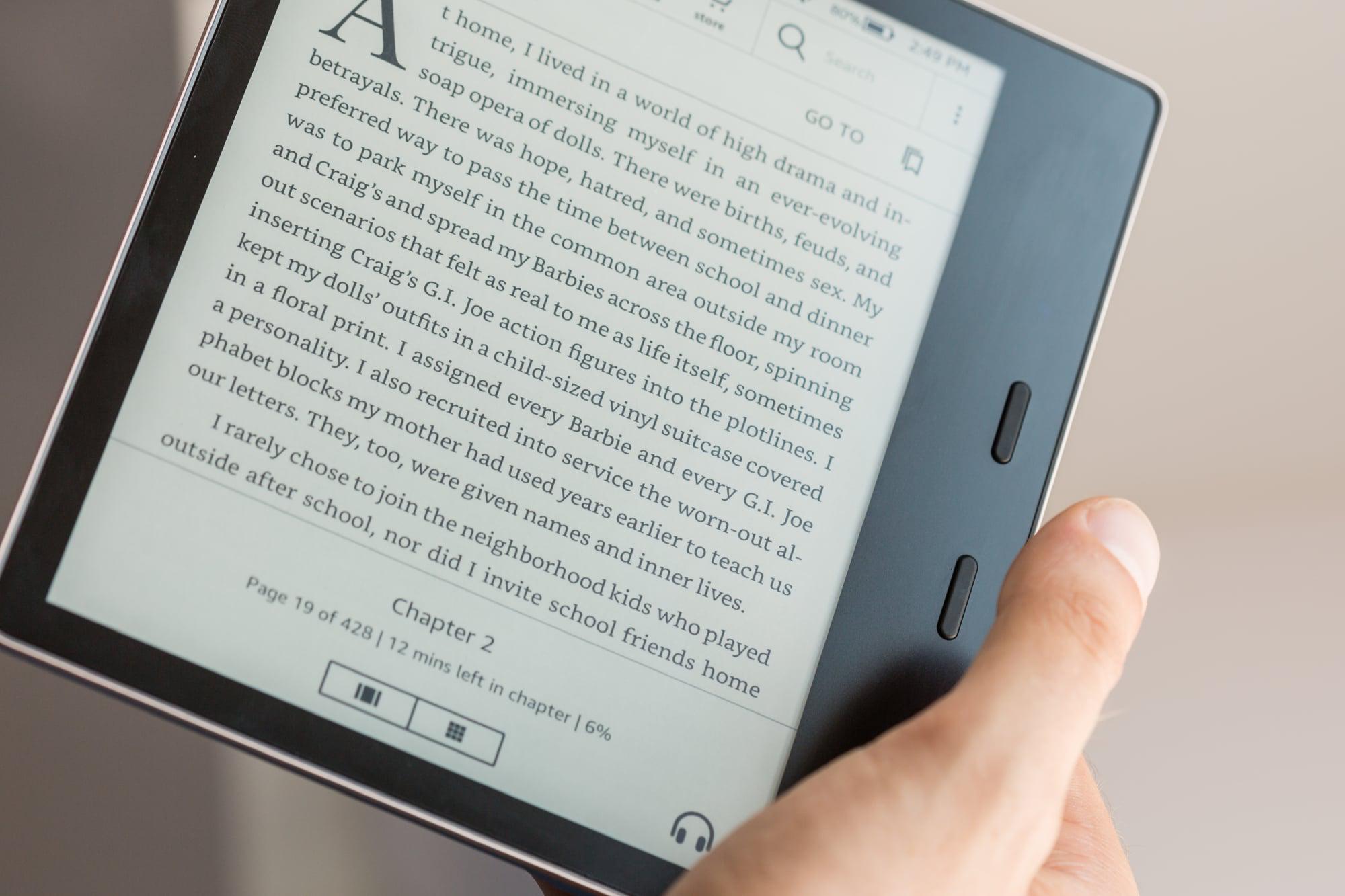
Looking for a Kindle Oasis replacement from another brand — physical buttons and one-handed reading feel
I’m looking to replace my Kindle Oasis with an e-reader from another brand. I’d especially like to hear from people who owned an Oasis and then switched to a device with physical page-turn buttons.
My priorities are:
- Physical page-turn buttons and an Oasis-style asymmetric, one-handed design
- A comfortable, paper-like reading experience
- Great battery life
- Buttons that feel responsive and well placed
- No need for color if it reduces the quality or paper-like feel of black-and-white text
- Open to handwriting or note-taking features, but they are not essential
I have a large library of books purchased through Amazon, and I’d like to be able to access and sync them on the new device if possible. I’d appreciate knowing whether that works well in practice, including reading progress, highlights, and notes.
If you switched from an Oasis to another e-reader with buttons, which did you choose, what do you like and dislike about it, and would you recommend it? Did the buttons and one-handed feel compare well to the Oasis?
Thanks in advance.
r/eink • u/kermit780 • 1d ago
I recently got bit by the E Ink bug and went down the rabbit hole. It started when I picked up a reMarkable 2 on Marketplace for what I thought was a crazy good deal. It was $150, and I remembered them being around $500. Turns out it was just a fair price. Still, I was in love with E Ink. It's crisp, clear, and easy on the eyes. The reMarkable was just lacking in features for me. It's good for notes, but I wanted some scheduling ability at a minimum.
Off to YouTube and eBay I went. I picked up a Ruertu color E Ink tablet. For $200, with a color screen, 128GB, and an SD card slot, I thought it was a steal. It was decent for the price, but the writing feel was nonexistent. The screen was slick, nothing like the reMarkable, which had a great feel. The built-in notes and calendar apps were also pretty bad. The color screen was nice, but I hadn't done enough research and didn't realize how dark these screens are. The reMarkable looked bright and clear in a well-lit room. The Kaleido 3 screen was dark even in decent light and needed the backlight on, which I didn't find appealing. I did like the fingerprint reader, though.
So then I got a Kindle Scribe. Nope, not it. After that I got a TCL NXTPAPER. Its screen isn't E Ink, but it's really nice. The matte finish was easy on the eyes and the ink mode was great for reading, but the pen experience was bad. It writes horribly.
Then I bought an iFlytek AINOTE 2. The hardware is so nice. It's really thin and light and feels super premium. The software isn't bad either. My main gripe was that I'm left-handed and the palm rejection wasn't very good, which got frustrating. The AI features are okay, but they need a data connection, so hotspotting from my phone whenever I wasn't home was a hassle. Overall, it was my favorite, and I would have kept it.
The problem was that I still had my iPad the whole time, and it was still my go-to device for everything else. I had an Apple Pencil but didn't use it much because writing on glass felt horrible to me. So I tried a paper-like screen protector, and it was really good.
So that's where I am now: back on the iPad Pro 11 with an app I built to make it feel more like the E Ink tablets I loved, without having to carry two devices. It's not perfect, but it's a good compromise for me. Until E Ink tablets drop in price, I can't really justify a second device, so I'll just rock the iPad. If you use an iPad for notes, my app is Marginalia Notes & Planner for iPad and iPhone and I included an E ink mode in the settings. It’s not the same, but it makes me feel good using it.
r/eink • u/hugo_makes • 2d ago
I’ve been working on the refresh speed of my DIY eink screen, and it’s now fast enough to play the black-and-white animation in this clip. That was fun to get working. Now I’m trying to figure out what to do with it.
For anyone who missed my earlier posts, I’ve been building a little world across a few eink screens on my desk. Each screen has its own scene. Maybe the faster refresh could let a cat run from one screen into another. Or maybe it could let the dog react right when I press the orange button.
I’m still figuring out what would actually be fun to have on my desk. If you had one of these, what would you want it to do with the faster refresh?
r/eink • u/TEMPLACITY • 1d ago
Made a few more of these since the screen one, this one's the pen since it has no battery and still writes. It's EMR, electromagnetic resonance. A grid of wire coils under the screen pulses a magnetic field, a tiny coil in the pen soaks up a little of that energy and sends it back when the field cuts out, and the grid works out where the signal came from. Pressing harder changes the signal, that's the pressure. Same trick in the Kindle Scribe pen, the reMarkable 2 Marker, Supernote and most Boox pens. Not every e-ink pen works this way though, the Paper Pro Marker and Kobo's Stylus 2 are active pens with a battery you charge.
r/eink • u/Dapper_Elk3602 • 2d ago

A while back I made a small wallpaper converter for the Xteink X4 (wallpaper.jakegreen.dev), and I received so much support from everyone in the ereader community. I’ve kept working on it and made some small updates over the year, but in the last few weeks I’ve ended up creating a brand new tool.
You drop in an image like always, and it gets resized and converted for your device’s screen. It now knows about 70-ish devices: Kindle, Kobo, Boox, reMarkable, PocketBook, Xteink (of course), Seeed Studio and a bunch of the smaller ones.
What I’ve added/upgraded:
While I was at it, I’ve also been working on a device comparison tool and a PDF to EPUB converter on the same site, which I’ve found useful.
The old version is still around if you like it better. If anything’s broken or your device is missing, let me know and I’ll sort it out as soon as I can.
r/eink • u/standard_sai • 2d ago

I built my own e-reader/dashboard/game gadget.
I used an esp-32 customized crosspoint to support this 7.8" 300ppi display and added new dashboard and games features.
- Uses QR code to open a web interface that can be used to uplaod/convert book formats to supportable formats, design dashboard layouts, manage sd card, and many more things.
- Can read manga (<1sec to switch between pages)
- Dashboard currently has 4 widgets - plan to add more later.
- Has 4 games inbuilt will make more soon. (Players join using hotspot and they are all synced and managed by esp32 using a game web interface)
- Not a touch screen just using 4 navigation buttons
Wanted to make the software open source that might help others who are interested to build similar devices. Any suggestions are welcome 😌
Just wanted to share it here - is been a journey and I love e-ink displays, they are so cool.
r/eink • u/ReadWithPro • 1d ago
We recently visited SuperC-Touch, a small Taiwanese company with around 10 employees working on a different approach to color e-paper.
Instead of viewing the display from the ink film side, their design lets you view it through the transparent backplane glass.
We got to see their 4.8-inch prototype and compare it with two Kaleido 3 e-readers.
The colors looked noticeably more saturated in person, which was pretty interesting.
But there are still some big limitations: only 90 PPI in color, no front light or touch layer yet, and we didn't get to see it refresh.
The company also claims a 98% aperture ratio and 96 gray levels, though we haven't independently verified those numbers.
This was actually our first on-site interview for Read with Pro, a small independent e-paper website based in Taiwan.
We took some photos and tried to explain the technology in plain English.
Full interview:
https://www.readwithpro.com/blog/superc-touch-color-epaper-backplane-viewing-interview-en

r/eink • u/nothing01022 • 1d ago

I was using my Bigme hbp without any screen protectors and it was so clear then i put a matte screen protecting sticker to be safe from scratches but now the screen looks quite dark. Whats the best option for screen clarity? I to have anything on it to protect it from scratches.
r/eink • u/jonas42215 • 2d ago

Following up on my last two posts (the 1 Hz BWRY updates and the 2-second Spectra 6 partials). This is what I teased earlier: pushing a 7.3" Spectra 6 panel way past its stock 6-color palette.
Every square in this 6x8 grid is a solid, undithered color, with no spatial dithering or halftone trickery going on. There are a few stock colors mixed in and some of the shades are pretty close to each other, so it's not 48 completely distinct colors yet, but it already opens up oranges, pinks, muted greens, greys, browns, and a bunch of different blues and purples.
This is done using a custom multi-pass update. Instead of just snapping the pigments to the standard 6 primaries, I'm running a second pass with custom waveforms to nudge them into intermediate states. There is definitely room to squeeze more shades out of this as I dial it in, and adding a third pass could push the palette even further.
Of course, there are some real trade-offs. Because it's multi-pass, the full refresh takes longer than a standard update. Intermediate pigment states are also more sensitive to temperature and panel-to-panel variation, so getting consistent, repeatable colors is trickier than just using the stock 6.
It's still early and I'm working on characterizing the colors and cleaning up the process. Just like with the fast update stuff, I plan to release everything publicly once it's ready so people can experiment with it on their own panels.
r/eink • u/fullgrid • 1d ago

r/eink • u/Resident-Ad8185 • 1d ago
Anyone have any thoughts on how these two compare?
r/eink • u/jonas42215 • 2d ago
Following up on my earlier post with the fast-updating BWRY screen. I've been digging into Spectra 6 waveforms next, and here is an early look at what I've got working.
Normally, Spectra 6 panels take around 15 to 20 seconds for a full, flashy refresh. With a custom waveform, I got this 7.3" display updating a counter every 2 seconds in yellow and blue, while the full-color swatches stay completely untouched on the screen. No full-screen flash and no disturbing the rest of the image. I've also tested this on other Spectra 6 sizes and it works there too.
If you're wondering why it's yellow and blue instead of black and white, it comes down to how the pigments behave in these panels. Yellow and blue are much easier and cleaner to toggle back and forth directly with a short pulse, whereas getting clean black and white usually takes a much longer clearing sequence to separate all the pigments properly.
I'm still working through the rest of the waveforms, and I've also managed to squeeze extra colors beyond the stock 6 out of these panels. I'll save the full breakdown of that for a future post. Just like with the BWRY stuff, I'm planning to release everything publicly once it's all cleaned up.
r/eink • u/stefansvartling • 1d ago

So here is my review of the Reetle SmartInk I (1). It’s an AI Audio Recorder that also is a small micro e-Reader with e-ink display that you can read your ebooks on. Quite cool. You can also add your todo’s to it and see them on the home screen. You can also sync them to Apple Reminders if you want. You can choose to have your recordings locally or uploaded to Reetle Cloud and transcribed and summarized. It’s your choice. Pretty nifty.
r/eink • u/trycatchthis • 1d ago
Newsletters were the one thing I still read on my phone instead of my eReader, so I built Newsstand.
You forward newsletters to a private address, and you can read them three ways on eInk:
- In the browser, with an eInk theme: black on white, no images (stripped on the server), no animation, tap the edges to turn pages. Every page works without JavaScript, so older eInk browsers are fine.
- As a daily EPUB: one book of everything unread, contents page and a chapter per issue.
- In KOReader: a private Atom feed for News Downloader.
The EPUB download and the KOReader feed are free. (There's also Send to Kindle every morning, which is paid after a trial.)
I'd like to hear how it behaves on your device, especially Boox and PocketBook browsers.
r/eink • u/Official_SeeTheAir • 1d ago
Does anyone know anything about the specs of this device and whether we can change the firmware with TRMNL, Tesserae, or something else?
They only share the display specs but not the microcontroller details.
Thanks