r/eink • u/ResolutionOriginal80 • 2h ago
my e-ink business card

42
Upvotes
r/eink • u/VegetableSir7788 • 9h ago

my old kobo touch was just sitting in a drawer so i gave it a new brain. it only has 256 MB of ram and stock firmware is painfully slow on it, so i wrote KoboDash, a native C app that draws straight to the screen. way faster than stock!
it reads epub, mobi and txt offline, long press a word and you get the english/german dictionary (you can add more dictionaries too). it can also be a desk dashboard with weather and calendar from your own server.
hold home for 2 seconds and you're back in stock kobo, no bootloader or kernel stuff touched. only for the touch A (N905).
these are my actual photos. its free and open source: https://github.com/darkbringer1/kobo-ereader
r/eink • u/cedarrenjun • 4h ago
We’re developing a new 4.7" e-paper device powered by ESP32-S31.
Specs:
• ESP32 S31, 16MB PSRAM + 16MB NOR Flash
• 4.7-inch display, 297 PPI, front light
• 2-point touch, 4 physical buttons (similar to Yuexingtong)
• Linear actuator for haptic feedback
• 6-axis IMU for auto rotation, built-in temperature & humidity sensor, IR transceiver
• Dual microphones + speaker
• 16GB TF card included, TF card slot for upgrade
• Wi-Fi / Bluetooth file transfer, AirDrop compatible
• Supports ai-native & Workbuddy
• Unused IOs broken out, expandable for custom peripherals
• Open 3D files, compatible with CNC, 3D printing, bare PCB
• White front panel
• Build: front AG glass, aluminum midframe, rear AG glass
• 2000mAh battery
We will have engineering prototypes ready next month.
We are looking for 10 beta testers.
DM me if you’re interested!
r/eink • u/SpeakNowAndEnter • 14h ago
Hello!
I am a civil engineer which involves lots of project meetings and note-taking to keep track of deliverables and questions and things of that nature, and I’ve often found myself with piles of paper notes I’ve taken that I’m stuck sorting through or having to re-type after the fact or whatnot. At one meeting recently I saw another engineer pull out a folio with an electronic notebook, which I’d never even thought of as a concept, and am now really looking into getting one.
I’m pretty sure his was a ReMarkable model, so that’s what I looked into first. Everything about it seems great, except the subscription model for storage and handwriting search feels like a pain. I hate subscriptions and I know that $4 per month will continue to go up over the years. But it having the best writing feel on the market (from what I’ve read) makes it tempting nonetheless.
The BOOX Air6 C is also one I was looking at. I’m a Master’s student as well as a full-time engineer, so being able to download Canvas from the play store to access my lecture PDFs and maybe even mark up engineering plans on it would be a positive, but also the distraction-free aspect of ReMarkable is tempting so that I could just focus on work. For those of you who have the BOOX, have you found it easy to just dedicate it to note taking / PDFs? Or is that kind of wasting its potential?
Also, where could I go to test out some of these units in-hand? I’ve never used an e-ink notebook before, so in terms of writing feel I’d like to actually know what it feels like before dropping ~$500 on one.
Any advice is appreciated!
r/eink • u/at_underscore_ • 14h ago
I’m considering getting a Boox tablet next year to read academic papers through Zotero. I know the integration exists but I’d love to hear actual testimonials!
r/eink • u/UsandoFXOS • 48m ago

Perhaps some of you (the most veterans), remember me from 2021 when i created the website adapted for eink screens (like my kindle 2019 my wife gift to me) e-ink.club were i created a collection of about 10 typical brain-games (sudoku, mineswepper, othello, tents & trees, etc.).
Always it has been a non-profit project. So a side-project for me (web developer). And incredibly, after 3 years (from 2021 to 2024) the number of visitants/players continued growing, in fact doubling. So in 2024 i added 3 more games (i announced it here) and since there number of matches/players increased 4x. So this 2026 added Tents & Trees, which i love.
Those games are made just from scratch, using javascript compatible with old devices/web browsers, and requiring the minimal CPU and RAM. Oh, even using a color palette friendly with gray scale screens and with low resolution. Obviously, you also can play to it in a PC or in a cell.
I finally added this week a new one "play": Twistory, a machine to play interactive stories based on very well-known novels, films and legends, using AI. The AI narrates the story you choose by episodes. You decide what happens in each one:
And it is a game: the AI tries to reach the work's original ending while still respecting your decisions. Will it get there… or will you steer it away?
You can use it
Disclaimers
Please... any comment you give me will be always very useful.
Cheers!
Hey r/eink,
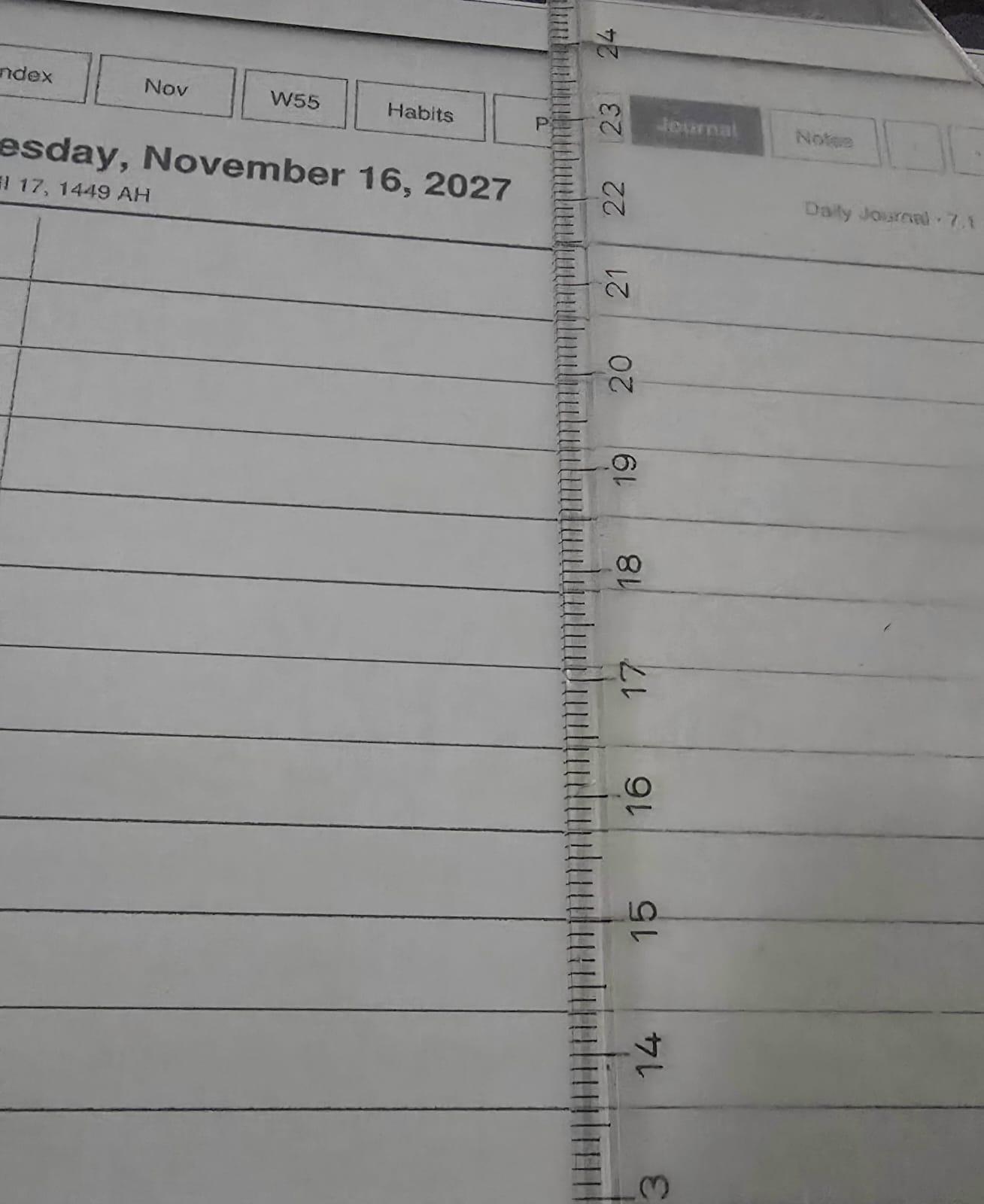
One frustration I always had with digital PDF planners is scaling distortion: most are built on A4/A5, so when opened in "Fit to Screen" on a 6.13", 7.8", 8.2", or 10.3" E-Ink screen, your 8mm ruled lines shrink and feel cramped.
I built a free, 100% client-side web studio that compiles hyperlinked vector PDFs directly at the exact active millimeter dimensions of your display (1 mm = 2.8346 pt), so an 8mm line or 5mm dot grid measures true 1:1 under your stylus.
Try it here: https://e-ink-planner-studio.vercel.app (No account, no backend, everything runs locally in your browser)
18 Calibrated Presets (+ Custom Device Builder):
- Pocket / Narrow (< 95 mm layout): BOOX Palma 2 Pro, Palma 3, reMarkable Paper Pro Move (dedicated stacked weekly cards, 2-column index, single-column habits).
- E-Ink Tablets: Viwoods (Mini & 10.65"), Supernote (Nomad & Manta), reMarkable (2 & Paper Pro), Kindle Scribe, BOOX (Go 10.3 / Note Air4 C / Tab Mini C).
- Standard Tablets: iPad (Mini, 11", 13") & Samsung Galaxy Tab (11", 12.4", 14.6").
- Supports Portrait & Landscape with responsive multi-column spreads for 10"+ screens.
Highlights:
- True 1:1 Physical Ruling: 5mm–8.7mm presets + 4–12mm custom slider, Ruled/Dot/Square/Cornell/Meeting templates, and E-Ink contrast options.
- Floating Toolbar Safe Zone: Configurable Left/Right/Top inset so pen bars never cover navigation tabs.
- Modular & Flexible: Full Planner, Daily Journal, Minimal Calendar, Meeting Hub, or Custom toggles; Sectioned or Chronological page order; custom Cover Page (with image upload).
- Dates, Holidays & Languages: 1–24 month spans (including 14-month early start), custom workweek/rest days, 140+ country holidays, .ics calendar import, optional Hijri date, and 8 languages (EN, AR RTL, FR, DE, ES, IT, TR, JA).
Full transparency: I ruler-tested the output physically on my Viwoods AiPaper Mini, while the other presets are mathematically calibrated from their exact display specs. I'd love feedback from Supernote, BOOX, reMarkable, and Scribe users on how the margins and links feel on real hardware!