r/homelab • • 16h ago

Discussion paying $340/mo to not use two A5000s in our rack. is self hosting a trap at this scale?

0 Upvotes

Last month’s API bill was $340. Meanwhile we‘ve got two A5000s in the rack that haven’t done real work since a side project wrapped in spring. So I‘m trying to figure out whether serving in house on those cards actually beats per token pricing, once I add up power, cooling, and my own weekend hours.

gpustack keeps coming up whenever I look at scheduling both cards under one roof. It’s the open-source option I keep landing on, but I genuinely don‘t know how the math shakes out for light internal stuff like doc search, summaries, that kind of thing.

Part of me thinks the migration effort alone probably kills it at this scale. The other part thinks paying $340/mo to not use hardware we already own is dumb.

Anyone actually run this comparison for a small internal workload? Did the numbers ever clear the bar, or is this one of those not worth it until you’re at 10x the volume , things?


r/homelab • • 13h ago

Discussion Can one SMTP relay handle three domains in my homelab?

0 Upvotes

I send from three domains: mine, a family wiki and my brother's small business invoicing. Right now it's all through a Gmail app password, which breaks Google's terms. I want one cheap relay with a separate DKIM per domain. What are you guys using?


r/homelab • • 10h ago

Discussion My homelab survived an electrical fire that knocked out my whole street

34 Upvotes

Fire next door. Killed power for 6 hours. UPS died at hour 3, box rebooted itself, WireGuard was back before I got home. Ditched Plesk for BeAdmin last month, hadn't even set up backups yet.


r/homelab • • 4h ago

Creator Content Made a browser game for people who enjoy racking servers more than they should

0 Upvotes

ColoTycoon is a free browser game where you build servers from individual parts, rack them in colos around the world and sell hosting. Swapping RAM or moving a server to another rack takes real time, just like the real thing.

Curious what this sub thinks feels realistic or missing.

https://colotycoon.com


r/homelab • • 1h ago

Help New to homelabs, what do you guys actually use them for?

0 Upvotes

I'm pretty new to all this and keep seeing people building homelabs. I have no clue what I'd actually use one for but I'm interested in getting into it. What do you guys use yours for? Like what can you actually do with it that makes it worth having one? Also curious what you guys started with.


r/homelab • • 12h ago

Help Hardware recommendations for an 8-12 player modded Minecraft server

0 Upvotes

Hello everyone,

I recently posted here about my homelab Hanami, which I'm now hoping to expand by adding a dedicated mini PC for hosting a modded Minecraft server, which will be named Momiji fitting with the theme of Japanese seasonal festivals.

Some friends and I are starting a Liminal Industries - Rescripted playthrough (1.20.1 Forge) on December 18th and while I initially intended to host, I lack the hardware to do so as my current server is an EliteDesk 800 G3 Mini with an i5-7500T and 16GB of DDR4-2400, running Debian 13. Not nearly enough power to host a server this size, let alone alongside all my existing services and containers.

For this next server, I'm hoping to run headless CachyOS instance on it and then use something like Crafty Controller to manage the Minecraft servers themselves. I plan on only actively running one server at a time on this new hardware, and not for any more than 10-2 players maximum.

I'm pretty broke right now, so my friend is going to co-host instead, but I still intend to put together this hardware once I have some income again, and maybe moving this active server over to my hardware once that time comes.

I'm looking for advice on what specs I'll need, how to get the most out of my hardware, and where I can find this kind of hardware for an affordable price in British Columbia, Canada. Ideally in or around Victoria or Vancouver, and refurbished/second hand.

Any help will be greatly appreciated! <3


r/homelab • • 17h ago

Help Advice on RAM for 2-PC Home Lab

1 Upvotes

So I have Proxmox setup on a Dell OptiPlex 3060 SFF with an i5-8500, 1TB SSD, and 32GB of DDR4 RAM, currently only running HAOS and NUT, but would like to eventually run Technitum, Traefik, Komodo/Arcane, Authentik, Joplin Server, Netbird client, Bookstack, Actual Finance, Syncthing, and Immich.

I have another PC that is only missing RAM (i5-12500, 1TB NVMe, several HDDs) that I would like to set up as a Jellyfin server and shared file storage over LAN. Haven't decided whether to set it up with Proxmox or TrueNAS. The files will only be shared locally with Linux and iOS devices.

Could/should I run the *arr+Gluetun stack and Immich on my OptiPlex?

What's the least DDR4 RAM I should get for my second PC?


r/homelab • • 11h ago

Help New to homelabbing, where do you get your hardware cheap?

8 Upvotes

I'm new to homelabbing and want to get started, but I've been wondering where you actually get your components without spending a fortune. Do you mostly buy used stuff from eBay, refurbished business hardware or something else? I'm based in Germany, so any tips for sites or sources here would be really helpful.


r/homelab • • 5h ago

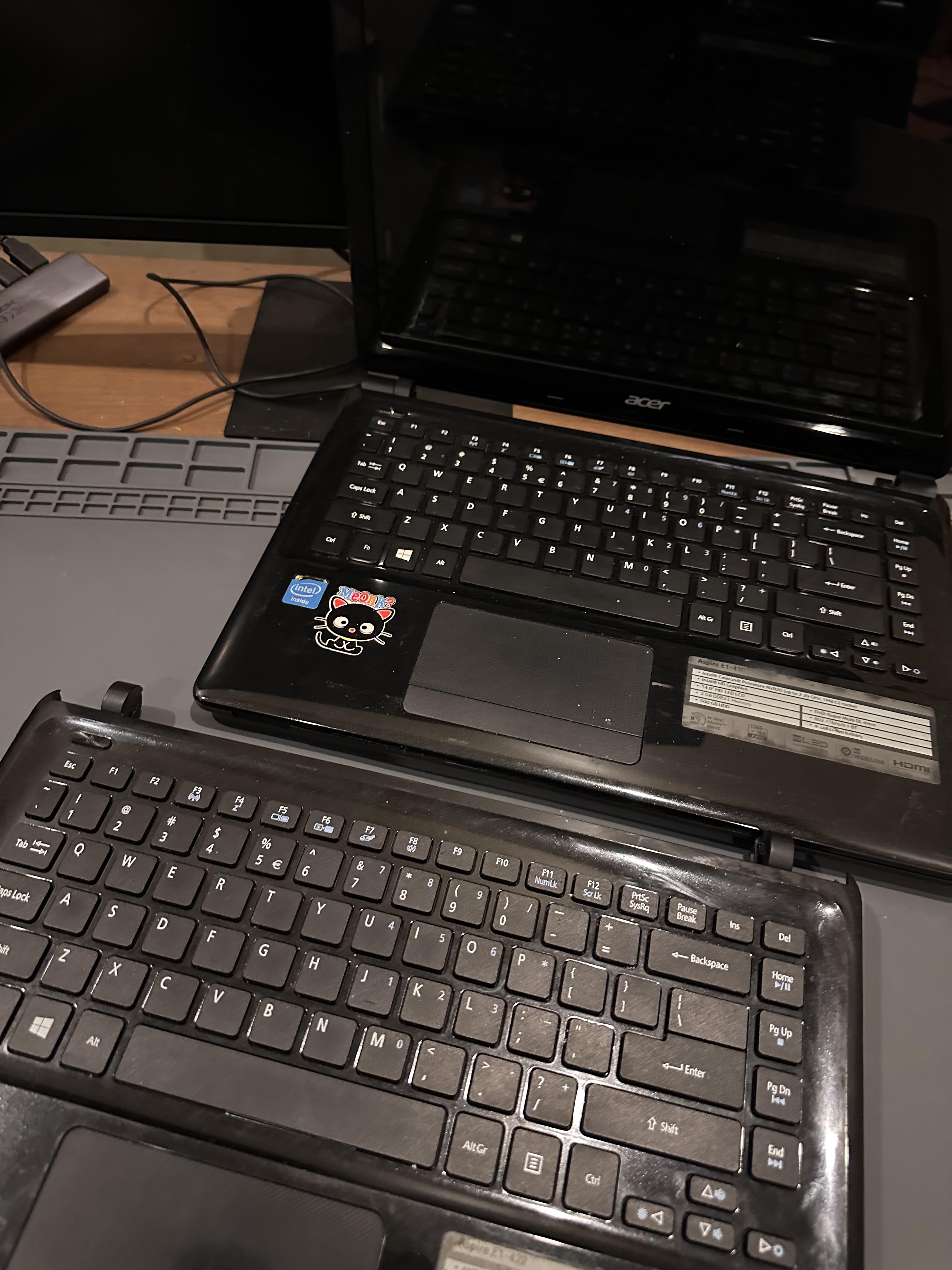
Help what can i do with these two old laptops, or what should i turn them into?

Post image
0 Upvotes

Acer Aspire E1-422 (2013) - working fine
CPU: AMD Dual Core E1 2500 1.4 GHz (x64)
GPU: AMD Radeon HD 8240
Display: 14 inch 1366 x 768
RAM: 2 GB DDR3L (1.45 GB usable)
Storage: 500 GB HDD
Optical drive: DVD Super Multi DL
Connectivity: Wi Fi 802.11 b g n, Bluetooth, HDMI
Webcam: HD webcam
Battery: 4 cell Li ion
OS: Windows 8.1 Pro 32 bit

Acer Aspire E1-410 (2014) - rusted internal HDD port, needs hot air gun replacement
CPU: Intel Celeron N2820 up to 2.39 GHz 1MB L2 cache
GPU: Intel HD Graphics
Display: 14 inch 1366 x 768
RAM: 2 GB DDR3L
Storage: 500 GB HDD
Optical drive: DVD Super Multi DL
Connectivity: Wi Fi 802.11 b g n, Bluetooth, HDMI
Webcam: HD webcam
Battery: 4 cell Li ion


r/homelab • • 23h ago

Help 3d printed homelab rack

0 Upvotes

I plan on upgrading my homelab (its currently just an old laptop) to use a few raspberry pi 4b's, and wanted to see if anyone had links to stl files i could use to print a rack? ideas for making one DIY would also be welcome


r/homelab • • 12h ago

Discussion Is it worth spending more money on 3200MHz DDR4 ram or 2133/2666MHz is ok for a server?

Thumbnail reddit.com
0 Upvotes

r/homelab • • 4h ago

Help Chinese Networking Equipment

0 Upvotes

I recently bought a M.2 to ethernet adapter and a USB to ethernet adapter for my new router I'm building to begin my home lab setup. I bought these off AliExpress (links below). Given the current worries of Chinese products basically being spyware, are these devices more likely to be okay since they are only adapters? And would I be able to check if anything strange was occurring using a program like wireshark? I'm just interested in people's thoughts on these items and Chinese networking equipment in general.

M.2 to ethernet adapter:

https://www.aliexpress.com/item/1005010130895304.html?spm=a2g0o.order_list.order_list_main.5.440318028HZZBc

USB to ethernet adapter:

https://www.aliexpress.com/item/1005008633221117.html?spm=a2g0o.order_list.order_list_main.11.440318028HZZBc


r/homelab • • 2h ago

Help Any suggestions for a Enterprise NGFW that offers a homelab key?

8 Upvotes

I've heard in the past that some firewall providers will give you a limited key for perpetual homelab use with the purchase of a firewall. Does anyone know of a brand that still offers that?


r/homelab • • 52m ago

Help Building a homeland gaming server.

0 Upvotes

I’m building a homeland gaming server. I have the server security planned out. But I need help with isolating the server from my home network. My spectrum router doesn’t support vlan security so I need help with a stop gap in between. And if possible if someone experienced could audit my server security stack. I would be greatly appreciative.

HOME GAME SERVER - SECURITY STACK

HARDWARE
Beelink SER5 Pro
AMD Ryzen 7 5700U
16GB RAM
512GB NVMe - Operating system and game servers
230GB SATA SSD - Backup storage
Spectrum SAX1V1K router

OPERATING SYSTEM SECURITY
Debian 13
AppArmor
Seccomp
auditd
unattended-upgrades
Minimal Debian installation

NETWORK SECURITY

Spectrum router firewall
nftables
Tailscale
IPv4 and IPv6 firewall rules
Default-deny inbound traffic
UPnP disabled
Only required game ports forwarded
No public administration ports

REMOTE ADMINISTRATION SECURITY

Tailscale VPN
SSH key authentication
Root SSH login disabled
AMP administration restricted to Tailscale
Cockpit restricted to Tailscale, if installed
No public SSH, AMP, or Cockpit access

GAME SERVER ISOLATION

AMP by CubeCoders
Podman
Rootless containers
Separate container per game
No privileged containers
No host networking
Restricted filesystem access
No backup storage access
Restricted container capabilities

INTRUSION DETECTION

Falco
Linux kernel event monitoring
Container escape detection rules
Privilege escalation detection
Suspicious process monitoring
Host filesystem monitoring
auditd security event logging

SECURITY NOTIFICATIONS

ntfy
iOS push notifications
Windows PC notifications
Critical security alerts
Falco service failure monitoring
External log forwarding to gaming PC when online

BACKUP AND RECOVERY

Restic
Encrypted backups
230GB dedicated SATA SSD
Scheduled game-world backups
Configuration backups
Pre-update snapshots
Weekly Windows PC backup copy
Backup integrity checks
Manual recovery and restoration

SYSTEM MONITORING

systemd journal
SMART monitoring using smartmontools
Disk-space monitoring
Service health monitoring
Backup failure alerts
Security log monitoring

PUBLIC GAME ACCESS

Minecraft Paper
Geyser for Bedrock compatibility
TCP port 25565 for Java
UDP port 19132 for Bedrock
Additional game ports only when required
No public management interfaces

EMERGENCY RESPONSE

Phone security alerts
Physical Ethernet disconnection
Preserve logs for investigation
Reinstall Debian if host compromise is confirmed
Restore verified backups only


r/homelab • • 20h ago

Help Remote NAS needs a power cycle every few months and the site has bad internet and almost no cell. How do I get notified when it's down?

1 Upvotes

I've been trying to sort out out-of-band management for a NAS I keep at a remote property. The NAS itself is fine, but every few months something goes weird and it needs a power cycle. It's usually at a point where I can't reach it over the network either, and I can't drive out there every time.

What I've tried so far:

- A cheap IP KVM. Works, but it sits on the same flaky network.

- A 4G router as backup WAN. Better, but cellular coverage at the site is poor.

- Tailscale on a separate Pi next to the NAS. This works when the NAS hangs and the link is still up, but it's no help when the internet is out or the Pi locks up too.

So everything I have still depends on the site's internet or on cellular, and neither is reliable there. Starlink feels like overkill in cost and power for something that only needs to send a few bytes when things break.

I'm leaning towards a hardware watchdog plus an ESP32 relay to handle the power cycle locally. Has anyone built something like this? And the part I really can't figure out: how do you handle the "notify me" side when there's no reliable connectivity at all?


r/homelab • • 4h ago

Discussion What's the weirdest/most hyper-specific thing you've set up in your homelab?

12 Upvotes

Mine is probably using a USB Bluetooth dongle on my basement Ubuntu server (theengs gateway-mosquitto) to eavesdrop on a cheap Govee BLE temp sensor in my daughter's room upstairs, compare it in real time against my Nest Thermostat over Matter, and log outdoor weather so I can eventually auto-nudge the furnace before bedtime when her room dips below 68°F. (#dadmode)

Runner-up is tracking my basement sump pump's power spikes on an Anker SOLIX battery so it calculates how long I have before the pit overflows during a power outage and tells me how long I have before I need to get our '26 Toyota Sienna plugged in for backup generator

What's the weirdest hyper-specific automation or monitor you've built with weird somewhat unrelated hardware solving a real problem in your home???

P.S.
My next thought is trying to fully offline either a "local personal news briefing" from a USB sdr police scanner piped into something like local whisper running on my stack, or maybe setting up a tv tuner, attic HDTV antenna and routing it into Plex so I've got cable and local news on tap + primetime tv recorded.

Also thinking about a similar ble sniffing thing with plant watering sensors for my wife's plant obsession.

Honestly the funnest thing about homelabbing for me is the "hmmmmm.....what's next" part :)

AI disclaimer - definitely could have done some of this on my own...but definitely not at this velocity without massive AI help lol


r/homelab • • 20h ago

Discussion Forgive my ignorance but what am I looking at?

Thumbnail
imgur.com
0 Upvotes

r/homelab • • 21h ago

Help First homelab: A lot of questions

0 Upvotes

Hello everyone. I've got an old Acer Nitro laptop sitting around (i7-4710HQ, 16GB RAM, GTX 860M with 2GB VRAM, 250GB SATA SSD + 1TB HDD) and figured it out i could transform it in a little homelab.

The problem is i am a complete begginer, so i came here to ask you guys some questions and some tips or info that i should know.

My questions:

  1. Which OS would you recommend for a beginner on this hardware, and why?
  2. What is worth self-hosting? What do you actually use every day?
  3. What should I keep in mind about running a laptop 24/7 (battery, heat, closing the lid, power usage)?
  4. What's the best way to access everything remotely while staying secure? Tailscale? Cloudflare Tunnel? My ISP uses CGNAT, if that matters.
  5. Any beginner mistakes I should avoid, especially around backups and security?
  6. Is there any cheap upgrade worth doing (RAM, SSD)?

Basically any tips, beginner mistakes to avoid (especially with backups and security), or "I wish someone told me this earlier" stuff would be awesome. Thanks!


r/homelab • • 18h ago

Discussion Senior security engineer building a home lab. Looking for opinions on this hardware list.

0 Upvotes

I've been in cybersecurity for about a decade, and I love working with network security tools. I'm trying to incorporate Cisco switches for CCNA practice (I have a lot of hands-on network troubleshooting experience, but I lack the actual Cisco switch and routing hands on configuration aspect). I'm looking to add firewall/IPS/WAF, switches, ztna and or vpn, load balancing, some Linux and windows servers, windows workstations, an AD environment, siem for logging, EDR, vuln scanning, and eventually add some aws/azure practice down the road. I threw in this into Claude and chagpt to build me a home lab set up but I'm actually looking for some recommendations on what to buy as both kind of gave me conflicting information (of course lol). I'm also looking to run a bunch of VMs, NAS, etc. my budget is 2500-5000 which I feel like is a good amount, this should keep me busy for A WHILE while I have down time.

My recommended build
Target budget: about $3,500-$4,200.
Core hardware
Component
What I'd buy
Target price
Why
Main virtualization server
MINISFORUM MS-01, i9-13900H barebone
~$655-680
14C/20T, 2×10Gb SFP+, 2×2.5GbE, PCIe slot and multiple NVMe slots. Excellent homelab platform.[store.minisforum.com],[store.minisforum.com]
RAM
96GB DDR5, 2×48GB
~$250-300
RAM becomes the limiting factor once you start running firewalls + Windows + Splunk + network VMs
Storage
2×2TB NVMe
~$250-320
One VM datastore + second datastore/snapshots/ISOs
Cisco switch #1
Catalyst WS-C3560CX-12PC-S
~$120-200 used
Physical IOS, L2/L3, VLANs, trunks, STP, PoE, routing
Cisco switch #2
Catalyst WS-C3560CX-8PC-S
~$100-150 used
Lets you actually build trunks, STP topologies, EtherChannels, routing
Firewall appliance
Protectli 6-port appliance, 16-32GB RAM
~$500-750
Dedicated OPNsense/pfSense firewall, routing and segmentation
Wireless
Wi-Fi 6/6E AP with VLAN support
~$150-250
Enterprise-ish WLAN/VLAN labs
UPS
APC/CyberPower 1000-1500VA
~$150-250
Protects the lab
Rack
9U/12U short-depth open-frame rack
~$100-180
Physical organization
Patch panel/cabling
Cat6 patch panel + ~15 patch cables
~$100
Physical networking practice
Console
USB-to-RJ45 Cisco console cable
~$25
IOS configuration
SFP+
2× DAC cables
~$40-60
10Gb lab backbone
Expected total: roughly $2,700-$3,300 before software/licensing, leaving substantial room for expansion.
The MS-01 is particularly good for this project. The current i9-13900H barebone is approximately $655-$680 direct, and provides two 10Gb SFP+, two 2.5Gb Ethernet ports, PCIe expansion and three M.2-class storage positions. [store.minisforum.com],[store.minisforum.com]
MINISFORUM MS-01 Workstation
I prefer that over a conventional NUC here because networking is central to your goal.

Architecture I'd build
Plain Text
INTERNET
|
ISP modem / ONT
|
2.5G WAN interface
|
+---------------------------+
| OPNsense / pfSense |
| Dedicated Firewall |
+-------------+-------------+
|
2.5G TRUNK
|
+----------------+----------------+
| Cisco Catalyst 3560CX - CORE |
| |
| VLAN / STP / ACL / OSPF / SVIs |
+----+------------+------------+--+
| | |
trunk trunk access
| | |
+------v------+ +---v-------+ AP
| Cisco SW2 | | MS-01 |
| 3560CX | | Proxmox |
+-------------+ +-----+-----+
|
10G SFP+
|
VIRTUAL LAB NETWORK
|
+--------------------+--------------------+
| | | | |
Cisco Palo Linux Windows Kali
CML Alto Servers AD
|
+------+-------+--------+
| | | |
R1 R2 R3 SW1
| | | |
OSPF BGP IPSec VLANs
That is much closer to what you encounter professionally than three old routers sitting on a desk.

Network design
I'd deliberately design this as an enterprise mini-network.
VLANs
VLAN
Network
Purpose
10
10.10.10.0/24
Management
20
10.10.20.0/24
Servers
30
10.10.30.0/24
User endpoints
40
10.10.40.0/24
Security tooling
50
10.10.50.0/24
Vulnerability scanning
60
10.10.60.0/24
DMZ
70
10.10.70.0/24
OT/ICS
80
10.10.80.0/24
IoT
90
10.10.90.0/24
Wireless
100
10.10.100.0/24
Network transit
999
none
Native/black-hole
You can consequently practice:
802.1Q
access/trunk ports
STP/RSTP
root bridge manipulation
EtherChannel/LACP
inter-VLAN routing
ACLs
DHCP relay
NAT
OSPF
BGP
HSRP concepts
SPAN
port security
DHCP snooping
DAI
802.1X concepts
That maps extremely well to CCNA while still being useful beyond the exam.

The physical Cisco gear is worth buying
For someone at your level, I would buy physical switches but virtualize most routers.
Two good current used-market purchases are:
Cisco WS-C3560CX-12PC-S
Current used/refurbished listings are roughly $120-$205. [ebay.com], [ebay.com]
Cisco WS-C3560CX-8PC-S
Current examples are around $85-$150. [ebay.com],[ebay.com]
eBay Catalyst 3560CX listings
I'd specifically favor the 3560CX over enormous old rack switches. They're compact and give you real Cisco CLI without turning your office into a datacenter from a heat/noise standpoint.
I would not spend $1,000-$1,700 on a packaged CCNA hardware kit. For reference, current CCNA hardware bundles run from roughly $749 to $1,700.[shop.certi...onkits.com], [shop.certi...onkits.com]
Put that money into compute.

Virtualization host
MS-01
I'd configure:
CPU
Core i9-13900H
14 cores
20 threads
RAM
96GB DDR5
This matters much more than buying some giant Xeon server.
Storage
Plain Text
NVMe #1
2 TB
Proxmox + production lab VMs
 
NVMe #2
2 TB
lab VMs / snapshots / security data
Later:
Plain Text
NVMe #3
4 TB
Splunk / PCAP / ISO / backup storage
The platform supports multiple NVMe drives, dual 10Gb SFP+, dual 2.5GbE and PCIe expansion.[store.minisforum.com], [store.minisforum.com]

Put Proxmox on it
I would make Proxmox VE your primary hypervisor.
Then create bridges:
Plain Text
vmbr0 = management
vmbr10 = network lab
vmbr20 = security
vmbr30 = OT
vmbr40 = DMZ
And trunk those networks into the Cisco infrastructure.
This is where things get interesting because yourphysical Cisco network becomes connected to your virtual enterprise.

VMs I'd create
Infrastructure
Plain Text
DC01
Windows Server
4 vCPU
8 GB RAM
 
DC02
Windows Server
4 vCPU
8 GB
 
LINUX01
Ubuntu Server
2 vCPU
4 GB
 
LINUX02
Rocky Linux
2 vCPU
4 GB
 
CLIENT01
Windows 11
4 vCPU
8 GB
Use that environment for:
AD
DNS
DHCP
PKI
LDAP
RADIUS
NPS
certificate authentication
Linux administration

Security VM stack
This is where your lab differentiates itself from an ordinary network lab.
Kali
Plain Text
4 CPU
8 GB
100 GB
 
Nessus
Plain Text
4 CPU
8 GB
150 GB
Run authenticated scans against Windows/Linux hosts.
This directly reinforces the vulnerability-management side of what you already do.
Splunk
Plain Text
8 CPU
16 GB RAM
500 GB+
 
Send it:
Cisco syslog
OPNsense logs
Suricata alerts
Windows Event Logs
Linux syslog
authentication logs
firewall traffic
Then you're simultaneously practicing network engineering and detection engineering.

IDS/IPS environment
Deploy Security Onion or Suricata.
Create a SPAN session:
Plain Text
Cisco switch
|
+----- production/lab traffic
|
+----- SPAN
|
v
Security Onion
That gives you the same conceptual workflow you regularly deal with around Forescout/OT sensors:
Plain Text
traffic
↓
SPAN
↓
sensor
↓
packet analysis
↓
alerting
You can deliberately create bad configurations and then prove what happened from the PCAP.

Build yourself an OT network
Considering your pharmacy/OT work, I'd absolutely include this.
Plain Text
OT VLAN 70
|
Cisco access switch
|
+--------------+--------------+
| | |
PLC-SIM HMI-SIM Linux PLC
| | |
+--------------+--------------+
|
SPAN port
|
Security Onion
Look into:
OpenPLC
ScadaBR
Node-RED
Modbus/TCP
OPC-UA
MQTT
Now you can generate actual industrial traffic and inspect:
Plain Text
TCP/502
Modbus
 
TCP/4840
OPC-UA
 
TCP/1883
MQTT
That bridges your networking, packet-analysis and ICS experience.

Network virtualization
This is important.
Install Cisco CML or EVE-NG/GNS3.
Your physical switches are for things that benefit from actual hardware. Your router farms should be virtual.
You can have:
Plain Text
OSPF AREA 0
R1---------R2
| |
| |
R3---------R4
AREA 10
 
|
BGP
|
ISP
Then deliberately break:
OSPF adjacencies
BGP advertisements
MTU
ACLs
NAT
default routes
VLAN trunks
STP
and troubleshoot them.
That's what will dramatically improve your network engineering ability.

Firewall lab
The dedicated firewall box matters.
A six-port Protectli-style device lets you physically create:
Plain Text
WAN
LAN
DMZ
LAB
OT
SPAN/TEST
The older Protectli VP4650, for example, provides six Intel 2.5Gb interfaces, AES-NI and support for up to 64GB RAM. Protectli lists the base hardware around $579, though that particular model has been replaced by the revised VP4651. [protectli.com]
Protectli Vault
You don't need 64GB.
I'd install:
Plain Text
16 GB RAM
500 GB NVMe
OPNsense
Then use:
VLAN interfaces
NAT
firewall policy
IPsec
WireGuard
IDS/IPS
Suricata
DHCP
DNS
HAProxy
routing
Don't use it as your virtualization host. Keep your edge firewall separate from your compute infrastructure.

Palo Alto
Since you're already working with Palo Alto, there's another layer I'd add if you have legitimate access to lab/evaluation images and licensing.
Plain Text
VLAN 60 DMZ
|
Internet → OPNsense → PA-VM → Servers
|
+---- Security VLAN
Practice:
security zones
App-ID
NAT
URL filtering
security policy
routing
logging
GlobalProtect concepts
packet captures
session browser
policy evaluation
You could later swap that VM for Check Point.

F5
Same idea with an authorized BIG-IP VE lab/evaluation image if available.
Build:
Plain Text
CLIENT
|
v
BIG-IP
10.10.60.10
|
+----------------+
| |
WEB01 WEB02
.21 .22
Then experiment with:
virtual servers
pools
nodes
health monitors
SNAT
persistence
SSL
tcpdump
connection tables
This is obviously particularly relevant to the kind of troubleshooting you've been doing recently.

Zscaler simulation
You can't realistically reproduce the entire ZIA/ZPA cloud service in a home environment.
But you can reproduce the architecture concepts:
Plain Text
Client
|
VPN / tunnel
|
OPNsense
|
Proxy
|
Internet
 
Private App
|
Connector network
|
Reverse proxy
|
Client
That will let you understand:
segmentation
proxying
application access
source NAT
egress IP
tunnels
DNS behavior
Zero Trust access flows
at a packet level.

Automation node
Create another Ubuntu VM:
Plain Text
AUTOMATION01
 
Ubuntu
4GB RAM
Install:
Plain Text
Python
Ansible
Git
VS Code Server
Netmiko
NAPALM
Terraform
Put every network configuration in Git.
For example:
Plain Text
homelab/
├── ansible/
├── cisco/
├── paloalto/
├── opnsense/
├── linux/
├── diagrams/
├── pcaps/
└── splunk/
This is the piece I'd strongly recommend you add rather than stopping at CCNA.

r/homelab • • 9h ago

Project Showcase: Software - Mostly AI Generated Brewlab – a self-hosted coffee app: recipes with a brew timer, grind converter between your grinders, bag stash, brew log, LLM-assisted weekly bean recommendations (one container, SQLite, no account)

Thumbnail
gallery
0 Upvotes

Upfront: this is 100% vibe-coded. I described what I wanted and tested it on my own setup; Claude Code wrote the code. I made it for myself, to replace a couple of chat-assistant workflows I was using for coffee, and figured someone else with too many grinders might get some use out of it.

What it does

  • Recipes with a guided timer: set dose, ratio and temperature, then step-by-step pours with a chime at each step. Pour amounts scale with the water.
  • Grind converter: type a setting on one grinder and get the equivalent on your others, per brew method. It keeps your position inside each grinder's range for that method instead of using microns-per-click math. The library covers 47 grinders and brewers, with ranges from manufacturer or community charts (each one cites its source); gaps are estimated and marked.
  • Stash and brew log: bags with roast dates, days off roast and grams left, plus ratings and notes per brew.
  • Discover (optional): a weekly list of coffees to try that learns from your ratings. An AI provider is optional; everything works without one.

Self-hosting details

  • docker compose up -d, image ghcr.io/cmerkle/brewlab (amd64 + arm64), one volume, SQLite, nightly snapshots, JSON export
  • Made for phones first, installable as a PWA
  • No login: it's one person per instance. Keep it on your LAN/VPN, or put auth in your reverse proxy.
  • MIT licensed, no telemetry

Since I'm not writing the code myself, I leaned on tests to keep it honest: unit tests, end-to-end tests of the setup flow, and a layout check on 15 phone, foldable and desktop sizes. I use it every day. Still, treat it as a hobby project, not a polished product.

GitHub: https://github.com/cmerkle/brewlab

If your grinder isn't in the library, or a range looks off, a link to a chart is the most useful thing you could send.


r/homelab • • 6h ago

News PSA: Unraid black Friday sale.

25 Upvotes

November 25th - 30th, but no word on what the discount will be ... Habitually they only have sales on the low and mid tiers, while the high tier / lifetime updates tier isn't put on sale.

So don't get too excited and think there will be Steam Sale type discounts, but it is a good time to save a little money on upgrading or getting into a basic tier.


r/homelab • • 2h ago

Help Monitor recommends

0 Upvotes

I’m looking to buy a monitor to use with UNRAID. I’m after one that suitable for use with having asthenopia.


r/homelab • • 9h ago

Discussion UGREEN DXP4800 Plus or Beelink ME Pro 304?

Thumbnail reddit.com
0 Upvotes

r/homelab • • 14h ago

Discussion Looking for feedback on the NAS I'm building

Thumbnail reddit.com
0 Upvotes