r/homelab • • Oct 12 '26

News đŸ„ł Giveaway r/homelab x UptimeRobot. 10 Winners

9 Upvotes

Hey r/homelab! We're UptimeRobot, and we've teamed up with the mods to run a giveaway for this community, with a prize pool of 10 monitoring plans, including a year of our Scale plan worth $888. Anyone who's worked in creating a homelab has a story! Now's your chance to share it and maybe win something for your trouble.

What's the weirdest thing you have been monitoring with UptimeRobot or a similar service?

We're looking for the most weird/funny or unexpected use cases!

Prizes (10 winners total)

  • 1 grand prize winner: Scale plan ($888 value) plus UptimeRobot swag
  • 2 runners-up: Team plan ($468 value each) plus UptimeRobot swag
  • 7 additional winners: Team plan ($468 value each)

How to participate
Reply here with your story. You don't have to write an essay. That's it, you're in!

Dates: The giveaway runs from October 12 through October 26.

Looking forward to reading your weird, embarrassing, ridiculous, and funny stories!


r/homelab • • Jun 06 '26 Thanks This Bravo

Moderator Announcement: New Rules & Processes on Software Projects

426 Upvotes

I would like to thank everyone for their feedback in the recent post & poll where we asked for feedback on how to slow the deluge of "I made X, because Y" type posts in r/homelab, most of which are AI generated and/or spam. While we felt that that the initial plan we shared was quite good, with your input we were able to refine that plan and make some notable improvements and clarifications. And yes, there's a TL;DR at the end 👀

Effective now, the below new rules and policies are in effect, though we plan to apply them conservatively and gently at first to see how things go. All of these changes are happening because of the massive community support for them, and we will be seeking additional feedback as time goes on so please feel free to chime in.

To be clear, here are our goals, based on community feedback:

  • Control the recent influx of questionable "I made X, because Y" type posts, the vast majority of which are created entirely with AI, are spammed across multiple subreddits, and are generally not maintained afterwards
  • Establish a clear stance on and rule set for how r/homelab has decided to handle these types of posts, as well as other user-created software
  • See how these changes impact our community, seek additional feedback, and continue to adjust accordingly

Flair changes that are now in effect:

  • "Project" has become "Project Showcase: Hardware"

New Flairs:

  • Project Showcase: Operations [For things between hardware and software, such as Ansible playbooks, and dashboards/monitoring/automation made with existing software tools]
  • Project Showcase: Software - Little or No AI Assistance - [AI only used as coding assistant (autocomplete, debugging, refactoring, documentation, etc), if at all]
  • Project Showcase: Software - Mostly AI Generated - [AI generated most or all of the code, working at a human's direction]

We have also organized the post flairs in the list to make them easier to locate.

Both "Project: Software" flairs have a reasonably low minimum subreddit karma requirement to be able to post with them. AutoMod will remove any post with them that don't meet the karma requirement, and inform the user why their post was removed. The minimum karma requirement is only for these two flairs, as we don't want to restrict new community members from being able to post questions. Any software project posts that try to go around this by using a different flair will fall under the new rule #7 and will be addressed.

Rule changes:

New Rule #7 - Software Project Posting Requirements

  • All software projects must be relevant to r/homelab, use a "Project: Software" flair, disclose AI usage with post flair and in the text of the post, include responses to the prompt displayed when posting with one of the software project flairs, and the user must meet the minimum subreddit karma requirement. Posts that do not meet these requirements, try to bypass the "Project: Software" flairs, provide incomplete or misleading disclosures, or otherwise violate community standards may be removed.

That said, since we're now officially allowing some degree of self-promotion and requiring links, we felt that we should redefine rule #6 to clarify that it applies only to monetized and commercial advertising/links. Here is the updated verbiage, with the old one below for comparison:

Rule #6 - No Commercial Advertising or Monetized Referral Links

  • Monetized referral links, affiliate links, product advertising, and company advertising are not allowed. Contact the moderators via Mod Mail before posting if you believe an exception applies. Non-commercial personal projects are permitted, but must follow all other sub rules.

Rule #6 - No Referral Links/Advertising/Company Advertising

  • We do not allow links/posts that include any sort of referral link, product advertising, nor company advertising. If you think you have an exception please ask the mods first.

Flair Prompt - As mentioned in Rule #7, when posting with any of the "Project: Software" flairs, the below prompt will be displayed:

Your post MUST include:

  • A link to the GitHub (or similar) repository, which must include at least one month of commit history and screenshots
  • A description of the problem the software project solves, and why it was created instead of using an existing FOSS solution
  • An explanation of how the software project is relevant to r/homelab, or how it may benefit members of the community
  • If you used AI or an LLM in development, a description of what role it played and how much you relied on it

If you see any posts with a Project: Software flair that do not meet the four items listed above, please report them to the mod team under Rule #7 and we'll address them.

Additional things to note:

Existing posts will be grandfathered in, and previous posts that were removed may be reposted if they meet the new requirements. New posts will be required to comply with the new rules.

As with the existing rules, when a mod removes a post for violating this new rule, a canned response will be sent to the user to inform them why their post was removed. Mods are able to add on to the response if desired before sending it.

While we're on the topic of AI, we would also like to clarify that the above rules are specific to the use of AI in software projects that are being shared, and they do not apply to posts or comments that were written with AI. There is some dissent in the community, but the general consensus in the community has been that a reasonable level of AI usage is acceptable for putting a post together, correcting grammar or formatting, or for translating from a user's native language. That said, best practice is to not include all of the excess emoticons and outline formatting that LLMs like to use. If a post or comment is egregiously AI generated, feel free to downvote it and move on, but please do not report it to the mod team solely for that.

We would also like to note that there has not been any opposition to posts about hosting your own LLMs, and the hardware/software involved. The new rules do not apply to these posts as well.

We're looking for community feedback as we all get used to this. We plan to apply rules conservatively and gently at first, and will be listening to user reports and comments. If your post is removed and you believe it meets the requirements, please chat with us via Mod Mail and we may consider either re-opening it or letting you repost it.

TL;DR - All posts where someone has made some sort of software (AI generated or not) will require a "Project: Software" flair, and these flairs should curb the vast majority of the low quality and spammy posts.

Thank you,
The r/homelab Mod Team

Edit: The first day with the new rules has gone very well overall, but it has demonstrated that there is room for improvement, namely with flairs and categorization.

Here are the changes we've made since the initial announcement post:

  • Added a "Project Showcase: Operations" for things that fall somewhere between hardware and software, notably Ansible playbooks, dashboards/monitoring/automation made with existing software tools. When posting with this flair, a prompt appears that explains this in more detail. Please let us know if there are any other types of things we should specifically call out that belong in this category.
  • Renamed the "Project: x" flairs to "Project Showcase: x" to clarify that these are intended for showing off what you've made (though you can still ask for suggestions in the process of showing off).
  • Adjusted colors of the new flairs

We're still open to suggestions from the community. Thanks!


r/homelab • • 7h ago

Project Showcase: Hardware Old server died. Replaced it with a 3-node cluster.

Post image
219 Upvotes

My old home server was a single-node Talos Linux-based Kubernetes cluster running on an old Thinkpad. It died over the summer while I was traveling and I was without it for ~2 months. The first thing I did when I got home was rebuild it.

I travel for ~6 months per year so redundancy and out of band access were top priorities. The Minisforum MS-01 supports Intel AMT and up to 10Gb network links so that was the obvious choice for something I expect to last for (hopefully) ~10 years. I got three of them. They are all running Talos Linux in a cluster.

The Synology handles storage. Volumes are generally iSCSI for system level stuff (app config/persistence, databases, etc) and NFS for things I would want to manage through a file manager (media, documents, etc). This has 2x 6tb drives running in raid 0 though so I want to upgrade both for capacity and safety.. That's a future project though.

The UPS is a PowerWalker with a network card that exposes SNMP data that both the Kubernetes nodes and Synology poll to see if they need to shut themselves down.

The display at the bottom has basic system level monitoring (resource consumption, temp, storage capacity, etc) and a button that lets me cut power to any of the devices using some smart plugs. Display is powered by an old RaspberryPi 3. It's mounted in a RackMate T0.


r/homelab • • 16h ago

LabPorn My first time getting into homelabbing

Post image
184 Upvotes

Running about 14 TB of nominal storage for plex media server, with an ARR stack, and a Minecraft server for friends and the kiddos. Picked up a free apc ups as well as a 16 port unmanaged network switch for free from my company. Computer has 32 gb ram with i5 11th gen cpu, which also was free from the company.


r/homelab • • 13h ago

Project Showcase: Hardware Getting my homelab dialed in

Post image
113 Upvotes

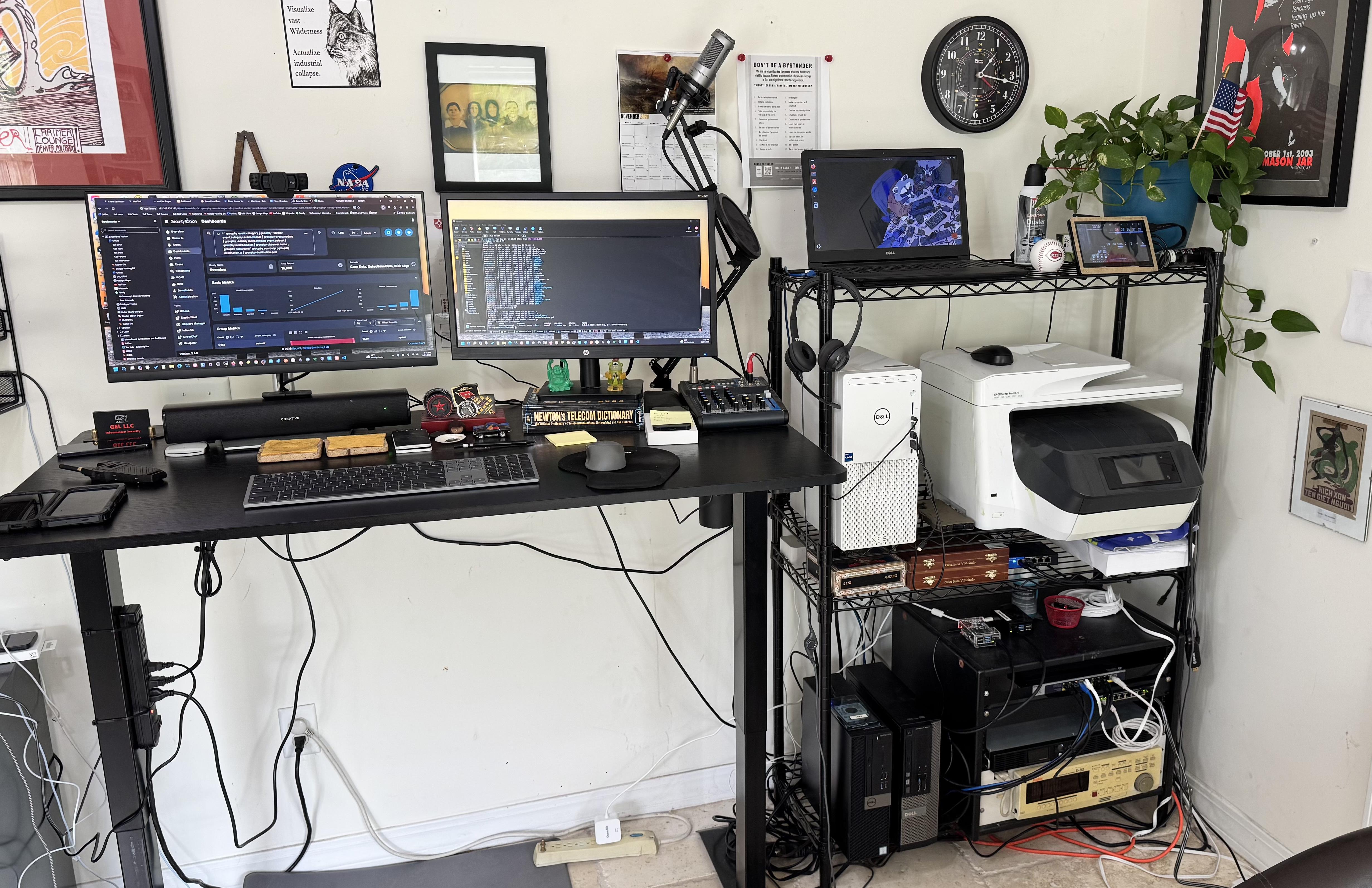
Running VMs on the second shelf Dell box: SecurityOnion, Wazuh, and Kali on Windows 11. The two lower shelf Dells are hosting Docker containers on Ubuntu server, so far running: Glance, OpenProject, Immich, Beszel, Gitea, Bloodhound, DVWA, OWASP Juiceshop, Duplicati. A couple of Raspberry Pis running a TAK server, MoODE, and Wireguard.


r/homelab • • 6h ago

Diagram My OnlyLANs: Don't hate me, please be gentle.

Post image
23 Upvotes

So with the use of the nifty tool from one of the members on here (https://github.com/Goblinmine/homelab-diagram) I decided to give this a shot.

This is still a work in progress and yes there are some definite flaws but the target 🎯 state hopefully will address many of them.

Also OnlyRAMs is where I am going to wait for RAM Altman... He can shake his booty there if he wants my RAM 🐏.

I'm in the process of migrating from a Windows 10 and a DriveBender pool (that app is not deprecated) to TrueNAS. Am 80% done, but still a lot to do as per the target state. Tailscale is one of the items on my list, as well as setting up a subnet just for IoT.

Feedback, advice, memes and comments welcome. Have at it.


r/homelab • • 6h ago

Project Showcase: Hardware 3D-printed dual 3.5" HDD caddy for the OptiPlex 3080 SFF (designed with Claude in FreeCAD)

Thumbnail
gallery
19 Upvotes

My Proxmox server is an OptiPlex 3080 SFF that lives on top of my fridge. One of the services on it is Frigate, I wanted the recordings on their own drive: the constant writes were slowing down everything else on my main disk, and I didn't want them mixed in with my data.

The problem: the SFF case only fits one 3.5" drive. An external enclosure would've cost money and space I don't have, and I already had a spare drive ,doing nothing ,from an old machine.

The build: I designed a replacement that holds two drives in the same socket. I'd never used CAD before. I got the base done in FreeCAD following tutorials, then got stuck. To finish it I used Claude driving FreeCAD through an MCP server (freecad-mcp), giving it caliper measurements, photos of the stock caddy and a description of the part. It took a lot of back and forth explaining the mounting tabs.

What went wrong: the first print (about 4 hours on a friend's Bambu Lab) looked great, but the tabs ended up off-center and the base was 1 mm deeper then necessary. Instead of reprinting, I fixed it with a Dremel until it fitted inside with no problems.

Power: the stock cable only has one SATA power connector, so the second drive runs off a SATA Y-splitter.

Temps: I logged temperatures with both drives outside the case first. Inside the case, side by side, with all 3 cameras recording, they run about 4 °C warmer than before, which I'm happy with.

Files: free STL + STEP if you have the same machine: https://www.printables.com/model/1927731-dual-35-hdd-caddy-for-optiplex-3080-sff

I also made a video about the build: https://youtu.be/_uL50xsFY1A


r/homelab • • 3h ago

Discussion [Question] What is your preferred homelab router that has 1x 10Gig ethernet (or 4x 2.5Gig ports)?

10 Upvotes

I tend to prefer running OpenWRT (or some form of Linux) as my core router/firewall and I have a couple router options that I've used in my homelab. I have an older Intel Mac Mini running OpenWRT and I have as a secondary option a Lenovo Mini PC with a four ports PCI card running Linux.

What is your preferred go-to router to run for your homelabs?


r/homelab • • 16h ago

Discussion GL.iNet GoodCloud was abused to put malware on routers and KVMs, and a firmware update alone may not clean a dirty config

94 Upvotes

Heads up for anyone running GL.iNet gear in the lab or as a travel router. GL.iNet confirmed on 20 November 2026 (notice updated 23 November) that a vulnerability in their GoodCloud remote management service was used to reach some routers and KVM-over-IP devices and install malware. They say that path is blocked now, but devices that already got hit stay infected until the matching security firmware is on them. They haven't said how many customers were affected or whether any data left the devices.

The versions they give as examples: 4.11.1 or newer for GL-MT3000, GL-MT6000 and GL-MG1300, and 1.10.3 or newer for KVM models like the RM1 and RM10. If your model isn't on the list that doesn't mean it's fine. No CVE is named in the public reports so far.

What I'd do if you have any of these:

Find every GL.iNet box you own, especially anything enrolled in GoodCloud. Their quick indicator is a process containing "crond -i /tmp/.log", but GL.iNet itself says that check will miss some infections, so a clean result doesn't prove much.

Flash the security firmware for your exact model even if the check comes back clean. If the malware lives in the config directories a normal upgrade might not be enough, so I'd do a clean install and not restore the old config.

Rotate the admin password, Wi-Fi keys, VPN/WireGuard keys and SSH keys. If it was a KVM, take a look at the machine hanging off it as well.

And if you don't actually need the vendor cloud management, turn it off and reach the thing over your own VPN instead.

For those who already patched: did you keep your old config, or did you wipe and rebuild the device?


r/homelab • • 10h ago

Help Duda actualizar homelab (Proxmox + HA + LXC): i5-7500 vs i5-10500 vs i7-10700

Post image
30 Upvotes

Buenas, os dejo una foto de mi humilde montaje actual (el disco va fuera en el dock con su ventilador casero porque es bastante calentorro y ruidoso, y lo uso para las pelĂ­culas de Jellyfin). Estoy montando mi servidor casero y quiero cambiar este equipo por algo mĂĄs moderno manteniendo el formato SFF.

Ahora mismo tengo este HP EliteDesk 800 G3 con un i5-7500 y 32 GB de RAM, pero se me queda corto. Mi idea es pillar un equipo de 10ÂȘ generaciĂłn, pasarle mis 32 GB de RAM y meterle Proxmox con Home Assistant y varios contenedores LXC (Docker, Jellyfin, etc.).

Estoy dudando entre coger uno con el i5-10500 o estirarme 50€ mĂĄs a por el i7-10700. Como soy novato en esto, querĂ­a preguntaros cuĂĄl os parece mejor opciĂłn y quĂ© tal van de consumo, ya que va a estar encendido 24/7 y no sĂ© si notarĂ© mucha diferencia en la factura respecto al i5-7500 que tengo ahora o si el i7 gasta mucho mĂĄs en reposo que el i5-10500.

Tampoco tengo claro si merece la pena pagar esos 50€ de mĂĄs por el i7. Veo que tiene 16 hilos frente a los 12 del i5, pero al estar empezando no sĂ© si realmente se aprovechan tantos hilos en un homelab casero o si con el 10500 voy sobrado.

ÂĄGracias de antemano!


r/homelab • • 1d ago

Project Showcase: Hardware Update from Kyoto: my solar-assisted 48V DC Ryzen rack is now at 6 nodes (+2 workers) and actually serving real production traffic!

Thumbnail
gallery
929 Upvotes

Hey r/homelab, big update from Kyoto!

Seven weeks ago I posted when the first two Ryzen 9 9950X nodes of this 48V DC solar-assisted rack finally lit up. Today the rack is up to 6 Ryzen nodes, my old Proxmox/k3s homelab has been officially retired and absorbed into it (two Minisforum MS-A2s survived the merger), and our actual production web services are now running live on this wooden cabinet.

Looking at 256 vCPU and ~536 GiB of RAM humming away inside plywood shelves in Kyoto—with a dual-R9700 GPU server below and a Mac Studio casually claiming the penthouse floor—I honestly still half-expect the SketchUp drawings from March to sue me for taking them literally.

It definitely did not go smoothly though. Here is what fought back over the last six weeks:

  1. Way more fuses and way more crimping than I signed up for After all the great electrical-safety feedback on my earlier posts, I ended up adding way more DIN-rail fuses than I originally budgeted for—both in money and in sanity. I am a software guy, not an electrician, so learning to crimp and wrestle heavy-gauge DC cables inside a tight wooden cabinet turned into an unexpected upper-body workout. It will never win a datacenter cable-porn award, and my thumbs still remember every single lug, but every branch is properly fused and measured now and I am weirdly proud of it.
  2. The custom rear fan panels worked great—then the RSP power supply humbled me The transparent polycarbonate rear fan panels finally arrived and went on with six Noctua industrialPPC 140mm fans. Airflow for the Ryzen blades is dialed in now and honestly looks awesome from the back. The MEAN WELL RSP grid backup supply, on the other hand, sounded like it was preparing for takeoff at Kansai International Airport. To save my ears, I swapped its stock fans for quiet Noctua fans—and immediately discovered why MEAN WELL used tiny jet engines in the first place. Without enough static pressure, the RSP started getting way too warm. My deeply scientific thermal-engineering fix for now (photo 5) is slapping two aluminum heatsinks onto the lid and aiming a cheap USB desk fan straight at it. Following the proud Kyoto homelab tradition of steel-pillar heatsinks and plastic-folder airflow baffles, it looks ridiculous and works great.
  3. Watching the cluster run on Kyoto sunlight never gets old With a Victron SmartShunt wired in, Home Assistant now tracks the whole picture: rooftop solar, 48V battery, RSP grid backup, AC servers, and the rest of the building. Since October 5, the rooftop panels have produced 198.63 kWh on the 48V DC side and 72.63 kWh on the AC plug-in solar side (271.26 kWh total). On a clear November morning around 9 AM (photo 8), the DC panels put out ~720 W—running the entire ~474 W cluster on pure Kyoto sunlight with 0 W from the RSP while still pushing ~230 W into the battery! Over longer stretches (photo 9), solar + battery supplied 49.1% of the DC bus over the last 7 days (45.9 vs 47.59 kWh across 167.8 recorded hours), 41.3% so far in November (125.52 vs 178.15 kWh), and 41.2% cumulatively since October 24 (152.38 vs 217.18 kWh across 769 recorded hours). Not 100% off-grid—turns out the sun still refuses to work night shifts in November—but powering almost half of a 24/7 6-node Ryzen cluster off balcony railings feels awesome.
  4. Discovering that an all-CPU rack was not enough Back in March I boldly declared this would be a pure CPU-density rack—just clean rows of Ryzen blades, zero GPU drama. That plan survived about five minutes of real AI traffic. Even the separate dual-R9700 box could not keep up with our LLM and audio workloads by itself, so a Mac Studio quietly moved into the top shelf to help shoulder inference. Turns out modern workloads laugh at all-CPU purists; you really need a balanced mix of CPU and GPU machines.
  5. Migrating live production while building the platform (and breaking things along the way) Honestly, the software side tested my sanity even more than the 48V wiring. I was building the hosting platform at the exact same time as gradually cranking up the live traffic split from our old setup—which is a polite way of saying I caused more than a few real production outages while flying a plane I was still bolting together. Early on I got carried away writing custom Python and Node.js glue (my own scale-to-zero gateway, custom CI pollers, a single-node SQLite control plane). Disk usage quietly ballooned past 3 TB, SQLite started throwing multi-second writer locks, and my own safety checks ended up blocking my own deploys.

Those outages hurt, but they forced me to rip out most of the custom plumbing and lean into boring, rock-solid OSS:

  • Cilium in full eBPF mode without kube-proxy (~36 Gbps over the 40GbE DAC links)
  • CloudNativePG (PostgreSQL 17 HA) replacing single-node SQLite for the control plane
  • Official GitHub ARC runners scaling from zero
  • KEDA + KEDA HTTP Add-on replacing my custom idle gateway (cold wake dropped from ~16s down to ~2.4s, and memory dropped ~80%!)
  • Rancher local-path NVMe (~3,675 MB/s) + 1-second Litestream replication to S3
  • Native MinIO bucket replication from Kyoto to a TrueNAS box in Tokyo (~15 ms RTT), with a weekly automated non-destructive restore drill that spins up temp containers, checks PG PITR + 5 SQLite DBs + registry blobs in ~36 seconds
  • gVisor + Cilium network policies isolating untrusted workloads from the LAN

Coming out the other side of those rough weeks, the whole stack finally feels genuinely solid. Back in March I mentioned wanting a place to deploy lots of small AI-built web apps without worrying about cloud bills—and that part actually turned into a real platform we run our own services on (and just started opening up at pangea.host). Still plenty to polish, but seeing real users hit hardware I crimped and bolted together in Kyoto is easily the most fun I have had with computers in years.

Happy to answer any questions about the 48V DC wiring, the Noctua/USB-fan RSP rescue, the solar numbers and Home Assistant setup, or the Kubernetes and Kyoto-to-Tokyo DR stack!

Edit: I also wrote up a longer deep-dive with extra wiring/RSP close-ups, solar data, and the Kubernetes/DR breakdown on Medium: https://medium.com/@jkondo_85993/from-sketchup-to-production-in-kyoto-8-bare-metal-nodes-48v-solar-dc-a-usb-desk-fan-and-737e716a3bc3

Earlier posts:


r/homelab • • 2h ago

Labgore WD Blue Array finally lost a drive at 9 years and 1.5 million Load/Unload Cycles

Thumbnail pastebin.com
6 Upvotes

Been running 4 drives on Windows server 2016/2019 in storage spaces, default firmware, finally had a drive die. 1.5 million head parks with 9 years uptime, thats like once every three minutes? Dont use reddit much. Pastebin of the smart report from crystal disk info linked. Mostly just used to host media for home streaming, and general purpose file server.


r/homelab • • 9h ago

Project Showcase: Hardware Lurking no more! First homelab begins.

Post image
19 Upvotes

Thanks for all the info this far. I just learned what a q-flash is and we are putting things together.

Aiming for a gaming server, immich cloud and jellyfin. The bios flash was required to get this i7-7700 to work in this 40 dollar ebay board.

32 GB of ddr4 was being wasted in a closet and I have to prove that AI idiot wrong.


r/homelab • • 15h ago

Discussion Hard Drive Rental

24 Upvotes

I want to change the vdev layout of my ZFS pool (media library), but I don't have enough spare capacity to offload the data. I don't back it up since it's all media I could re-acquire if needed.

Does anyone know of services that rent out a stack of HDDs for a few days or weeks? I'd use them as temporary storage while I destroy and rebuild the pool, then send them back.

I’m not interested in buying some drives and reselling them.

Thanks!

Edit:

It’s about 60TB of data, and I’m probably just going to go the route of backblaze or s3. I’ll have to compare some prices there.


r/homelab • • 14h ago

Project Showcase: Hardware DC UPS - Marsriva KP9 Pro

Thumbnail
gallery
22 Upvotes

I have been using the KP9 pro for my ONT and router for the last 10 days. So far so good. It looks very good on paper. No outages so far.

I have to admit, their support and shipping times are very good. I contacted the company directly and got the UPS shipped out and delivered from China to Europe in 8 days.

Anyone else using it?


r/homelab • • 17h ago

Discussion Why did you make homelab? I’m curious

35 Upvotes

r/homelab • • 7h ago

Project Showcase: Hardware Lenovo ThinkStation P330 Tiny + Yeston RTX 3050 6GB – Finally Stable! Full Engineering Report Included

Thumbnail gallery
5 Upvotes

r/homelab • • 7h ago

Discussion Next steps

4 Upvotes

Now that I'm addicted to my home lab, I was curious what else I could implement to improve my Ubuntu server. Here's everything I have as of now:

-Jellyfin : Homepage, Radarr, Sonarr, Prowlarr, gluetun, qbittorent, bypass, flsresolverr, Seerr, declutarr

-SearXNG

I'm wondering if pi hole would be worth it? I'm afraid my server might be down from time to time, which I'm scared would affect all the devices on my home network if it happened.

I'm getting decent at docker compose if that helps! Open to any suggestions.


r/homelab • • 16m ago

Project Showcase: Hardware Local Inference Lab Update: Almost 60,000 tok/s cold prefill (+82%) on DeepSeek-V4.1-Flash over PCIe (4× RTX PRO 6000 Blackwell) + upstream Flare scheduler upgrades

Thumbnail
reddit.com
1 Upvotes

r/homelab • • 19m ago

Project Showcase: Hardware Someone's 40 mac studio cluster

Thumbnail
youtube.com
3 Upvotes

I found this on youtube and had to share it here, this guy is running a cluster of 40 mac studios on what seems to be his attic, it's honestly very space efficient.

the things that stood out to me:

  • he found out putting all electrical stuff on the front while keeping network on the back helped keep things tidy
  • he just piled them up
  • fans on either end: a good extractor fan (with redundant backup in place) as well as giant fans on the other end to push fresh air
  • it's all running on 1g networking, except the nas which uses 2.5g
  • he's using it for investing, Pyroboadvisor, logitration
  • 300-500€ monthly cost

r/homelab • • 4h ago

Discussion Server/Home Lab for filament drying

2 Upvotes

So has anyone tried to use the exhaust heat from their gear to help dry 3d Printer filament in addition to using their server as a space heater?


r/homelab • • 47m ago

Help Internal SSD Failure

Thumbnail gallery
0 Upvotes

r/homelab • • 8h ago

LabPorn Upgrade from Mac mini

Post image
4 Upvotes

My old NAS was a Mac mini running raid1 on a pair of 18TB external usb drives. Jellyfin and web server were fine, but it was always a good idea to hit Play and Pause to give it a chance to buffer a bit.

I also had a single external drive for Time Machine. And then I noticed that the Time Machine drive had failed 25 days earlier and I hadn’t noticed. Which is when I realized I needed better automation.

It took five days to transfer 10TB of media from the mini. I’m very happy. And Jellyfin is much snappier.


r/homelab • • 1d ago

Project Showcase: Hardware 2 Years in now, starting from zero experience

Thumbnail
gallery
859 Upvotes

hey folks!

i'm 2 years into homelabbing now. I started with zero background in this field, with a 10u mini-rack, diy NAS, and jellyfin. i’ve spent countless hours on this project, and while i feel like i’ve only just scratched the surface, i've learned so much.

today i wanted to share some pics and specs about the current setup.

PVE1 / 24/7 Foundation

  • Intel Core i3-6100
  • 32 GB DDR4
  • 4 x 4 TB WD Red Exos (ZFS RAIDZ1)
  • RX 580 8 GB
  • Services: Jellyfin, Homarr, Pi-hole, Samba, Home Assistant, NetBox

PVE2 / On-demand Lab

  • Intel Core i5-13400 (12 Cores / 16 Threads)
  • 128 GB DDR4 (yes, i have RAM guys!)
  • Samsung 980 PRO 2 TB
  • 2 TB HDD
  • GTX 1070 + GTX 1080 Ti
  • Services: Immich, Paperless-ngx, SolidWorks, LLM

HP EliteDesk 800 G1 / Firewall

  • Intel Core i5-4570 (4 Cores @ 3.20 GHz)
  • 16 GB RAM
  • Software: OPNsense

Juniper EX2200-24T / VLAN Infrastructure

  • 24-Port 1GbE Managed Switch

Pi5 / Cluster & Management

  • Raspberry Pi 5 (4 GB)
  • Quorum Witness (QDevice)
  • Role: NUT (UPS Monitoring) & Rack Monitoring

air circulation and cooling noise are present but i’ve managed the levels by installing sound-dampening mats on all inner walls and keeping the rack door shut. the lab is in my gaming room (i'm 48 btw), so noise is managable. power consumption is around 90w at "night mode" (still WIP) and up to 350w under load (llm).