r/homelab • • 16h ago

Project Showcase: Hardware 2 Years in now, starting from zero experience

Thumbnail
gallery
616 Upvotes

hey folks!

i'm 2 years into homelabbing now. I started with zero background in this field, with a 10u mini-rack, diy NAS, and jellyfin. i’ve spent countless hours on this project, and while i feel like i’ve only just scratched the surface, i've learned so much.

today i wanted to share some pics and specs about the current setup.

PVE1 / 24/7 Foundation

  • Intel Core i3-6100
  • 32 GB DDR4
  • 4 x 4 TB WD Red Exos (ZFS RAIDZ1)
  • RX 580 8 GB
  • Services: Jellyfin, Homarr, Pi-hole, Samba, Home Assistant, NetBox

PVE2 / On-demand Lab

  • Intel Core i5-13400 (12 Cores / 16 Threads)
  • 128 GB DDR4 (yes, i have RAM guys!)
  • Samsung 980 PRO 2 TB
  • 2 TB HDD
  • GTX 1070 + GTX 1080 Ti
  • Services: Immich, Paperless-ngx, SolidWorks, LLM

HP EliteDesk 800 G1 / Firewall

  • Intel Core i5-4570 (4 Cores @ 3.20 GHz)
  • 16 GB RAM
  • Software: OPNsense

Juniper EX2200-24T / VLAN Infrastructure

  • 24-Port 1GbE Managed Switch

Pi5 / Cluster & Management

  • Raspberry Pi 5 (4 GB)
  • Quorum Witness (QDevice)
  • Role: NUT (UPS Monitoring) & Rack Monitoring

air circulation and cooling noise are present but i’ve managed the levels by installing sound-dampening mats on all inner walls and keeping the rack door shut. the lab is in my gaming room (i'm 48 btw), so noise is managable. power consumption is around 90w at "night mode" (still WIP) and up to 350w under load (llm).


r/homelab • • 7h ago

Project Showcase: Hardware Update from Kyoto: my solar-assisted 48V DC Ryzen rack is now at 6 nodes (+2 workers) and actually serving real production traffic!

Thumbnail
gallery
308 Upvotes

Hey r/homelab, big update from Kyoto!

Seven weeks ago I posted when the first two Ryzen 9 9950X nodes of this 48V DC solar-assisted rack finally lit up. Today the rack is up to 6 Ryzen nodes, my old Proxmox/k3s homelab has been officially retired and absorbed into it (two Minisforum MS-A2s survived the merger), and our actual production web services are now running live on this wooden cabinet.

Looking at 256 vCPU and ~536 GiB of RAM humming away inside plywood shelves in Kyoto—with a dual-R9700 GPU server below and a Mac Studio casually claiming the penthouse floor—I honestly still half-expect the SketchUp drawings from March to sue me for taking them literally.

It definitely did not go smoothly though. Here is what fought back over the last six weeks:

  1. Way more fuses and way more crimping than I signed up for After all the great electrical-safety feedback on my earlier posts, I ended up adding way more DIN-rail fuses than I originally budgeted for—both in money and in sanity. I am a software guy, not an electrician, so learning to crimp and wrestle heavy-gauge DC cables inside a tight wooden cabinet turned into an unexpected upper-body workout. It will never win a datacenter cable-porn award, and my thumbs still remember every single lug, but every branch is properly fused and measured now and I am weirdly proud of it.
  2. The custom rear fan panels worked great—then the RSP power supply humbled me The transparent polycarbonate rear fan panels finally arrived and went on with six Noctua industrialPPC 140mm fans. Airflow for the Ryzen blades is dialed in now and honestly looks awesome from the back. The MEAN WELL RSP grid backup supply, on the other hand, sounded like it was preparing for takeoff at Kansai International Airport. To save my ears, I swapped its stock fans for quiet Noctua fans—and immediately discovered why MEAN WELL used tiny jet engines in the first place. Without enough static pressure, the RSP started getting way too warm. My deeply scientific thermal-engineering fix for now (photo 5) is slapping two aluminum heatsinks onto the lid and aiming a cheap USB desk fan straight at it. Following the proud Kyoto homelab tradition of steel-pillar heatsinks and plastic-folder airflow baffles, it looks ridiculous and works great.
  3. Watching the cluster run on Kyoto sunlight never gets old With a Victron SmartShunt wired in, Home Assistant now tracks the whole picture: rooftop solar, 48V battery, RSP grid backup, AC servers, and the rest of the building. Since October 5, the rooftop panels have produced 198.63 kWh on the 48V DC side and 72.63 kWh on the AC plug-in solar side (271.26 kWh total). On a clear November morning around 9 AM (photo 8), the DC panels put out ~720 W—running the entire ~474 W cluster on pure Kyoto sunlight with 0 W from the RSP while still pushing ~230 W into the battery! Over longer stretches (photo 9), solar + battery supplied 49.1% of the DC bus over the last 7 days (45.9 vs 47.59 kWh across 167.8 recorded hours), 41.3% so far in November (125.52 vs 178.15 kWh), and 41.2% cumulatively since October 24 (152.38 vs 217.18 kWh across 769 recorded hours). Not 100% off-grid—turns out the sun still refuses to work night shifts in November—but powering almost half of a 24/7 6-node Ryzen cluster off balcony railings feels awesome.
  4. Discovering that an all-CPU rack was not enough Back in March I boldly declared this would be a pure CPU-density rack—just clean rows of Ryzen blades, zero GPU drama. That plan survived about five minutes of real AI traffic. Even the separate dual-R9700 box could not keep up with our LLM and audio workloads by itself, so a Mac Studio quietly moved into the top shelf to help shoulder inference. Turns out modern workloads laugh at all-CPU purists; you really need a balanced mix of CPU and GPU machines.
  5. Migrating live production while building the platform (and breaking things along the way) Honestly, the software side tested my sanity even more than the 48V wiring. I was building the hosting platform at the exact same time as gradually cranking up the live traffic split from our old setup—which is a polite way of saying I caused more than a few real production outages while flying a plane I was still bolting together. Early on I got carried away writing custom Python and Node.js glue (my own scale-to-zero gateway, custom CI pollers, a single-node SQLite control plane). Disk usage quietly ballooned past 3 TB, SQLite started throwing multi-second writer locks, and my own safety checks ended up blocking my own deploys.

Those outages hurt, but they forced me to rip out most of the custom plumbing and lean into boring, rock-solid OSS:

  • Cilium in full eBPF mode without kube-proxy (~36 Gbps over the 40GbE DAC links)
  • CloudNativePG (PostgreSQL 17 HA) replacing single-node SQLite for the control plane
  • Official GitHub ARC runners scaling from zero
  • KEDA + KEDA HTTP Add-on replacing my custom idle gateway (cold wake dropped from ~16s down to ~2.4s, and memory dropped ~80%!)
  • Rancher local-path NVMe (~3,675 MB/s) + 1-second Litestream replication to S3
  • Native MinIO bucket replication from Kyoto to a TrueNAS box in Tokyo (~15 ms RTT), with a weekly automated non-destructive restore drill that spins up temp containers, checks PG PITR + 5 SQLite DBs + registry blobs in ~36 seconds
  • gVisor + Cilium network policies isolating untrusted workloads from the LAN

Coming out the other side of those rough weeks, the whole stack finally feels genuinely solid. Back in March I mentioned wanting a place to deploy lots of small AI-built web apps without worrying about cloud bills—and that part actually turned into a real platform we run our own services on (and just started opening up at pangea.host). Still plenty to polish, but seeing real users hit hardware I crimped and bolted together in Kyoto is easily the most fun I have had with computers in years.

Happy to answer any questions about the 48V DC wiring, the Noctua/USB-fan RSP rescue, the solar numbers and Home Assistant setup, or the Kubernetes and Kyoto-to-Tokyo DR stack!

Edit: I also wrote up a longer deep-dive with extra wiring/RSP close-ups, solar data, and the Kubernetes/DR breakdown on Medium: https://medium.com/@jkondo_85993/from-sketchup-to-production-in-kyoto-8-bare-metal-nodes-48v-solar-dc-a-usb-desk-fan-and-737e716a3bc3

Earlier posts:


r/homelab • • 9h ago

Project Showcase: Hardware My current homelab

Thumbnail
gallery
151 Upvotes

Hi y’all! I recently dusted off my homelab and figured I’d finally make a post about it

I originally built this server around August 2025 and have been loving it ever since

For some context, my last company had an “old” computer they wanted to get rid of so I offered to take it. When I opened it up, I discovered it had a killer 16-core AMD Ryzen 9, a Corsair AIO, AND 64 GB of DDR4 RAM 🙏🙏

I already had a decent AM5 gaming PC, so I couldn’t really use these parts to upgrade my main rig
Instead, I decided to turn them into a homelab

Hardware:
AMD Ryzen 9 5950X
64 GB DDR4 RAM
4 × 4 TB HDDs (RAID 5 / 1 parity drive, 8 TB usable capacity)
1 × 2 TB HDD (separate drive for additional backups)
NVIDIA GT 1030
Fractal Design Node 804

Services:
Plex: Picked up the lifetime subscription back when it was around $200

Jellyfin: My girlfriend actually prefers Jellyfin over Plex, so I keep it running for her lol

Immich: I use the spare 2 TB HDD for an additional backup of my personal photos. Since the server is at my parents house and I moved halfway across the country, I wanted another layer of protection in case something happens to my main RAID array

Tailscale: Makes it easy to manage everything remotely

Cloudflare Tunnels: Bought a cheap domain and set up a few aliases/subdomains so we can access Jellyfin and Immich over internt

Wake-on-LAN + Raspberry Pi 4: My parents house occasionally has power outages, and I was getting tired of asking them to manually turn the server back on. I set up a Raspberry pi 4 on the same Tailscale network AT my parents house that stays powered on and can send a WOL message to the server locally

Overall, it’s been a super fun project, and I’m really happy with how it turned out. My next steps would be to buy a better GPU and tinker with local AI models, I bought the 1030 bc it was really cheap and I wanted something to help transcode media


r/homelab • • 16h ago

Discussion Hello guys in reddit! New to here!

Post image
134 Upvotes

I bought an old desktop from university classmates' father, It took 300 rmb(about 50$), I want to build a homelab with it in my univeritsy doom.

I'm a freshman in compute science. Hope I can learn the things I need by doing all of this by myself. Can't wait to explore. People here are so cool!!!


r/homelab • • 15h ago

Project Showcase: Operations From one laptop to a 10" rack running my accounting firm, plus a local AI node on an OCuLink eGPU

Thumbnail
gallery
116 Upvotes

Foto 1: The rack: OptiPlex Micro (production), 2× WD Purple 4 TB, 2× HP ProDesk Mini G1i on Proxmox.

Foto 2: AI node: ASUS Prime RTX 5060 Ti 16 GB on a Minisforum DEG1 + MSI 750 W, OCuLink to mini #1.

I run a small tax and accounting firm in Mexico. In August all the automation (tax authority downloads, invoicing, WhatsApp, dashboard, database) lived on one laptop. This is where it ended up after ~3.5 months of nights and weekends.

The rack (DeskPi RackMate T1, 8U, 10")

- Dell OptiPlex 7010 Micro: production. i5-13500T, 32 GB, 1 TB NVMe + 1 TB HDD. Windows 11 with the FastAPI dashboard, WhatsApp webhook, Telegram bot and SQLite.

- 2× WD Purple 4 TB in Dell caddies (USB-SATA to the OptiPlex). Disk 1: nightly mirror of client folders, database, WhatsApp media and email attachments. Disk 2: weekly encrypted 7z, Sunday vault and 7 days of Proxmox backups from both minis. The internal HDD holds the weekly system image.

- HP ProDesk 4 Mini G1i #1: Ultra 5 235T, 32 GB, Acer Predator GM7 2 TB, Proxmox 9.2. LXC containers (Claude Code sessions, monitoring, data warehouse, DNS) and the AI node VM.

- HP ProDesk 4 Mini G1i #2: same model. Jellyfin, Immich, Nextcloud, Vaultwarden, Uptime Kuma, Caddy with a local CA, second AdGuard and a warm standby server.

- CyberPower CP1500PFCLCD: NUT on mini #1 shuts the server down over SSH first, then itself.

The AI node (photo 2)

- ASUS Prime RTX 5060 Ti 16 GB open-air on a Minisforum DEG1 with an MSI MAG A750GLS, connected to mini #1 over OCuLink through an M.2 adapter. PCIe 4.0 x4.

- PCIe passthrough to a Debian 13 VM; nvidia-open in the VM only, nothing on the Proxmox host.

- 30-min burn-in: ~17.5 TFLOPS FP32, 94 TFLOPS FP16, 0 errors, 63 °C max, pinned at 180 W, Gen4 x4 the whole time.

- Ollama: gemma 12B ~100 tok/s, gpt-oss 20B ~83 tok/s, plus qwen 9B, an embedding model and Whisper. A small dispatcher queues generations one at a time (two models fit in 16 GB, but not generating together).

- What it does: reads e-invoice XMLs and tax certificates, transcribes client voice notes, drafts WhatsApp replies, classifies documents.

- Rule learned the hard way: the LLM never does math. Two of three models got an invoice total wrong in my benchmark, so code computes every amount and the model only extracts and classifies.

Lessons

- Measure before trusting a status light. Most "alarms" were bugs in my own monitoring.

- A backup isn't done until it's verified (7z test, hash, size), and every job reports to a dashboard with red/green bars.

- Identify backup disks by volume ID, not drive letter.

- An OCuLink eGPU on a 35 W mini PC performs like the same card in a desktop.

Next: a bigger SSD for mini #2 and moving more daily work to the local GPU instead of paid APIs.

Happy to answer questions about the passthrough, the backups or running a business on a homelab.


r/homelab • • 14h ago

Project Showcase: Operations I bought a used Raspberry Pi 4 (8GB) to play around with self-hosting.

Thumbnail
gallery
108 Upvotes

Bought a used Raspberry pi 4 8gb ram with heatsink and fan for 7000 rupess (75$).

35 containers, about 3GB of RAM used, around 48°C. Nothing is port-forwarded, nothing auto-updates, every image is pinned and every container has a memory limit.

What it runs:

What it runs:

Media:

- Jellyfin: (direct play) streams movies and TV shows

- Seerr: where I request new movies and shows

- Sonarr: finds and grabs TV shows

- Radarr: same thing for movies

- Lidarr: same thing for music

- Prowlarr: manages indexers for all the *arr apps in one place

- Bazarr: fetches subtitles

- Recyclarr: syncs quality profiles so I get good 1080p releases

- Unpackerr: extracts compressed downloads

- Cleanuparr: removes stalled and junk downloads

- Byparr: gets through Cloudflare checks on indexers

- qBittorrent and slskd: the download clients, both behind Gluetun on Cloudflare WARP

- Navidrome: streams my music

- Audiobookshelf: my audiobook library, with AudiobookRequest and audiobookbay-automated to fetch new ones

Network: Pi-hole + Unbound for the whole LAN, Tailscale  for remote access, firefox Samba and Syncthing.

Monitoring: Homarr, Beszel, Scrutiny, Uptime Kuma, Dozzle, Dockge, ntfy, Diun.

Hardware: The Pi boots from a 256GB USB SSD, with a 2TB HDD for data and a 1TB WD as automatic fallback. The drives run on powered hubs.

The parts I'm proudest of:

- Zyxel router didn’t support DNS change, so unlocked the router to apply DNS,

- Hardlinks work on NTFS with the in-kernel ntfs3 driver, despite what everyone says.

- I tested the VPN kill switch by cutting the tunnel for 60 seconds. Zero packets leaked.

- About 30 SQLite databases get backed up every night without stopping a single container.

- If the 2TB drive disappears, every app switches to the 1TB drive within 30 seconds and switches back when it returns.

- The Pi has a reserved DHCP address and Tailscale advertises my home subnet, so the same IP works on and off my network.

- Firefox browser, by default its container is turned off, but when I want to download some game dumps (that are not torrents) I login remotely and start off the download.

- KDE Plasma is installed but stays off, for light document editing, printing etc. One command gives me a desktop, and turning it off frees about 1GB of RAM.

My modded Switch OLED uses the Pi as a wireless shelf. A read-only nginx container serves my game library to DBI, and I move files over FTP without pulling the SD card.

I don't open a browser to check on it. A Rainmeter widget on my desktop and a KWGT widget on my phone show CPU, RAM, temperature and storage live.

Most of it was built with Claude Code, which runs right on the Pi.

Takeaway:

Before I bought the Pi, I asked every AI assistant I could find what I could comfortably run on it. Every one of them lowballed it and told me most of this was overkill for a Pi 4. All 35 containers run smoothly, with plenty of RAM to spare and not a single problem.

So now I'm wondering: if a second-hand Pi 4 handles all this, what a mini pc could do.


r/homelab • • 6h ago Popcorn

Help If you had $1000 for home dabbing what would you do?

29 Upvotes

Completely new to the hobby just dabbled in home.assistant to make a voice assistant. I wanna really really dive in now I have my nas set up. So if you had 1000 what would you do? Lights? A new router? A new server (im using a raspberry pi 4 rn)


r/homelab • • 14h ago

Discussion What's the weirdest/most hyper-specific thing you've set up in your homelab?

27 Upvotes

Mine is probably using a USB Bluetooth dongle on my basement Ubuntu server (theengs gateway-mosquitto) to eavesdrop on a cheap Govee BLE temp sensor in my daughter's room upstairs, compare it in real time against my Nest Thermostat over Matter, and log outdoor weather so I can eventually auto-nudge the furnace before bedtime when her room dips below 68°F. (#dadmode)

Runner-up is tracking my basement sump pump's power spikes on an Anker SOLIX battery so it calculates how long I have before the pit overflows during a power outage and tells me how long I have before I need to get our '26 Toyota Sienna plugged in for backup generator

What's the weirdest hyper-specific automation or monitor you've built with weird somewhat unrelated hardware solving a real problem in your home???

P.S.
My next thought is trying to fully offline either a "local personal news briefing" from a USB sdr police scanner piped into something like local whisper running on my stack, or maybe setting up a tv tuner, attic HDTV antenna and routing it into Plex so I've got cable and local news on tap + primetime tv recorded.

Also thinking about a similar ble sniffing thing with plant watering sensors for my wife's plant obsession.

Honestly the funnest thing about homelabbing for me is the "hmmmmm.....what's next" part :)

AI disclaimer - definitely could have done some of this on my own...but definitely not at this velocity without massive AI help lol


r/homelab • • 7h ago

Project Showcase: Hardware Working Progress

Post image
24 Upvotes

So I started my own little homelab. I've always wanted one for testing Kubernetes but when I started my jellyfin on my main desktop, I realized that I should make my own home lab.

Hardware

12u DeskPi Rack

I have a deskpi 2u Screen

3d printed a mount on top and a generic mobile display

8 port gigabit 1gb switch, gigaplus 2.5gb 10port switch with 2 sfp+

2x HP Elite Mini 400s G9s

Mac Mini m4 Pro

Nvidia Jetson Orion Super

Home Nas

And a Desktop 4070 super, i5 12600k, 64gb Ram


r/homelab • • 12h ago

Help Any suggestions for a Enterprise NGFW that offers a homelab key?

24 Upvotes

I've heard in the past that some firewall providers will give you a limited key for perpetual homelab use with the purchase of a firewall. Does anyone know of a brand that still offers that?


r/homelab • • 16h ago

News PSA: Unraid black Friday sale.

24 Upvotes

November 25th - 30th, but no word on what the discount will be ... Habitually they only have sales on the low and mid tiers, while the high tier / lifetime updates tier isn't put on sale.

So don't get too excited and think there will be Steam Sale type discounts, but it is a good time to save a little money on upgrading or getting into a basic tier.


r/homelab • • 17h ago

Discussion What is special about Tec Mojo mini server racks that everyone is buying them up?

19 Upvotes

In a few days or weeks I'll start buying a normal PC for home lab (not Pi 5 or ZimaBoard) (and not only PC), but that's not the point. Why did everyone love Tec Mojo racks so much that everyone is buying them up? And is it even worth buying their mini stand for your small home lab?


r/homelab • • 9h ago

Discussion Reminder: Check your homelabs report systems!

17 Upvotes

Today, I found out by luck that my main truenas pool is degraded. One of the drives failed a month ago and I didnt receive any emails or notifications about it even tough everything was working fine some time ago. Luckily I run a hot spare that took over but without me actively checking, there could have been another failure that might have led to data loss.

So take this as a reminder to check/test your notifications and monitoring systems!


r/homelab • • 21h ago

Help 10 TB disk in my ZFS mirror is dying, looking for any advice

14 Upvotes

Hey guys, same person as the school-lab post from Hungary (more positive updates coming soon there), but this one is about my personal lab.

I've had my homelab drives (two 10TB DC H510's) for 2 years now, got them used with a lot of hours if we're being honest, and even back then they were basically all I could afford. Well, a few days ago I got the first SMART error of a vendor-specific pre-fail attribute going bad, forum searches showed that for some people running an extended self-test somewhat cleared it and their drives kept working.

I also tried this, and it went well for about two days, but this morning the errors came back, and not just the pre-fail one, now it has ~200 bad sectors, ~2K pending ones, and zfs is detecting data loss already on this drive. For now, I've powered the server off because I don't know what else to do, I have about 3.5TB of unreplaceable data on it, and currently the second biggest disk in my household is a failing 1TB WD Green.

I've already asked around friends, no one could accomodate me for a few months. I can afford MEGA or some other S3 object storage and I probably will back up there today, but even an average cost of 25 EUR or ~10K HUF means I'm losing an eight of my internship pay every month just to keep my data. Any ideas or recommendations on where I could get replacement drives for a reasonable price would be very welcome. I'm not asking for donations, just not my kind of thing to rely on others.

Thank you for reading, all the best! (and may your hard drives be healthier than mine)


r/homelab • • 14h ago

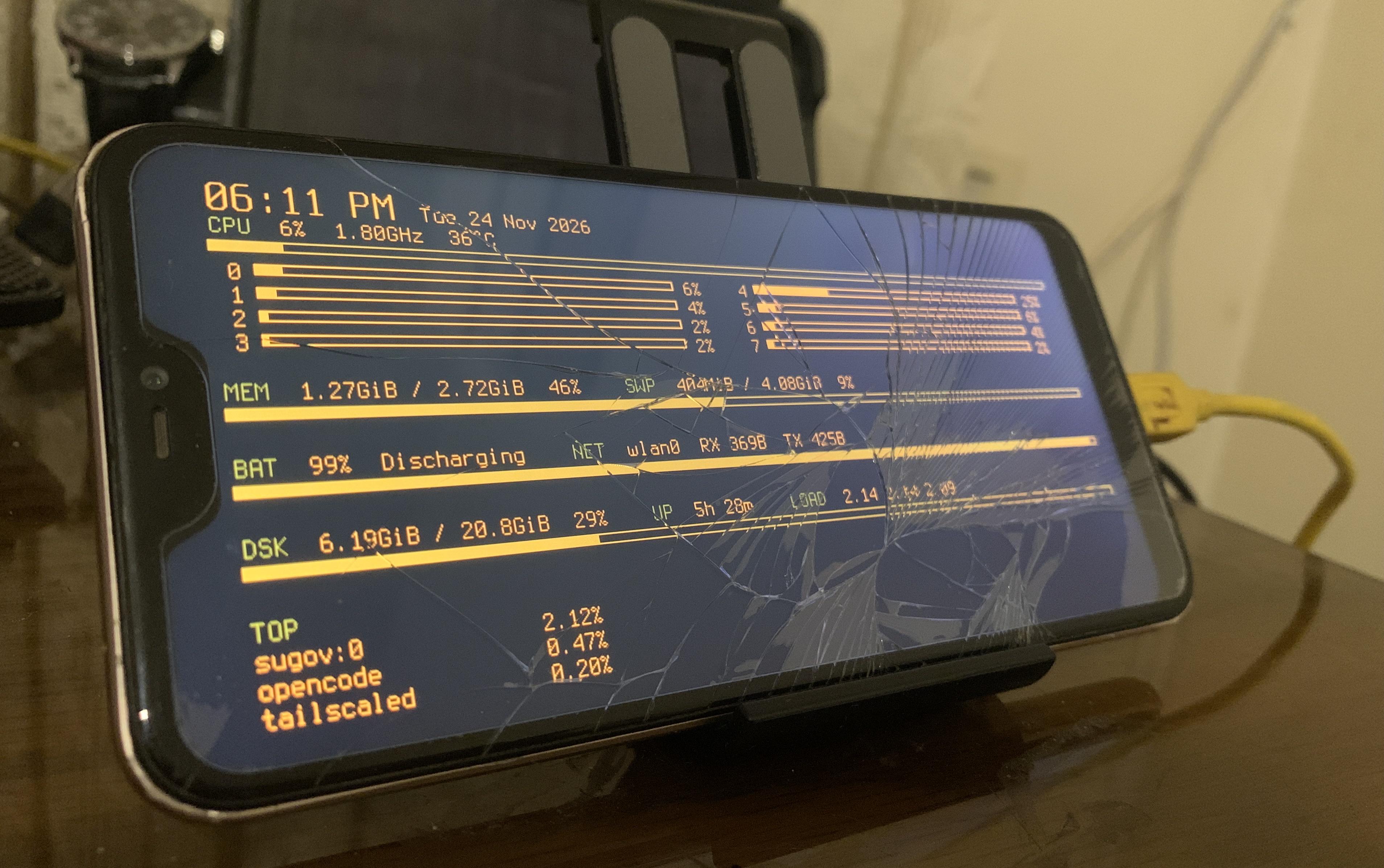
Project Showcase: Hardware Mi A2 Lite with no battery now it's an always-on postmarketOS server

Post image
13 Upvotes

r/homelab • • 6h ago

Project Showcase: Operations Got OPNsense running for my home lab! What should I do next?

Post image
10 Upvotes

Hi everyone,

Im new to the self-hosting side of networking. I just replaced my all-in-one Eero Max 7 router with a Dell Optiplex running OPNsense (dual 10Gb NIC), a hybrid managed 2.5Gb/10Gb switch, and a single Omada BE11000 AP. I have a Raspberry Pi 4 also running alongside the OptiPlex, with a Pi-hole instance for OPNsense and the Omada controller app for the AP. What should I do next? I do plan on VLANs (i already have a guest network on the AP), but is there anything else I can do with this amazing new setup? I've seen that you can control OPNsense with the OPNsense mobile app; has anyone done that, and is it worth it?

Thanks!


r/homelab • • 21h ago

Help New to homelabbing, where do you get your hardware cheap?

8 Upvotes

I'm new to homelabbing and want to get started, but I've been wondering where you actually get your components without spending a fortune. Do you mostly buy used stuff from eBay, refurbished business hardware or something else? I'm based in Germany, so any tips for sites or sources here would be really helpful.


r/homelab • • 12h ago

Discussion Looking for ideas for this lil beast!

Post image
6 Upvotes

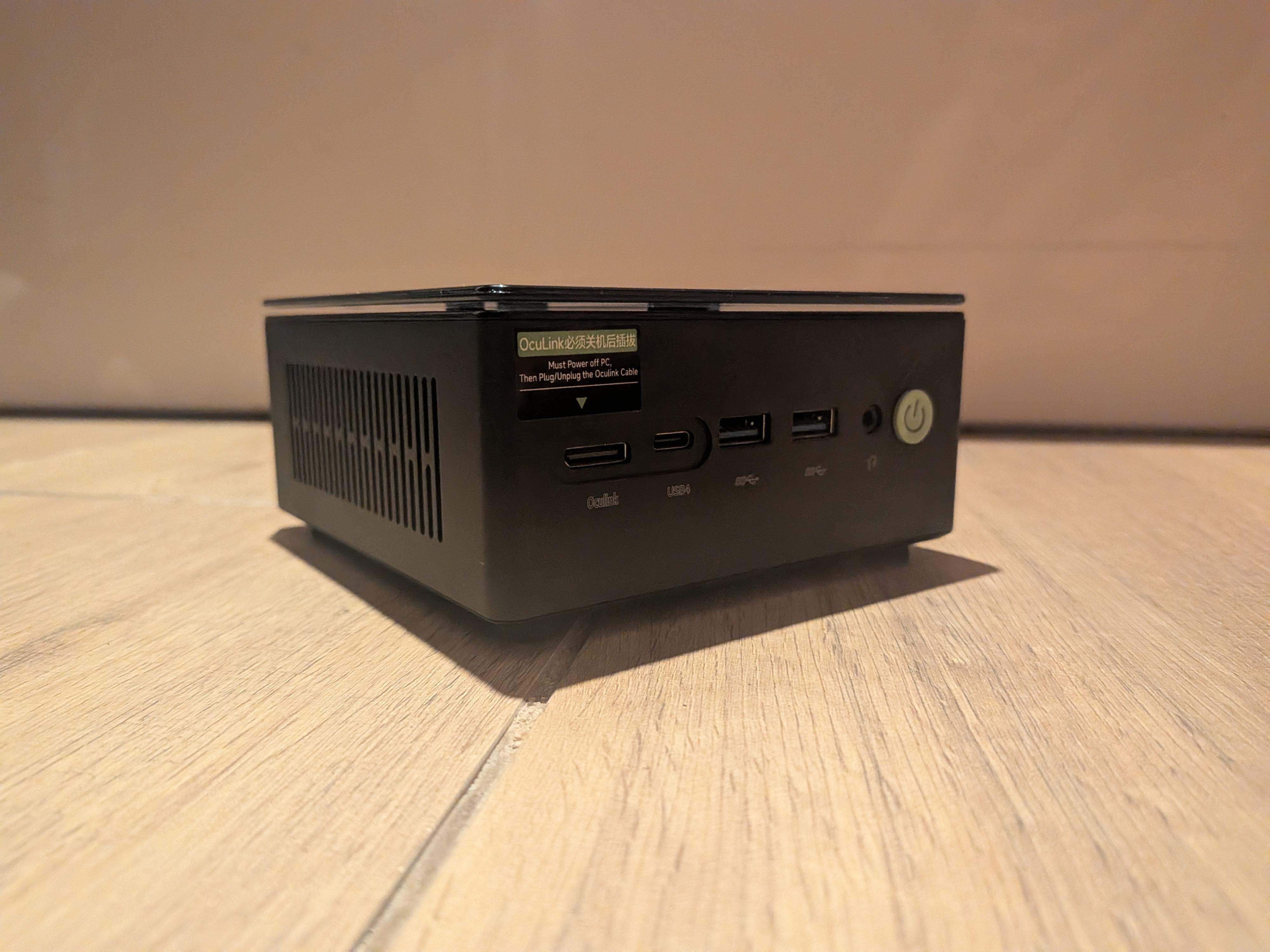
i managed to snag this lil GMKtec NucBox K8 Plus Mini PC, for 600$~ it has a ryzen 7 8845hs and a whopping 48gb of ddr5 ram! + 2 ethernet ports, i installed a 512gb nvme ssd and in the future ill try to use some aliexpress adapters to use the oculink port for extra sata ports/hba controller.

i plan on setting proxmox and then running a vm with AMP (a game server manager) and i would like to have other vms with truenas, next cloud, home assistant, jellyfin ect ect, however i am unsure on how to divide the server, should i create 1 vm for each of those, or run them all in docker, or something else, aswell as how much resources i should allocate to each vm, i assume the AMP instance will require the most resources so i will alocate atleast 24gb + 4 cores but i am unsure about everything else.

any help would be highly appreciated!


r/homelab • • 1h ago

Diagram My Homelab

Post image
5 Upvotes

r/homelab • • 7h ago

Help Should I leave the eye there or move it to the top?

Post image
5 Upvotes

I'm redoing my rack I replaced some old enterprise servers and I'm cleaning up the cabling and network equipment. I also added a face for local llm that reacts vllm stats. I'm going to print a proper bezel but for now it's just bungeed on.

I was originally planning to put it in the top rack slots, but I thought it looked ok here. What do you guys think?


r/homelab • • 11h ago

Help Discovering the Homelab concept

5 Upvotes

I just discovered this concept thanks to an old Asus Pc I had at home. I installed a Linux distro to wake up the machine it is using AMD Radeon Vega quadcore with 12Gb of RAM and 1T internal. So in all this journey I found some info about I can access this machine from my MAC using SSH and suddenly I was searching about homelabs. Am I right about this? Can I create a Homelab using this Pc to access to media, archives and process unity? I’m just so excited about what I discovered and I need a confirmation lol and what should be my next step maybe learn some Bash or commands?


r/homelab • • 20h ago

Discussion MDD (MaxDigitalData) Warranty *Not* Honored in UK

Thumbnail amazon.co.uk
5 Upvotes

tl;dr: Don't buy MDD (MaxDigitalData/GoHardDrive) drives outside of the US.

Relying specifically on the 5 year warranty, I purchased a few 12GB MDD drive in 2024 from amazon.co.uk with the title of "MDD MAXDIGITALDATA MDD - HC520 HUH721212ALE601 12TB 7200RPM 128MB Cache SATA 6.0Gb/s 3.5inch Enterprise Hard Drive - 5 Year Warranty (Renewed)". The actual product link is here.

This was an "Amazon Renewed" product "Sold By: Amazon Export Sales LLC". (This is Amazon's import/export company; no other company/seller is listed anywhere.) It was "Guaranteed by Amazon" under the badge:

Products sold by third-party sellers are backed by the commercial Amazon Renewed Guarantee in addition to statutory consumer rights enforceable against the third-party sellers and in conjunction with Amazon's or the seller’s Return Policy and the A-to-Z Guarantee.

It's now been about 2.5 years of normal use and one of the drives has failed. Of course, the cost of the drive has doubled since my purchase so I would like a replacement/repair rather than a refund. This should be a straightforward warranty claim.

Amazon stonewalled with every excuse. First, "this was a third-party sale." Yes, but it was Amazon. They would not identify any other third-party whose sale it was. Second, "it has been over two years and outside of our return policy, we cannot offer any assistance." Despite the guarantee badge including "statutory consumer rights enforceable against the third-party sellers" not limiting it to Amazon's return policy. Third, "contact the manufacturer."

GoHardDrive (who owns MDD) said that they could not provide any assistance because it had been purchased on Amazon and sold by a third-party.

I am aware of my rights under the UK's Consumer RIghts Act 2015 for a replacement, repair, or refund from the retailer because the product was not as described and/or was defective, which in this case is Amazon. It's just unbelievable that I would have to go through small claims (risking an Amazon account ban) to fix this.

My immediate next steps are to write a stern letter to Amazon in the UK and pray to the magnetic gods that I can source a replacement while my RAID-Z (fully backed up elsewhere) spins in a degraded state.

So don't believe the multi-year warranty claims on MDD drives sold anywhere outside of the US.


r/homelab • • 21h ago

Help Raspberry Pi with Waveshare 7 inch 5MP display

Thumbnail
gallery
5 Upvotes

Hi everyone,

has anyone here used the Waveshare 7-inch display with the built-in 5MP camera and can share some honest feedback on its overall quality?

I am especially curious about the display's color reproduction and viewing angles in everyday use, as well as how the 5MP camera actually performs—particularly in lower light.

On top of that, I am trying to decide which Raspberry Pi RAM variant makes the most sense for a pretty simple baby monitor setup. I plan to run a lightweight HTML script/interface, stream the live video (ideally over a wired Ethernet connection) to my Intel NUC, and support two-way audio so we can talk back and forth between both devices like a call, without really running much else on the Pi. Given how minimal that workload is, would the 2 GB RAM version be plenty, or would you still recommend going with 4 GB just to be safe?

Thanks in advance for any insights!


r/homelab • • 7h ago

Help Question about UPS

4 Upvotes

Hi guys, not sure if this is the right place to ask this question but I will still ask. So I have an APC UPS 1100 and it supports my TV and Playstation.
I am not sure if I am supposed to keep the wall socket plug on at all times where my UPS is plugged in or turn it off when I turn off my UPS?
Google gave me mix reviews, some said keep it on at all times even if the UPS is not powered on. Others said turn it off from the wall socket when not in use.
I don’t want to harm the UPS’s battery.
Please suggest what I should do.
Thank you.