r/homelab • • 6m ago

Project Showcase: Operations My Home Server – Building My Own Self-Hosted Digital Ecosystem

Thumbnail
gallery
1 Upvotes

Hi everyone,

I wanted to share my personal home server setup and a custom centralized interface I’ve been building on top of it called EVNORA OS. (Note: The UI labels are in Turkish since it’s built for my daily personal use, so I’ve included English captions for each screenshot.)

My goal was to replace commercial cloud dependencies with a quiet, low-power, self-hosted ecosystem that I can monitor and manage from a single place—and interestingly, I administer the entire server via SSH and web tools solely from an Android tablet and phone without a traditional desktop PC.

Hardware & Power

* Host: Mini-PC powered by an AMD Ryzen 5 7430U (6C/12T)

Memory: 32 GB DDR4* (30.8 GiB usable, with ~16.2 GiB allocated to ZFS ARC)

* Storage: Dual ZFS pools — an internal SSD pool for OS/apps/fast access and an external HDD pool for bulk media and local backups

Power Protection: Eaton 5E 900 G2 UPS* (idling around 40W / 9% load, giving ~31 minutes of runtime with automated shutdown configured at 15 minutes on battery)

OS & Core Self-Hosted Stack (25 Containers)

The server runs TrueNAS SCALE Community Edition hosting 25 Docker applications:

* Media & Photos: Immich, Jellyfin, Audiobookshelf

* Cloud, Notes & Security: Nextcloud, Vaultwarden, self-hosted Matrix (Synapse) for encrypted messaging

* Networking & Monitoring: Tailscale (mesh VPN + Funnel), Nginx Proxy Manager (wildcard SSL), AdGuard Home, Uptime Kuma, vnStat, FreshRSS, JDownloader

Why I Built EVNORA OS

While TrueNAS and individual app dashboards are great, I wanted a unified control center tailored to my daily workflow. EVNORA OS aggregates:

  1. Live system telemetry (CPU, RAM, ZFS ARC, CPU temps) and UPS power metrics
  2. Multi-copy backup status verification (ZFS snapshots, local HDD sync, and off-site cloud backups)
  3. SSL certificate expiration tracking and Tailscale port/tunnel visibility
  4. Historical bandwidth analytics powered by `vnStat`
  5. Custom frontends like EVNORA Media Merkezi to browse my media library smoothly on tablet and TV screens

I’d love to hear your thoughts, architecture critiques, or suggestions on what telemetry or security checks would be useful to add next!


r/homelab • • 29m ago

Discussion Server/Home Lab for filament drying

1 Upvotes

So has anyone tried to use the exhaust heat from their gear to help dry 3d Printer filament in addition to using their server as a space heater?


r/homelab • • 56m ago

Help possible to host email from raspberry pi

0 Upvotes

is it possible to host an email from raspberry pi?


r/homelab • • 1h ago

Project Showcase: Hardware Building the programmable RACK power supply I wish existed

Post image
11 Upvotes

Riffing off of the exceptionally useful feedback this sub posted last week here: https://www.reddit.com/r/homelab/comments/1xy1qr0/building_the_programmable_power_supply_i_wish/, our tiny team sat down and figured out what it would take to put the guts of the original desktop device described in that link, and put it in a proper 10" or 19" rack enclosure:

Just a concept, but gives you an idea of what it might look like

Adding a couple features essential to a permanent installation, such as AC-mains power, higher total wattage, and an ethernet port for HA/NUT/API access to power draw and control.

We took all the feedback we got here and on r/minilab and formulated a survey to help properly gather what most people want in a product like this.

Yes, this product idea is absolutely conceptual still, thus the rendered images. But really trying to show you what you described to me in that post, to see if this is directionally-correct.

Would love to get your thoughts via the survey below!

https://tonicaudio.com/grid/rack?utm_source=reddit&utm_medium=social&utm_campaign=grid_rack_survey&utm_content=homelab


r/homelab • • 1h ago

Solved How do sata circuit plates work? (Maybe a stupid question)

0 Upvotes

Hey everyone, I'm currently planning what case to get for my home server/nas and would really like to get the Jonsbo N6, but the sata circuit plate confuses me a little.

It has two molex and two sata plugs and the manual recommends to fill all of them and to use one cable per plug. My psu (be quiet pure power 12 550w) only has two sata cables with 5 sata and 1 molex in total. I know that i can convert between the connectors so that isnt an issue and for the time being my drives wouldnt exceed 6 either, 4x 4tb wd reds and one cache ssd for a zfs array.

Do those circuit boards pull power evenly from the psu depending on how many drives are connected, so that the drive amount may only become an issue when i go over 6? Or does each plug power x number of drives?


r/homelab • • 2h ago

Project Showcase: Hardware 3D-printed dual 3.5" HDD caddy for the OptiPlex 3080 SFF (designed with Claude in FreeCAD)

Thumbnail
gallery
13 Upvotes

My Proxmox server is an OptiPlex 3080 SFF that lives on top of my fridge. One of the services on it is Frigate, I wanted the recordings on their own drive: the constant writes were slowing down everything else on my main disk, and I didn't want them mixed in with my data.

The problem: the SFF case only fits one 3.5" drive. An external enclosure would've cost money and space I don't have, and I already had a spare drive ,doing nothing ,from an old machine.

The build: I designed a replacement that holds two drives in the same socket. I'd never used CAD before. I got the base done in FreeCAD following tutorials, then got stuck. To finish it I used Claude driving FreeCAD through an MCP server (freecad-mcp), giving it caliper measurements, photos of the stock caddy and a description of the part. It took a lot of back and forth explaining the mounting tabs.

What went wrong: the first print (about 4 hours on a friend's Bambu Lab) looked great, but the tabs ended up off-center and the base was 1 mm deeper then necessary. Instead of reprinting, I fixed it with a Dremel until it fitted inside with no problems.

Power: the stock cable only has one SATA power connector, so the second drive runs off a SATA Y-splitter.

Temps: I logged temperatures with both drives outside the case first. Inside the case, side by side, with all 3 cameras recording, they run about 4 °C warmer than before, which I'm happy with.

Files: free STL + STEP if you have the same machine: https://www.printables.com/model/1927731-dual-35-hdd-caddy-for-optiplex-3080-sff

I also made a video about the build: https://youtu.be/_uL50xsFY1A


r/homelab • • 2h ago

Help Refactoring My Homelab

2 Upvotes

TL;DR: What I think my questions are:

  1. Would you just take backups, blow everything away, and then start again?
  2. What are some good options for managing the traffic coming into the devices and also the devices themselves (patching, updates, etc...)
  3. Are there things I'm missing that maybe I should look into.

some brain dump

My homelab was a bit of an unemployment project. I had a lot of free time, some old computers and raspberry pis, and a passing knowledge of networking and software.

All of that said, I've reached a point where I want to get things better organized and I'm looking for some thoughts.

Here is my current setup:

DeviceSpecsApplications
MacMini (2014 intel)Intel i7-4578, 256GB SSD, 16GB RAMpi-hole, beszel
Pi5 (Blossom)512GB NVME, 8GB RAMimmich
Pi5 (Bubbles)512GB NVME, 8GB RAMNginx, a couple of NextJS websites
Pi4 (Buttercup)64GB USB, 6GB RAMHomeAssistant (unconfigured)
  • All of the devices are running Ubuntu 24.04
  • All of the devices are on a TailNet.
  • All devices on the TailNet route through the MacMini so they all get ad blocking.
  • I have a static IP and I have a couple of small websites running on Bubbles.

Here is what I'm trying to accomplish:

  1. I want to be able to better route traffic coming in.

    • Currently, the Nginx configuration does handling to route to the couple of NextJS apps that are on Bubbles. Everything else is only accessible on the TailNet.
    • I want to be able to host services like Gitea or JellyFin and make them accessible without being on the TailNet for collaboration/sharing.

      • git.domain.tld
      • media.domain.tld
    • I would like this to have some sort of GUI for management. It's been so many years since I've had to write Nginx configs I'm just counting down the days until I screw it up.
    • Also needs to be able to handle SSL
  2. I want to better manage resources.

    • Stuff is just spread out and I'm very much underutilizing the resources.
    • I would like to have some degree of backup as part of the process.
    • Any kind of management plane to make it easier to manage the devices.

Some considerations:

  • My immich library is over 200GB right now. It has something like 20 years of photos in it and I'm about to add two more old drives worth of stuff to it, so I need to be able to backup restore it.
  • Everything else is pretty much disposable.

What I think "ideal" looks like:

This is where I get a bit into what I'm thinking about doing and asking for options or opinions:

  1. Everything comes in through the MacMini. So router -> MacMini -> Pis. It's the interface for everything else.

    • It continues to run pi-hole for my TailNet.
    • It continues to run Beszel.
    • It probably runs JellyFin (I have a 2tb USB drive with media I can attach).
  2. Blossom continues to run Immich.
  3. Bubbles runs everything else.

    • Web server
    • Gitea
    • etc...
  4. Buttercup runs home assistant.

    • Never have really set it up, so that's not a high priority.
  5. Probably setup some sort of backups to an S3 storage of some sort.

I don't know. Maybe I just needed to rubber duck this a little bit.


r/homelab • • 2h ago

Diagram My OnlyLANs: Don't hate me, please be gentle.

Post image
8 Upvotes

So with the use of the nifty tool from one of the members on here (https://github.com/Goblinmine/homelab-diagram) I decided to give this a shot.

This is still a work in progress and yes there are some definite flaws but the target 🎯 state hopefully will address many of them.

Also OnlyRAMs is where I am going to wait for RAM Altman... He can shake his booty there if he wants my RAM 🐏.

I'm in the process of migrating from a Windows 10 and a DriveBender pool (that app is not deprecated) to TrueNAS. Am 80% done, but still a lot to do as per the target state. Tailscale is one of the items on my list, as well as setting up a subnet just for IoT.

Feedback, advice, memes and comments welcome. Have at it.


r/homelab • • 3h ago

Discussion Next steps

4 Upvotes

Now that I'm addicted to my home lab, I was curious what else I could implement to improve my Ubuntu server. Here's everything I have as of now:

-Jellyfin : Homepage, Radarr, Sonarr, Prowlarr, gluetun, qbittorent, bypass, flsresolverr, Seerr, declutarr

-SearXNG

I'm wondering if pi hole would be worth it? I'm afraid my server might be down from time to time, which I'm scared would affect all the devices on my home network if it happened.

I'm getting decent at docker compose if that helps! Open to any suggestions.


r/homelab • • 3h ago

Project Showcase: Hardware Lenovo ThinkStation P330 Tiny + Yeston RTX 3050 6GB – Finally Stable! Full Engineering Report Included

Thumbnail gallery
5 Upvotes

r/homelab • • 3h ago

Project Showcase: Hardware Old server died. Replaced it with a 3-node cluster.

Post image
105 Upvotes

My old home server was a single-node Talos Linux-based Kubernetes cluster running on an old Thinkpad. It died over the summer while I was traveling and I was without it for ~2 months. The first thing I did when I got home was rebuild it.

I travel for ~6 months per year so redundancy and out of band access were top priorities. The Minisforum MS-01 supports Intel AMT and up to 10Gb network links so that was the obvious choice for something I expect to last for (hopefully) ~10 years. I got three of them. They are all running Talos Linux in a cluster.

The Synology handles storage. Volumes are generally iSCSI for system level stuff (app config/persistence, databases, etc) and NFS for things I would want to manage through a file manager (media, documents, etc). This has 2x 6tb drives running in raid 0 though so I want to upgrade both for capacity and safety.. That's a future project though.

The UPS is a PowerWalker with a network card that exposes SNMP data that both the Kubernetes nodes and Synology poll to see if they need to shut themselves down.

The display at the bottom has basic system level monitoring (resource consumption, temp, storage capacity, etc) and a button that lets me cut power to any of the devices using some smart plugs. Display is powered by an old RaspberryPi 3. It's mounted in a RackMate T0.


r/homelab • • 4h ago

Help Is this an okay method to power 10 drives?

Thumbnail reddit.com
0 Upvotes

r/homelab • • 4h ago

Discussion Single system 1-2 drive OS that's easier than Proxmox

0 Upvotes

Currently running a micro Optiplex with an 8500T. Got a killer deal on eBay for Lenovo 13400T and will add 32GB of RAM to it and my NVME that I will upgrade to over the weekend. If I ever run out of space, I could add a second SATA SSD that I have lying around.

Currently have an old version of Proxmox, a single Windows VM I RDP into for basic browsing to keep my work and personal stuff separate while I work from home, a PiHole container and a container for my Omada controller.

I have a separate NAS (Asustor AS3304T) that has 3x4TB drives I use for network storage.

Basically, I get that Proxmox is awesome, but I just don't need all the flexibility. I just want something with an easy to use UI where I don't need to mess with terminal all the time, something I can easily keep up to date, and something that if I wanted to play with a few other docker things, I could ideally just click a button to install.

TrueNAS, ZimaOS, Incus.... something else?

The older I've gotten, the more "It just needs to work" I want some of my things to be.


r/homelab • • 4h ago

LabPorn Upgrade from Mac mini

Post image
4 Upvotes

My old NAS was a Mac mini running raid1 on a pair of 18TB external usb drives. Jellyfin and web server were fine, but it was always a good idea to hit Play and Pause to give it a chance to buffer a bit.

I also had a single external drive for Time Machine. And then I noticed that the Time Machine drive had failed 25 days earlier and I hadn’t noticed. Which is when I realized I needed better automation.

It took five days to transfer 10TB of media from the mini. I’m very happy. And Jellyfin is much snappier.


r/homelab • • 5h ago

Discussion With the recent self-defence laws in NT, I wanted to know is it possible to have a local AI running that can detect an intruder on CCTV and when it finds it, it tells all other homelab devices to wipe all data. Encryption is not enough as the strongest form of encryption is deletion.

0 Upvotes

r/homelab • • 5h ago

Help are cheap used servers from auctions actually worth it over mini pcs, or is it all oem firmware pain?

0 Upvotes

evening all. my homelab story so far is secondhand everything, a used mini pc off a classifieds site, two refurb drives, a hand-me-down laptop, and it's all been fine. but every time i see a proper used server on an auction site, an old dell or hp tower with a xeon and a stack of caddies, going for less than the drives inside it, i start wondering if i'm missing out by staying in mini pc land. so the question: are cheap ex-office servers actually worth it for a home setup anymore, or is the noise, idle power draw and shipping weight enough to make them a bad deal next to a second mini pc? i run jellyfin, immich and paperless on proxmox with room to spare, so it wouldn't be about need, more about wanting the drive bays and maybe a bit of ecc for peace of mind. the thing that made me actually want to ask was reading about oem firmware on these machines, locked bios options, proprietary fan curves, raid cards that fight non-oem drives. sounds like the sort of thing that would eat a whole weekend before you notice. anyone here running one of these auction finds as a daily server, and if so, what was the firmware situation like when you got it?


r/homelab • • 5h ago

Project Showcase: Operations NetBox never showed me which service runs where and what breaks if a box dies, so I built a plugin for it

Post image
0 Upvotes

NetBox is the source of truth for my whole homelab, but I always missed the service layer: Grafana pulling from Prometheus, Paperless writing to Postgres, the NAS everything backs up to.

So I built NetBox Service Canvas, an interactive canvas inside NetBox:

- Drag devices, VMs, services and applications onto a canvas

- Drawing a line creates a real NetBox object (protocol, port, data, hops)

- Impact analysis: click a host and see everything that breaks if it goes down, including VMs on a hypervisor

- Sticky notes, groups, auto layout, autosave

- Export as PNG, SVG or print-ready A4 PDF

- English and German UI, respects NetBox permissions, works with netbox-branching

Install: pip install netbox-service-canvas (NetBox 4.5.x, Apache-2.0)

GitHub: https://github.com/Jasper-Claus/netbox-service-canvas

PyPI: https://pypi.org/project/netbox-service-canvas/

Full disclosure: the code was written entirely by AI (Claude Code). I described what I wanted, tested it in my homelab and gave feedback. Curious what you think, and what you'd want on the canvas next!


r/homelab • • 5h ago

Help Hardware suggestion for a first home lab (NAS)

0 Upvotes

Hello, I am planning on building my first home lab, mainly to store my personal files (aka, mainly as a NAS) and maybe some apps. However, I don't really know what kind oh hardware to get.

I was initially thinking about buying a used mini pc and connect an hdd bay to it but I don't know if this is optimal since I'd have to connect them by usb.

Is building a pc with used part a better option ? If so, is buying old generation hardware to save money a good idea ? I am mostly thinking about ddr3 ram since I will mostly use my home lab to store data and ram is hella expensive.

Maybe using laptop part could also work ?

Note that a low power consumption is a MUST for me (that's the reason why I looked into mini pc's in the first place)

I am planning to buy most of the stuff used but since it's the black week, I can also buy a few thing new. My budget is around 200€ (the less the better)

Any suggestion is welcome, thanks.


r/homelab • • 5h ago

Project Showcase: Hardware Lurking no more! First homelab begins.

Post image
10 Upvotes

Thanks for all the info this far. I just learned what a q-flash is and we are putting things together.

Aiming for a gaming server, immich cloud and jellyfin. The bios flash was required to get this i7-7700 to work in this 40 dollar ebay board.

32 GB of ddr4 was being wasted in a closet and I have to prove that AI idiot wrong.


r/homelab • • 6h ago

Help Gethomepage is great - but what about security?

Post image
0 Upvotes

​With the constant CVEs coming out and vibe coded apps increasing risk.​​ How are you lot managing your dashboards?

This is ​my gethomepage dashboard​ its exposed to the internet with my reverse proxy and domain

  • ​Only services that have a public address have a href
  • Proxmox integration removed - so no lxc/VM status info
  • Docker proxy removed
  • No widget - so no api keys

Is there anything else I can do to make the dashboard less of an attack surface or am I being paranoid?


r/homelab • • 6h ago

Help HP JG920A need a bin file JG920A-CMW520-R1104.bin

0 Upvotes

I know this is an older file but it is what I need. I can't find it anywhere and this group was suggested to me. If anyone knows how to fwt it, I would appreciate it, TIA


r/homelab • • 7h ago

Help Duda actualizar homelab (Proxmox + HA + LXC): i5-7500 vs i5-10500 vs i7-10700

Post image
25 Upvotes

Buenas, os dejo una foto de mi humilde montaje actual (el disco va fuera en el dock con su ventilador casero porque es bastante calentorro y ruidoso, y lo uso para las películas de Jellyfin). Estoy montando mi servidor casero y quiero cambiar este equipo por algo más moderno manteniendo el formato SFF.

Ahora mismo tengo este HP EliteDesk 800 G3 con un i5-7500 y 32 GB de RAM, pero se me queda corto. Mi idea es pillar un equipo de 10ª generación, pasarle mis 32 GB de RAM y meterle Proxmox con Home Assistant y varios contenedores LXC (Docker, Jellyfin, etc.).

Estoy dudando entre coger uno con el i5-10500 o estirarme 50€ más a por el i7-10700. Como soy novato en esto, quería preguntaros cuál os parece mejor opción y qué tal van de consumo, ya que va a estar encendido 24/7 y no sé si notaré mucha diferencia en la factura respecto al i5-7500 que tengo ahora o si el i7 gasta mucho más en reposo que el i5-10500.

Tampoco tengo claro si merece la pena pagar esos 50€ de más por el i7. Veo que tiene 16 hilos frente a los 12 del i5, pero al estar empezando no sé si realmente se aprovechan tantos hilos en un homelab casero o si con el 10500 voy sobrado.

¡Gracias de antemano!


r/homelab • • 7h ago

Help USB Peripheral Switch Question

0 Upvotes

I'm interested in setting up a hardware-based keyboard/mouse switcher between my Windows and Linux PC's.

Currently I'm using deskflow as a software solution and it's pretty good but not perfect for me.

The two things I need to have are:

  • A way to switch computers through my Razer mouse button instead of the button on the peripheral switch
  • A way to sync clipboards between the computers (this can be software based for me)

Can I even achieve this setup realistically? Thank you for your time.


r/homelab • • 7h ago

Tutorial DIY IP-KVM

Post image
0 Upvotes

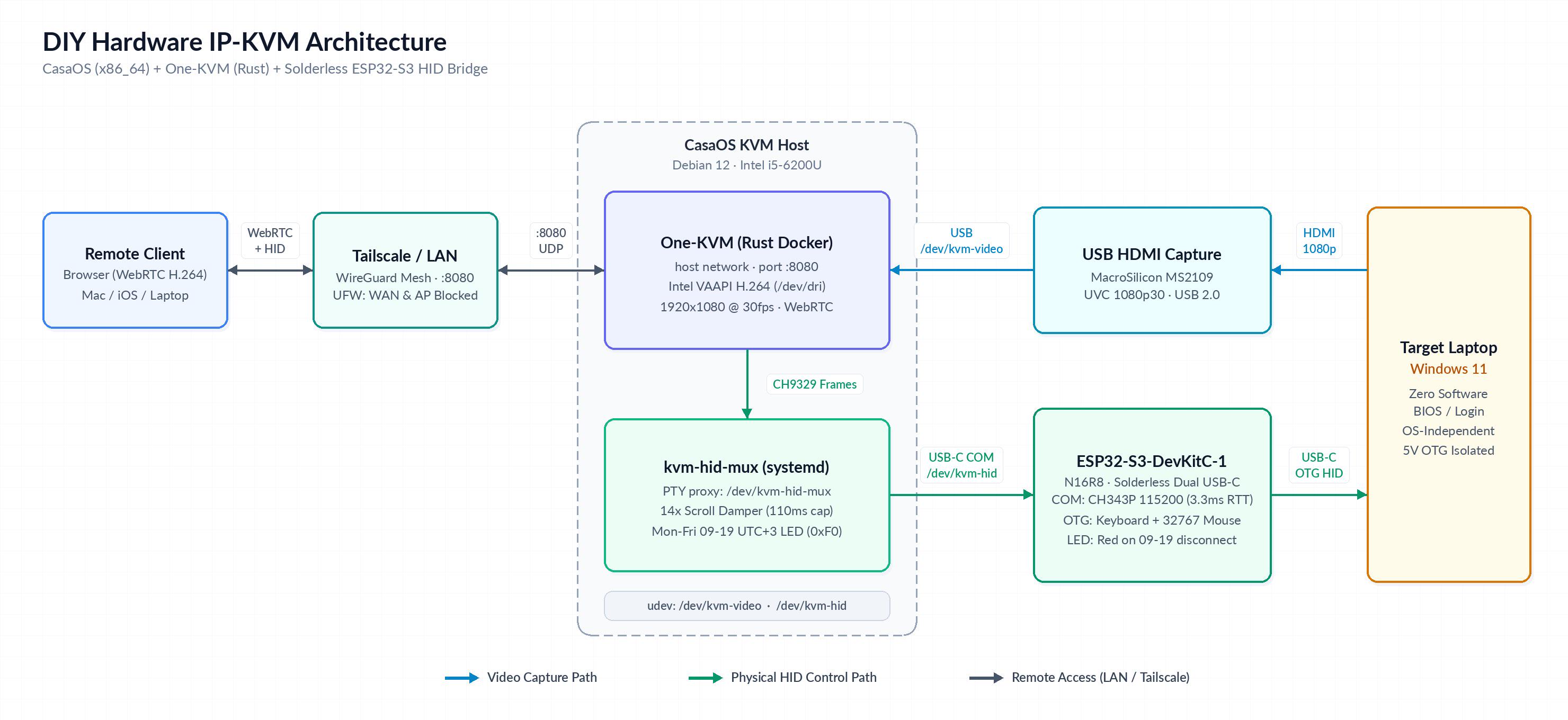
Hello, I was thinking of buying an IP-KVM for $80–100. Since I don’t really trust KVM manufacturers and considering past security vulnerabilities, I decided to build one myself. Using the One-KVM software running on my Debian server and hardware totaling $20 (or less)—an ESP-32 S3 Wroom and a USB 2.0 capture card with an MS2109 chip—I’ve implemented all KVM functions except for the ability to mount ISO files. I only allow remote access via Tailscale.
I’ve attached a diagram of the topology I’m using; feel free to ask any questions you may have.

On an i5-6200u processor, it uses approximately 10% CPU and 300 MB of RAM at a resolution of 1920x1080p and 30 fps. I’m quite satisfied with it.