r/pchelp • • May 11 '26

7th Anniversary of PCHH

Thumbnail reddit.com
4 Upvotes

r/pchelp • • Dec 15 '19

Perform these steps before posting about POST/boot/no video problems!

199 Upvotes

Link to original list from tom’sHARDWARE with pictures

"No POST", "system won't boot", and "no video output" troubleshooting checklist

This checklist is a compilation of troubleshooting ideas from many forum members. It's very important to actually perform every step in the checklist if you want to effectively troubleshoot your problem.

  • 1.Did you carefully read the motherboard owners manual?
  • 2.Did you plug in the 4/8-pin CPU power connector located near the CPU socket? If the motherboard has 8 pins and your PSU only has 4 pins, you can use the 4-pin connector. The 4-pin connector USUALLY goes on the 4 pins located closest to the CPU. If the motherboard has an 8-pin connector with a cover over 4 pins, you can remove the cover and use an 8-pin plug if your power supply has one. This power connector provides power to the CPU. Your system has no chance of posting without this connector plugged in! Check your motherboard owners manual for more information about the CPU power connector. The CPU power connector is usually referred to as the "12v ATX" connector in the owner's manual. This is easily the most common new-builder mistake.
  • 3.Did you install the standoffs under the motherboard? Did you place them so they all align with the screw holes in the motherboard, with no extra standoffs touching the board in the wrong place? A standoff installed in the wrong place can cause a short and prevent the system from booting.
  • 4.Did you verify that the video card is fully seated? (may require more force than a new builder expects.)
  • 5.Did you attach ALL the required power connector(s) to the video card? (some need two, some need none, many need one.) It is best to use cables connected directly to the PSU. Only use adapters if absolutely necessary.
  • 6.Have you tried booting with just one stick of RAM installed? (Try each stick of RAM individually in each RAM slot.) If you can get the system to boot with a single stick of RAM, you should enable an XMP profile or manually set the RAM speed, timings, and voltage to the manufacturer's specs in the BIOS before attempting to boot with all sticks of RAM installed. If your motherboard supports XMP profiles, that is the best way to get your RAM running at its rated specs. Nearly all motherboards default to the standard RAM voltage (1.8v for DDR2, 1.5v for DDR3, & 1.2v for DDR4). If your RAM is rated to run at a voltage higher than the standard voltage, the motherboard will underclock the RAM for compatibility reasons. If you want the system to be stable and to run the RAM at its rated specs, you should either enable an XMP profile or manually set the values in the BIOS. Many boards don't supply the RAM with enough voltage when using "auto" settings which causes stability issues.
  • 7.Did you verify that all memory modules are fully inserted? (may require more force than a new builder expects.) It's a good idea to install the RAM on the motherboard before it's in the case.
  • 8.Did you verify in the owners manual that you're using the correct RAM slots? The following image is just an example. Verify in the owners manual the recommended RAM slots to use for single, dual, triple, or quad channel applications. This will vary depending on motherboard manufacturer, number of supported RAM channels, and how many sticks of RAM are being used.
  • 9.Did you remove the plastic guard over the CPU socket? (this actually comes up occasionally.)
  • 10.Did you install the CPU correctly? There will be an arrow on the CPU that needs to line up with an arrow on the motherboard CPU socket. There may also be a notch that will only line up in one direction. Be sure to pay special attention to that section of the manual!
  • 11.Are there any bent pins on the motherboard/CPU? This especially applies if you tried to install the CPU with the plastic cover on or with the CPU facing the wrong direction.
  • 12. If using an after market CPU cooler, did you get any thermal paste on the motherboard, CPU socket, or CPU pins? Did you use the smallest amount you could?
  • 13.Is the CPU fan plugged in? Some motherboards will not boot without detecting that the CPU fan is plugged in to prevent burning up the CPU.
  • 14. If using a stock cooler, was the thermal material on the base of the cooler free of foreign material, and did you remove any protective covering? If the stock cooler has push-pins, did you ensure that all four pins snapped securely into place? The easiest way to install the push-pins is outside the case sitting on a non-conductive surface like the motherboard box. Read the instructions! The push-pins have to be turned the OPPOSITE direction as the arrows for installation. This means with the arrow pointing away from the heatsink.
  • 15. Are any loose screws laying on the motherboard, or jammed against it? Are there any wires running directly under the motherboard? You should not run wires under the motherboard since the soldered wires on the underside of the motherboard can cut into the insulation on the wires and cause a short. Some cases have space to run wires on the back side of the motherboard tray.
  • 16. Did you ensure you discharged all static electricity before touching any of your components? Computer components are very sensitive to static electricity. It takes much less voltage than you can see or feel to damage components. You should implement some best practices to reduce the probability of damaging components. These practices should include either wearing an anti-static wrist strap or always touching a metal part of the case with the power supply installed and plugged in, but NOT turned on. You should avoid building or working on a computer on carpet. Working on a smooth surface is the best if at all possible. You should also keep fluffy the cat, children, and Fido away from computer components.
  • 17. Did you check the debug LEDs, Q-code display, or install the system speaker (if provided) so you can check codes in the manual? Most modern motherboards come with debug LEDs or a Q-code display. A system speaker is NOT the same as normal speakers that plug into the back of the motherboard. A system speaker plugs into a header on the motherboard that's usually located near the front panel connectors. Debug LEDs, Q-code displays, or a system speaker are critical components when trying to troubleshoot system problems. You are flying blind without them. The motherboard owner's manual will have a list of codes you can reference. If your case or motherboard didn't come with debug LEDs, a Q-code display, or system speaker you can buy a system speaker for cheap here: http://www.cwc-group.com/casp.html
  • 18. Did you read the instructions in the manual on how to properly connect the front panel plugs? (Power switch, power led, reset switch, HD activity led) Polarity does not matter with the power and reset switches. If power or drive activity LED's do not come on, reverse the connections. For troubleshooting purposes, disconnect the reset switch. If it's shorted, the machine either will not POST at all, or it will endlessly reboot.
  • 19. Did you turn on the power supply switch located on the back of the PSU? The switch should be depressed on the side with an I, the O means off. Is the power plug on a switch? If it is, is the switch turned on? Is there a GFI circuit on the plug-in? If there is, make sure it isn't tripped. You should also make sure the power cord isn't causing the problem. Try swapping it for a known good cord if you have one available.
  • 20. Is your CPU supported by the BIOS revision installed on your motherboard? Most motherboards will post a CPU compatibility list on their website.
  • 21. Have you tried resetting the CMOS? The motherboard manual will have instructions for your particular board. User Darkbreeze also provided the following:

BIOS Hard reset procedure

Power off the unit, switch the PSU off and unplug the PSU cord from either the wall or the power supply.

Remove the motherboard CMOS battery for five minutes. In some cases, it may be necessary to remove the graphics card to access the CMOS battery.

During that five minutes, press the power button on the case for 30 seconds. After the five minutes are up, reinstall the CMOS battery making sure to insert it with the correct side up just as it came out.

If you had to remove the graphics card you can now reinstall it, but remember to reconnect your power cables if there were any attached to it as well as your display cable.

Now, plug the power supply cable back in, switch the PSU back on and power up the system. It should display the POST screen and the options to enter CMOS/BIOS setup. Enter the bios setup program and reconfigure the boot settings for either the Windows boot manager or for legacy systems, the drive your OS is installed on if necessary.

Save settings and exit. If the system will POST and boot then you can move forward from there including going back into the bios and configuring any other custom settings you may need to configure such as Memory XMP profile settings, custom fan profile settings or other specific settings you may have previously had configured that were wiped out by resetting the CMOS.

In some cases it may be necessary when you go into the BIOS after a reset, to load the Optimal default or Default values and then save settings, to actually get the hardware tables to reset.

http://www.spotht.com/2010/02/reset-bios-clear-cmos.html

  • 22. If you have integrated video and a video card, try the integrated video port. Resetting the bios, can make it default back to the onboard video. If you are trying to use HDMI outputs, try using DVI or VGA instead. Sometimes, the HDMI ports won't work until the correct drivers are installed.
  • 23. Make certain all cables and components including RAM and expansion cards are tight within their sockets.

I also wanted to add some suggestions that jsc often posts. This is a direct quote from him:

"Pull everything except the CPU and HSF. Boot. You should hear a series of long single beeps indicating memory problems. Silence here indicates, in probable order, a bad PSU, motherboard, or CPU - or a bad installation where something is shorting and shutting down the PSU.

To eliminate the possibility of a bad installation where something is shorting and shutting down the PSU, you will need to pull the motherboard out of the case and reassemble the components on an insulated surface. This is called "breadboarding" - from the 1920's home-brew radio days. I always breadboard a new or recycled build. It lets me test components before I go through the trouble of installing them in a case.

If you get the long beeps, add a stick of RAM. Boot. The beep pattern should change to one long and two or three short beeps. Silence indicates that the RAM is shorting out the PSU (very rare). Long single beeps indicates that the BIOS does not recognize the presence of the RAM.

If you get the one long and two or three short beeps, test the rest of the RAM. If good, install the video card and any needed power cables and plug in the monitor. If the video card is good, the system should successfully POST (one short beep, usually) and you will see the boot screen and messages.

Note - an inadequate PSU will cause a failure here or any step later.

Note - you do not need drives or a keyboard to successfully POST (generally a single short beep).

If you successfully POST, start plugging in the rest of the components, one at a time."

If you suspect the PSU is causing your problems, below are some suggestions by jsc for troubleshooting the PSU. Proceed with caution. I will not be held responsible if you get shocked or fry components.

"The best way to check the PSU is to swap it with a known good PSU of similar capacity. Brand new, out of the box, untested does not count as a known good PSU. PSU's, like all components, can be DOA.

Next best thing is to get (or borrow) a digital multimeter and check the PSU.

Yellow wires should be 12 volts. Red wires: +5 volts, orange wires: +3.3 volts, blue wire : -12 volts, violet wire: 5 volts always on. Tolerances are +/- 5% except for the -12 volts which is +/- 10%.

The gray wire is really important. It should go from 0 to +5 volts when you turn the PSU on with the case switch. CPU needs this signal to boot.

You can turn on the PSU by completely disconnecting the PSU and using a paperclip or jumper wire to short the green wire to one of the neighboring black wires.

View: http://www.youtube.com/watch?v=5FWXgQSokF4&feature=youtube_gdata

This checks the PSU under no load conditions, so it is not completely reliable. But if it can not pass this, it is dead. Then repeat the checks with the PSU plugged into the computer to put a load on the PSU. You can carefully probe the pins from the back of the main power connector."
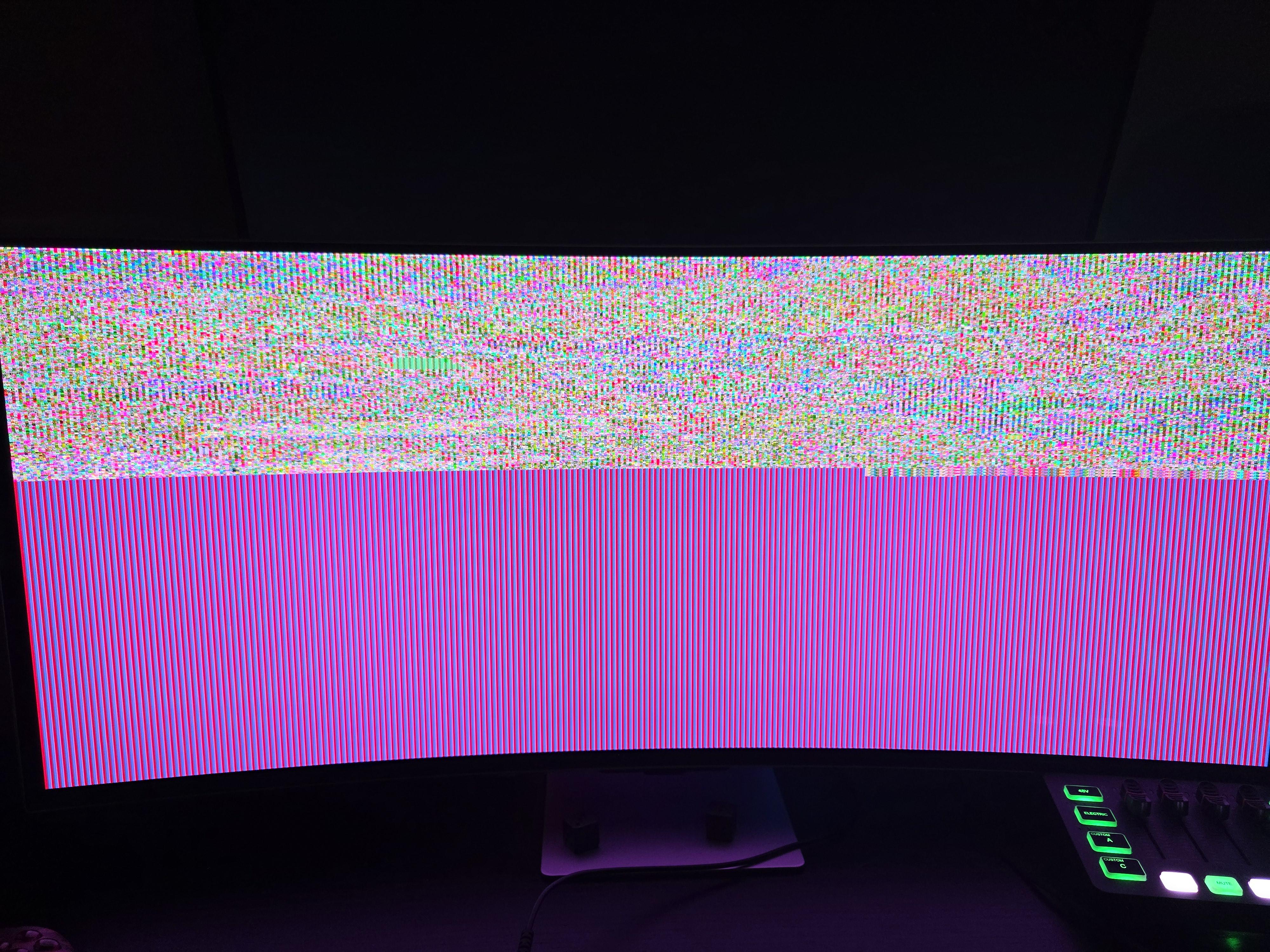

r/pchelp • • 1h ago

HARDWARE What kinda luck is this?

Post image
9 Upvotes

So I bought this 9070XT last November. It came with coil whine out the box but oh well, i can deal with that. Then today go to boot it up and get hit with this. 4 reboots and 2 different cables later it finally opened correctly.

Uninstalled drivers and did a fresh driver install so hopefully it was just a weird one off issue. Im a college student and a new GPU is a bit out the price range rn😂


r/pchelp • • 3h ago

HARDWARE Help

Post image
6 Upvotes

Hey, so today is my first time starting my pc in a year, last time I turned it on I noticed someone spilt something on it (party)

Now it has this glitchy display. Can anyone help me diagnose this?

Thanks!


r/pchelp • • 2h ago

SOFTWARE “Secure boot violation - invalid signsture detected” how to fix this ive tried everything incould and nothing helps.

4 Upvotes

Im not tech savvy at all so i tried to figure it out with AI

I get red text that says the thing from the title, i disabled secure boot because ai told me so and told me to restart, i did and it looked like it was about to work and HP logo showed up then screen just said “no signal”. I did SSD card test and it passed.

Then AI told me to do a power reset where i unplug my pc and the same red message appears again.


r/pchelp • • 8h ago

HARDWARE 100c CPU while idling.

Thumbnail gallery
11 Upvotes

So I bought an old ibuypower from a neighbor who was moving for dirt cheap, everything works fine except the CPU is constantly running at 100c. I reapplied thermal paste and it did nothing. This is my first desktop so I am a bit of a novice and I'm not really sure what to do about this besides the thermal paste.


r/pchelp • • 3h ago

CLOSED lines at bottom of screen

Post image
5 Upvotes

Unsure if it is GPU or Monitor, screenshots show no artifacts


r/pchelp • • 1h ago

PERFORMANCE CPU/GPU utilization issue

Thumbnail reddit.com
3 Upvotes

r/pchelp • • 1h ago

HARDWARE Anyone know why my pc is making this noise?

3 Upvotes

It comes on randomly for like 5-10 min then goes back to quiet for a bit then it happens again


r/pchelp • • 3h ago

HARDWARE Am I overreacting about PSU smell?

4 Upvotes

Just about an hour ago I turned on my PC, with an enhance Enp-7660l 600w Psu and I got a few whiffs of a smell that was like hot plastic, I am sick now so I don’t trust my nose and asked my girlfriend to check. She smelled it too, near the vent for the PSU. Not cables. It smelled like a 3d printer. I powered off, unplugged and am not using it. Should I get a new PSU? Or is this an overreaction? For some context the PC was near idle, maybe 10 tabs open on Firefox nothing crazy. No heavy load. Sub 100 watts by a decent margin.

I know this can be an issue and I want to play it safe rather than kill my PC because I would much rather replace a Psu than a whole PC.

Thank you all in advance for your help. If there is anything else I can give as information, let me know!


r/pchelp • • 8h ago

HARDWARE HELP!!! Red indicator light for DRAM on first power up.

Thumbnail gallery
10 Upvotes

I recently bought an ACER Nitro 65 gaming desktop that has a Ryzen 9 9900X, RTX 5070, 32GB DDR5 memory. I swapped out the already installed cooling pump and put in a Corsair titan ii rgb liquid cooling pump and fans on top. I had no issues connecting everything and when I turned on the computer every thing seems to be working fine except for DRAM indicator late and no input on monitor. I tried display cord and hdmi cord, swapping ends, swapping ports, trying a different monitor, power on and off computer, loosening pump, verify sticks are fully inserted and nothing has worked. I will attach photos. Please help!!! If someone has the brilliant idea to fix this today, I had a gift for you.


r/pchelp • • 2h ago

SOFTWARE I messed up by trying fortcheck.io

3 Upvotes

I stupidly went through with this website and now every ~30 minutes my command prompt pops up. I went through as many fixes as I could with no permanent fixes. CP still pops up, although empty, still is a huge bother. Sometimes even freezing a game or another program I am running. Is there any other checks or fixes to help? I have run Malwarebytes Deep Scan and Microsoft Defender (Offline Scan) with no threats found.

TIA


r/pchelp • • 24m ago

PERFORMANCE FPS Drops on Second Monitor

2 Upvotes

I just switched from a Ryzen 9900x to a Ryzen 7 9800X3D since I primarily game on my PC. I also have a 5070. I have noticed that when watching youtube or any videos on my second monitor (60hz) while gaming on my main monitor (180hz), the videos on my second monitor will lag or have significant FPS drops. I have disabled v-sync in my nvidia control panel. I am also using chrome for web search and videos. Has anyone else had a similar issue and resolved it?


r/pchelp • • 16h ago

PERFORMANCE Help/ I dont feel like my pc attained its full potential

Thumbnail gallery
39 Upvotes

Here is my specs and ill usually use to make lots of motion design in 2D & 3D . For example if im using after effects with lot of efforts in my timeline, it takes too much time to play and render, It takes around 10 to 15 mins for 4 to 6 seconds of rotoscope . After that i had to check the utilization in taskbar , it doesn't cross over 8 to 12 % both cpu & gpu .

For more information:

I use licensed adobe software.

The footages i use : 4k - 59.94 fps - 10bit .

I have a specific shocket for the pc and 1200w psu.

Have enough cooling , both cpu and gpu are using AIO .

But in games I get its full potential, I can't say any frame drops .

But also i haven't seen my psu cross over 450w .

Please tell me solution , i am struggling


r/pchelp • • 1h ago

OPEN I need help

2 Upvotes

I bought an MSI Raider GE48 a week ago on Facebook Marketplace. These are the specs:

- Intel i9-13950
- Nvidia RTX 4060
- 32GB RAM
- 256GB( I thought I had bought 1TB)
- 144Hz

A few days after getting it, I’ve been experiencing random crashes, blue screens, and restarts. I’m trying to figure out what’s been happening and the core problem.

Blue screens I’ve encountered:
- VIDEO TDR FAILURE
- VIDEO MEMORY ENGAGEMENT INTERNAL
- crashed have mentioned nvldmmkm.sys

I’ve tried reinstalling the NVIDIA Driver, which stopped it for day and after doing so, had some updates with windows. I’ve uninstalled and reinstalled the NVIDIA Driver. During this whole thing, Device Manager has said that it’s working perfectly fine. I also can’t enter safe mode since it pops up with 00000017.

I just need help, and I’m wondering whether I should take it for professional help, get new parts, or something?


r/pchelp • • 1h ago

OPEN Any help Secure Boot Violation.

Post image
2 Upvotes

I downloaded a mod that has good reviews, pc was doing perfect until i decided i was done using the mod & I went to turn secure boot back on & I get this message. I’ve asked chat gpt & I’ve done everything I was told but we all know how chat gpt can be. I had 0 issues out of this pc. Am I cooked? Please help.


r/pchelp • • 1h ago

SOFTWARE how to find deleted storage

2 Upvotes

i have almost nothing but steam and steam games (and a few other utility programs) plus my os downloaded to this ssd drive, but there still seems to be over 500 gigs of nonsteam data that i cant find on here, this drive used to be used as an extra drive but i migrated my os onto it from a hard drive.

i wouldve expected the os and other programs on it to take up only about ~75-100 gigabytes of space, not 579.

I've been searching everywhere on it to try and find out what it is but i think its old data that was covered up from the formatting and migration to this drive, and its still being read as data on the drive, at least thats what i believe, so how would i be able to simply just view a list of what is taking up space on the drive because windows' "uninstall a program" list doesnt help.

What used to be on the drive was just a bunch of steam games and ive tried installing and uninstalling all of them to see if that would fix it, but no dice, also the revo uninstaller didnt help either.


r/pchelp • • 2h ago

OPEN Is my SSD writes/day high?

Post image
2 Upvotes

So this drive is exactly 1 year old and has already lost 4% of its health, im a college student and i use this laptop mainly to read notes ,browse the internet and play some games now n then....

my brother's laptop which is 3 years old has only written 34TB of data and 92% ssd health meanwhile mine has written 30TB in 1 year...

What concerns me is that im a normal user and i have accumulated 30TB in 1 year which is around 80gb per day

Could it be some kind of virus? or windows thing? should i reinstall my OS or is there any other settings i have to take a look at?

Thanks!!!


r/pchelp • • 2h ago

SOFTWARE PC hard crashes when launching ANY game

2 Upvotes

Some context: about a month or two ago, my pc started to have issues shutting down or restarting. Windows would turn off, but the computer wouldn’t shut down and I would have to hold the power button down. I’ve tried multiple fixes, such as turning off fast startup, but nothing seemed to work. It wasn’t that big of an issue, so I just got used to it.

However a week ago, my whole pc started to freeze when messing around in discord, such as tuning into a stream or clicking on a gif. It even got to a point where it started crashing my whole pc, so yesterday I decided to do a fresh discord install. However, after doing so, I started to get the issue described in the title. Any game I try to boot crashes my entire pc instantly, even if it’s from a launcher other than steam. I’ve tried updating bios, updating windows, running a memory check (both sticks passed), reinstalling games, even running a cpu and gpu stress test- I just don’t know what to really do. If I could get any suggestions, I would really appreciate it!

Side note- I replaced the motherboard just as of last year due to my pc not being able to boot as well as my psu before I realized the MOBO was the issue.

OS: Windows 11
Motherboard: ROG STRIX X870-F GAMING WIFI
CPU: 7800x3D
GPU: AMD 7900xtx
RAM: T-Force Delta RGB 32GB DDR5-6000
PSU: Enermax Revolution D.F.X. 1050W 80+ Gold Certified fully modular ATX


r/pchelp • • 2h ago

HARDWARE Monitor locked OSD, anyone have a Blaupunkt?

2 Upvotes

Going through the options and locked the OSD (thinking that meant lock it ON because it times out too fast) and now I can't get it back, the manual doesn't tell you how to unlock it!


r/pchelp • • 7h ago

HARDWARE AIO making faint rattling noise on new prebuilt

5 Upvotes

Hi everyone just got my new prebuilt from Microcenter and the aio is making this faint like what I only can call a rattling noise. It’s definitely louder with my camera up to it but this is how it sounds after starting my pc up and it continues.

If you skip to 15-17 seconds it ramps up and you can really hear it. I built my last pc and I don’t think my previous aio ever made a noise like this but I wanted to check in to see if this is normal or if I should take it in to get the aio replaced?

Idle temps are sitting at 47-49 degrees. 9800x3d


r/pchelp • • 2h ago

Discussion Windows

2 Upvotes

My Bluetooth headphones aren’t being noticed by my pc even thought I was working before and I’ve tried almost everything to fix it and it still isn’t working


r/pchelp • • 5h ago

HARDWARE PC Randomly Shuts Off and Blue Screens Despite Recent Hardware Upgrades

3 Upvotes

ive been having this issue for over a year now, and i had recently bought pretty much all new parts at the time. (case, fans, motherboard, power supply, and cpu.) i believe the only thing i didnt change out was the gpu, i had used best buy's geek squad to help with my issues before and i had upgraded my pc, which they installed all the parts for. however the issue im having is that my pc will randomly power off, and the power button light will start flashing. it will sometimes just keep my screens on with the white text saying "your pc ran into a problem and needs to restart. you can restart" other times it will blue screen and say that, in which i will have to initiate the restart. it happens frequently almost everytime im on my computer, doesnt matter if im watching a show, or playing a game it will do it randomly whenever. im not very tech savy when it comes to knowing the insides and outs when it comes to this, is there anyway to fix this issue?

This is my parts list:

NZXT - H9 Flow ATX Mid-Tower PC Case

AMD - Ryzen 9 5900X 4th Gen 12-core - 24-Thread 3.7GHz

AMD Ryzen 9 5900X 12-Core Processor

MSI - NVIDIA GeForce RTX 4070 12GB VENTUS 3X OC 12GB GDDR6X PCI Express 4.0 Graphics Card

CORSAIR - CX-M Series CX750M Semi-Modular Low-Noise ATX Power Supply


r/pchelp • • 5h ago

OPEN Looking for help on a Dram light on PC startup.

3 Upvotes

The dram light turns on when I start the PC, not sure if this is normal, but once it connects to my TV it goes off and everything is fine.

The issue is, when I first turn it on for the day it doesn’t connect to my TV. It just stays on, fans spinning, and rgb lights on my fans is the default color (rainbow, not the colors I picked, just stays like that with no output to Tv. Once it connects it switches to my picked fan colors).

I need to turn the PC off completely, then turn it back on, and it connects like normal. Dram light goes on for startup, and goes off after connecting. This is every time I turn the PC on I have to do this. Turn off, turn back on.

I use HDMI 2.1, the GPU and TV are both very new and the HDMI slot works fine for other things.

The PC came with 1 stick of 16gb ram, and after a month I added another stick of 16gb gb ram (they are mismatched, and one is 4800, other is 5200. PC says they’re running dual channel at 4800 which is normal, and says 32gb ram is installed, so it seemed fine).

This was happening with the 1 16gb stick though too, so nothing has changed going to 32gb ram.

Thanks for any help, I’m new to PCs.