r/pchelp • • 5h ago

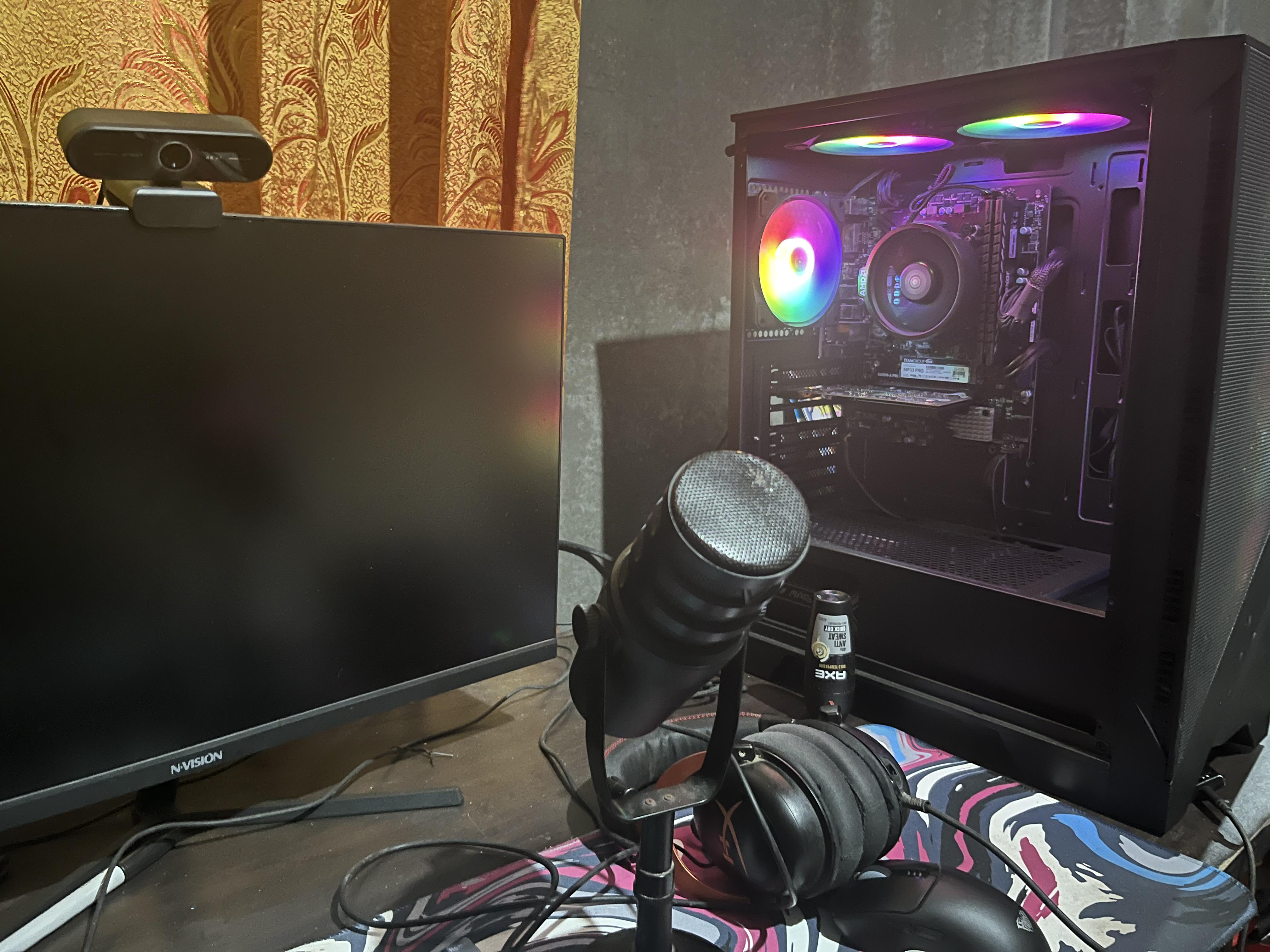
Discussion Is this a good enough pc for the price? If not what specs should i look for

Thumbnail gallery
12 Upvotes

Ive been looking for a new pc because my shitty laptop barely runs games anymore, i saw this one and thought i should get it and maybe upgrade the gpu, pc experts what do you think


r/pchelp • • 3h ago

HARDWARE Broke prongs on hard drive, what are my options?

Post image
7 Upvotes

I was trying to take my harddrive out of my old pc to get some stuff off of it, but the slot got stuck when I tried pulling it out. The plastic case beside the prongs broke off and the prongs get bent up but I did my best to straighten it up. Issue is that it can’t stay plugged in without that plastic casing. What options do I have to get the files off of this harddrive? Is there another way to plug it in?


r/pchelp • • 4h ago

HARDWARE Pc wont turn off

Post image
7 Upvotes

After i shut it down, the system unit seems to be completely functioning. I reformatted my whole pc to try to fix it but I still have the same problem


r/pchelp • • 3h ago

Discussion aio

5 Upvotes

I have a acer nitro-N8-181 5070 with air cooler but I want a LC aio but I don't know if I should use a 240 or 360mm, im not knowledgeable with that


r/pchelp • • 10h ago

OPEN Please Help, Major Stuttering/Crashing on New-ish Build

Post image
15 Upvotes

I'm at a complete and utter loss with this machine, it seems to keep finding and creating issues the more I try to fix it. I'm about to give up and live without a computer for the rest of my life at this rate.

Recently had an issue where mid-game by computer black-screened on me with no warning, and restarted by itself. Over the next several hours, these loops would get increasingly worse and faster, to the point where I could not so much as login to Windows before it would crash and loop. After doing some research I initially thought it was the power supply, which I replaced. It didn't fix the issue, so I replaced the motherboard next, then the CPU after that. Same issue, so I took it to a local PC shop and after two days of meticulously testing each component they reported my 6650xt was damaged in some capacity and causing the looping. So I upgraded to a 5060ti, figuring I might as well just rebuild my entire PC at this point.

Not only did this cause new issues, but the computer is still borderline unusable. Windows 10 tried installing whatever default Nvidia drivers and causing permenant black screens, which would then cause windows to not even boot once the pc was shut off, so i repaired it by booting into safe mode, uninstalling the old drivers, and manually installing new Nvidia drivers from their site. Now, after FINALLY getting back onto my own desktop after nearly two weeks of fiddling and wasting my money, the computer will randomly stutter, the screen will occasionally flicker entirely black and produce no signal, and attempting to do anything such as open three applications and move a window around in circles can cause freezing or outright crash.

I'm entirely done with this thing, and I refuse to lug it back to the PC shop just got them to have to charge me to fix what should be effectively a new PC.

Specs:

Motherboard: ROG Strix B550-F Gaming Wifi II (New)

CPU: Ryzen 7 5700x (New)

GPU: Nvidia PNY 5060TI (Taken from unused Prebuild)

Ram: 32Gb (2x16Gb) Corsair Vengeance Rbg Pro (From original build)

PSU: Corsair RM750e (New)

1 500Gb Crucal m.2 NVME (Boot Drive)

1 4Tb m.2 NVME (Storage)

CPU is hooked up to an AIO, I have checked temps on all components several times, this pc was put together not 4 days ago with fresh thermal paste, I have checked the drives on the off chance either was failing, among other fixes from across the web. I cannot figure this out for the life of me.

Tl;Dr: Replaced and upgraded nearly all components in my computer to higher specs in a goosechase attempt to diagnose a GPU failure, PC now unstable and stutters when opening any program, opening the Start Menu, and crashes when doing much of anything.

r/pchelp • • 3h ago

HARDWARE Trying to build a pc for my bro

4 Upvotes

Here are the parts I liked.

  1. ASRock Intel Arc B570 Challenger 10GB OC
  2. ASRock Radeon RX 7600 Phantom Gaming OC 8GB
  3. G.SKILL Aegis 16GB (2x8GB) DDR4-3200 CL16

Or Silicon Power XPower 16GB (2x8GB) DDR4-3200

4. Kingston NV3 500GB PCIe 4.0 NVMe

5. MSI MAG A550BNL 550W 80+ Bronze

I need a casing box and cooling I think.

He is using it for discord, Spotify and some lights games. Here is what he sent me as games he plays

2d - rain world, the bidning of Isaac and mewgenics. They lag from time to time.

3d - Subnautica, slime rancher, risk of rain 2. These always lag.

What else do I need. The final price comes down to €860. Will it be too powerful for his needs? Recommend me parts to replace so the price gets lower for him.


r/pchelp • • 3h ago

OPEN PC powers on (fans + RGB spin) but no video at all. Clear CMOS fixed it once, then it failed again. Gigabyte H410M H + i3-10100 + GTX 970

4 Upvotes

Hi everyone, I'd really appreciate some help with this.

Specs:

• Motherboard: Gigabyte H410M H (bought used, 6+ years old) • CPU: Intel i3-10100 • GPU: GTX 970 • RAM: DDR4 8x2 ddr 4 • PSU: evga 650w 80 bronze

What happened:

  1. Windows started failing after I enabled XMP and/or Intel Platform Trust Technology (PTT) to install Windows 11. A Clear CMOS fixed it and everything worked fine.
  2. Last night I shut it down normally and unplugged it 10 seconds later.
  3. Today I cleaned the dust off the RAM and did a Clear CMOS. The PC powered on (fans and RGB spin) but gave no video.
  4. I did another Clear CMOS and it booted once. I heard a faint high-pitched beep/whine at that moment (couldn't capture it clearly). Then it stopped booting again and the sound went away.

Current state: The PC turns on, fans and RGB spin, but I get no video. The monitor doesn't even show "No signal" or go into power saving, as if it gets nothing from the cable.

What I've already tried (nothing worked):

• Different HDMI and DisplayPort cables • Removing the GTX 970 and using the motherboard's video output (the i3-10100 has integrated graphics) • Removing the CMOS battery and doing Clear CMOS again • Testing with a single RAM stick in different slots • Reseating the 24-pin and CPU power cables

Extra: The front power button now only turns the PC on. Even holding it for 5+ seconds doesn't force a shutdown. I have to flip the PSU switch or unplug it.

My guesses: dead CMOS battery, bad RAM, failing PSU, or a dead motherboard. What should I test next before I replace the board?

Thanks, any tips or something that can help me with this please, have a gratis day!


r/pchelp • • 3h ago

HARDWARE Motherboard? It's very likely that the BIOS is dead, so I'm thinking of replacing it—is there a difference in performance depending on the price?

4 Upvotes

I was using one that cost around $80, and I wasn't dissatisfied with its performance. So, to be honest, I don't really care if it's cheaper or more expensive than this one.


r/pchelp • • 2h ago

HARDWARE Upgrade

Thumbnail gallery
3 Upvotes

I’m looking for upgrading my GPU I have a rx 580 looking to spend 300 to 500 dollars or should I focus on something else?


r/pchelp • • 44m ago

Discussion Need someone who has the Tonor TD510

Post image
2 Upvotes

Hello,

During a move, I lost the part on my Tonor mic that connects the "pickup to the tonearm". It's a kind of knurled screw (?). I could replace it if I knew whether it's an M3, M4, M5, or M6, and its length. So, if a kind soul who owns this mic could measure their screw (length and diameter), they would be a HERO ! I would be incredibly grateful ! I contacted Tonor support, and they weren't helpful at all. Buying a replacement screw is financially easier than buying a whole new arm. Thanks in advance !


r/pchelp • • 52m ago

Discussion Need help with my PC, it randomly started happening today.

2 Upvotes

PC problems: PC stays on for about 27 seconds, turns off, then turns back on and repeats the process.

HDMI chord not displaying onto monitor despite clearly being plugged in properly. To add onto this, I switched the HDMI cable, so I knew the chord wasn’t the issue. I even went as far as to plug it into my TV to see if it’d display that way, but for some reason that didn’t help either.


r/pchelp • • 4h ago

HARDWARE Upgraded my processor and its worse than my old one

4 Upvotes

I recently upgraded from

Motherboard- some old lga 1155 hp motherboard

Proccessor- i5-3470

Ram- 8gb ddr3

To

Motherboard- a520m- a pro

Proccessor- ryzen 5 4500

Ram- 8gb ddr4

I remember i played COD: cold war back on my old setup but now it crashes i cant even get past the main menu. In rdr2 the performance is significantly worse my 1% lows are terrible around 10-30 fps and my pc feels slower in general


r/pchelp • • 1h ago

OPEN PC turning on but peripherals not

2 Upvotes

What can I do if my PC is turning on, but my monitor, keyboard, and mouse aren't seeming to turn on. My microphone has its led lights on but not my keyboard.


r/pchelp • • 3h ago

PERFORMANCE Stuttering/freezing/audible buzzing

3 Upvotes

I was given a pc with a 3060ti 8gb, ryzen 7 7700, 32gb t force Vulcan 6000mhz ram, aorus motherboard but not sure what specifically, psu also unknown. The pc seems to run great with no problems. The only issue I have is when I try to play rust my screen freezes along with a buzzing sound that lasts 3-8 seconds and the cycle just repeats over and over. Only does it on rust too. Updated drivers, changed power settings, deleted the game and downloaded it on a different ssd, and a few other things with no fix. Even turned the graphics and draw distance all the way down and still no fix. FPS doesn’t drop and the whole of freezes not just rust when it happens.


r/pchelp • • 5h ago

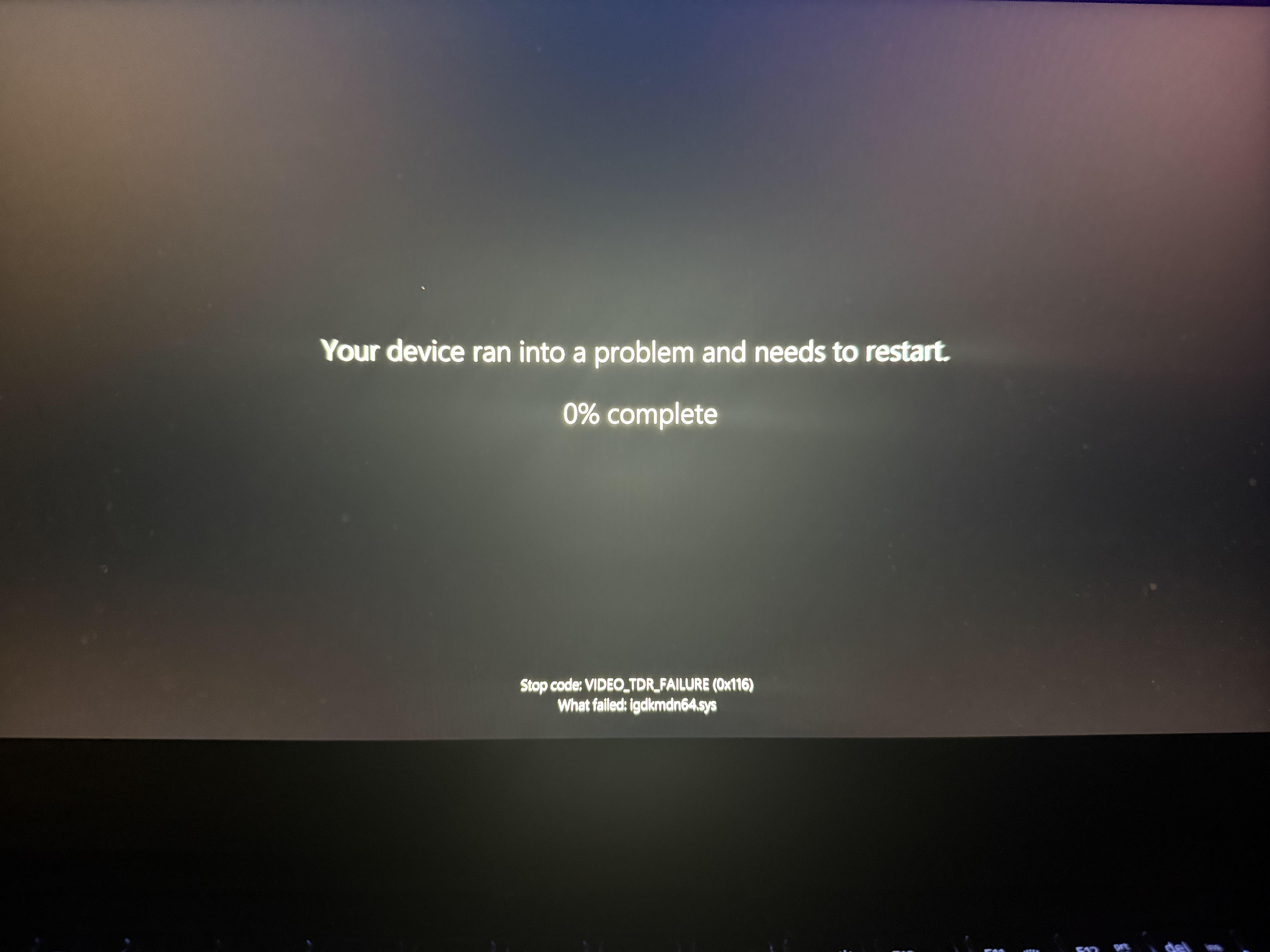
SOFTWARE Windows 11-After update, Intel Iris graphics fails and creates boot/crash loop

Post image
4 Upvotes

I updated my computer a couple nights ago, (11/20/26 or 11/21/26?) and I wasn’t paying much attention to exactly what update it was because I was shutting down before heading off to bed. Ever since then, my Razer Blade Stealth (early 2020 model) has been on the fritz, and throws this error for a split second just before going into recovery. [Stop code: VIDEO_TDR_FAILURE (0x116) What failed: igdkmdn64.sys]
Would really like to get this computer back to it’s normal operating condition, even though it is not my daily workhorse anymore, a lot of my music projects and software is on it and I do occasionally use it for light gaming.

System Specs:
Intel Core i7-1065G7 @ 1.30GHz (1.50 GHz)
16gb Ram
Intel Iris Plus Graphics (version 31.0.101.2141)
NVIDIA GeForce GTX 1650 Ti with Max Q Design

Currently running Windows 11 Home
Version 25H2 installed on 02/25/2025
OS Build 26200.9711

Not sure what other information regarding specs is relevant here, and I realize this PC is starting to show its age… I’m not computer scientist but I’ve tried several of the recovery options nothing has been successful, but here’s what I’ve been able to do so far:

I’ve booted into safe mode, disabled the Intel Iris driver in device manager and then I am able to restart the computer like normal under Microsoft’s default display adapter and the computer boots into Windows perfectly fine - but it seems the NVIDIA GPU is dependent on the Intel Iris Plus, for example Slay the Spire 2 main menu is getting about 2 fps under the default display adapter.

I’ve attempted to perform a clean installation of the Intel driver, and I’ve tried both versions of the Iris Plus drivers still available through Intel’s downloads. Both versions (when installed and enabled) create this same boot loop and the process restarts.
I’ve also attempted to pilfer through the windows update history to try and revert back to a state prior…
Point-in-time Restore feature is and has always been enabled, but there are no available snapshots.

From what I am able to see, the recent update to installed prior to these issues occurring was “Security Intelligence Update for Microsoft Defender Antivirus - KB2267602 (Version 1.463.390.0) installed on 11/20/26, which I have since tried to uninstall but my computer say it failed and when I retry the dialog box gets stuck and just doesn’t complete it.

I’m currently in the process of downloading a repair version of Windows 11, just to try it for funsies.

What do you techno wizards recommend? Is this thing destined to be an email-only machine?
Should I wipe the drives and start completely from scratch? Seems to me like some incompatibility with a now legacy graphics driver, but the way it shit the bed out of the blue when I’ve been running W11 quite some time now seems pretty odd??

Any advice is greatly appreciated.
If you made it this far, sorry for the book.


r/pchelp • • 4h ago

HARDWARE HELP! I leave in two weeks.

3 Upvotes

Hi there, I leave for the navy in two weeks and want to get this PC working again before I leave. My PC has been giving me some issues recently with overheating on the cpu and one day shut off due to the heat and refused to turn back on. I decided to get a new cooler, and that opened up a can of worms. I pretty much rebuilt my PC to try and figure out this issue, and my Z-490a pro would not start unless I took the cmos battery out for 5 - 10 minutes (it would flash the cpu EZ led). This was solved by flashing new bios firmware, but then it would only start without my gpu (once the gpu was in my cpu EZ led would again flash and would not turn on). After trying to put my gpu in my lower pcie slot, the pcie cable on my power supply started smoking.

Specs :
Z-490a pro
2080 super
i7-10700k
4x8 ddr4 3200


r/pchelp • • 5h ago

PERFORMANCE My memory clock isn’t going down even when there’s no significant load. Expected or is something wrong?

Post image
3 Upvotes

To address some questions before they crop up, I am running my GPU on normal power management mode and not maximum performance mode. I’ve already tried restarting, reducing my memory overclock to normal, and closing every program except the monitoring ones. Thank you for your assistance in advance.


r/pchelp • • 3h ago

HARDWARE Rate my brand new pc build please!

2 Upvotes

I won't lie I'm a rookie PC builder but I've been checking benchmarks and I know the cpu is a bottleneck but I will upgrade in the future to a Ryzen 5 5800x3d and use the 5600 in a future build If I make one

• CPU: AMD Ryzen 5 5600

• GPU: XFX Quicksilver Radeon RX 9070 XT White, 16GB GDDR6

• Motherboard: ASUS TUF Gaming B550-PLUS WiFi II (AM4, ATX)

• RAM: 32GB (2x16GB) DDR4-3200 CL16, Timetec Pinnacle Konduit

• Storage: Ediloca EN705 2TB PCIe Gen4 NVMe

• PSU: ASUS TUF Gaming 850W Gold Evo

• Case: Lian Li V100 (white), 4x 120mm ARGB fans

• CPU cooler: Thermalright Assassin King 120 SE White ARGB

• OS: Windows 11 Pro

Peripherals: Razer Viper V3 Pro mouse, a Hall effect 60% keyboard, an ultrawide 1440p 165Hz main monitor, and a 1080p 240Hz side monitor.


r/pchelp • • 3h ago

HARDWARE 5070 ti vs AMD 9070XT

Thumbnail reddit.com
2 Upvotes

r/pchelp • • 10h ago

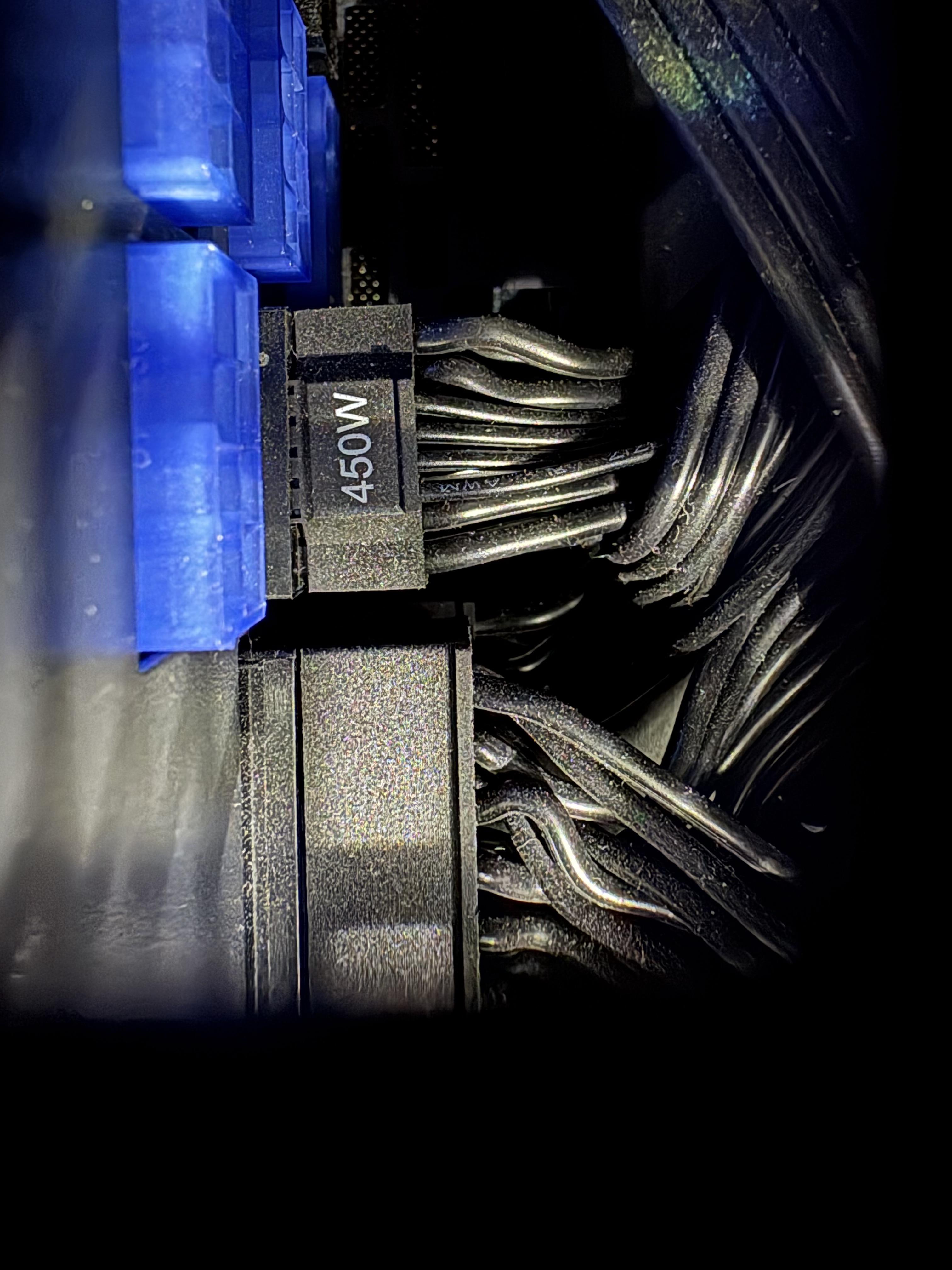
HARDWARE Is this small gap in my GPU power cable on the PSU side normal?

Post image
8 Upvotes

I’m not very experienced with PC hardware, so I apologize if this is a basic question.

I noticed a small gap between the power supply and the connector of the GPU power cable labeled “450W.”

My GPU is an MSI RTX 5070 Ti, and my PSU is a 1000W ATX 3.1 unit.

There was also a fairly strong earthquake recently while my PC was turned off, so I’m worried that the connector might have become slightly loose.

My PC is currently working normally.

Does the connector in the attached photo look properly seated? Is a small gap like this normal, or should the connector be completely flush with the PSU?

Is it safe to continue using my PC in this condition?

Thank you for your help!


r/pchelp • • 3h ago

SOFTWARE Taskbar problems

Post image
2 Upvotes

How do i fix my taskbar icons not showing up?


r/pchelp • • 3h ago

PERFORMANCE My pc has rlly bad download speed when it shouldn’t

2 Upvotes

I think it’s something with my pc bc I checked my sisters pc and her download speed is normal at around 280mbps. I moved my pc close to the router and i’m stuck at 20-40 mbps. I don’t know what’s wrong with my pc please can anyone help?

My PC has reached 280 Mbps before, but often drops to 20–40 Mbps.

My sister's PC gets around 280 Mbps.

My phone gets around 240–290 Mbps near the router.

Moving my PC next to the router didn't fix the slow speed.

My Wi-Fi signal shows 100%, with a link rate of 866.7 Mbps.

Pausing a game download improved my speed from around 21 Mbps to 40 Mbps.

I have the external MSI Wi-Fi antenna connected and positioned on my desk.

**PC Specs:**
PC: iBUYPOWER Gaming PC

RAM: 32 GB

CPU: Intel Core i7-14700F

GPU: NVIDIA GTX 1650

Motherboard: MSI PRO B760-VC WIFI 7 BULK (MS-7D98), Version 2.0

Wi-Fi adapter: Qualcomm FastConnect 7800 Wi-Fi 7

Wi-Fi driver: Qualcomm version 3.1.0.1430

Ethernet adapter: Realtek Gaming 2.5GbE Family Controller

OS: Windows 11 Home

Router: Spectrum 5 GHz Wi-Fi


r/pchelp • • 7m ago

Discussion RAM

1 Upvotes

Hi

I built a gaming PC about half a year ago. When I was buying the parts, I thought that 16G of RAM would be more than enough for gaming.

Now I’ve noticed that every game suffers from stuttering because there isn’t enough RAM. And because of that, the computer has to write the excess memory to the SSD.

What have the rest of you done about this? It’s a bit of a pain to start upgrading the RAM…